Skip to content

feat: Update ckb node to 0.105.1 - #2517

Merged
Keith-CY merged 10 commits into
nervosnetwork:developfrom
yanguoyu:feat-update-ckb
Nov 30, 2022
Merged

feat: Update ckb node to 0.105.1#2517
Keith-CY merged 10 commits into
nervosnetwork:developfrom
yanguoyu:feat-update-ckb

Conversation

@yanguoyu

@yanguoyu yanguoyu commented Nov 3, 2022

Copy link
Copy Markdown
Contributor
  1. migrate success
migrate-success.mov
  1. migrate failed
migrate-failed.mov

@Keith-CY

Keith-CY commented Nov 4, 2022

Copy link
Copy Markdown
Contributor

If migration fails, will data of ckb be broken?

I ask this because if I need to send a transaction immediately but migration fails, I would prefer to keep data there and use a previous version of Neuron to send the transaction, instead of removing all data and synchronizing from scratch.

If the data of ckb are still available after migration fails, a cancel/dismiss button can be added in the removing data dialog so users can keep the original data.

Comment thread packages/neuron-wallet/tests/services/ckb-runner.test.ts Outdated
Comment thread packages/neuron-wallet/src/locales/en.ts
Comment thread packages/neuron-wallet/src/controllers/app/index.ts Outdated
Comment thread packages/neuron-ui/src/utils/hooks/index.ts Outdated
Comment thread packages/neuron-ui/src/containers/Navbar/index.tsx Outdated
@yanguoyu

yanguoyu commented Nov 4, 2022

Copy link
Copy Markdown
Contributor Author

If migration fails, will data of ckb be broken?

I ask this because if I need to send a transaction immediately but migration fails, I would prefer to keep data there and use a previous version of Neuron to send the transaction, instead of removing all data and synchronizing from scratch.

If the data of ckb are still available after migration fails, a cancel/dismiss button can be added in the removing data dialog so users can keep the original data.

If ckb migrate broken in progress, it can't run by old version like v0.104.1.

1. If users download the latest neuron, we shouldn't show the migrate dialog. And save the last version when the dialog show whenever.
@Keith-CY

Keith-CY commented Nov 4, 2022

Copy link
Copy Markdown
Contributor

If migration fails, will data of ckb be broken?
I ask this because if I need to send a transaction immediately but migration fails, I would prefer to keep data there and use a previous version of Neuron to send the transaction, instead of removing all data and synchronizing from scratch.
If the data of ckb are still available after migration fails, a cancel/dismiss button can be added in the removing data dialog so users can keep the original data.

If ckb migrate broken in progress, it can't run by old version like v0.104.1.

Then we should allow users not to migrate.

Maybe we can add a button next to the ok button that is labeled with Go to backup and the directory where ckb data is will be opened by it.

@yanguoyu

yanguoyu commented Nov 6, 2022

Copy link
Copy Markdown
Contributor Author

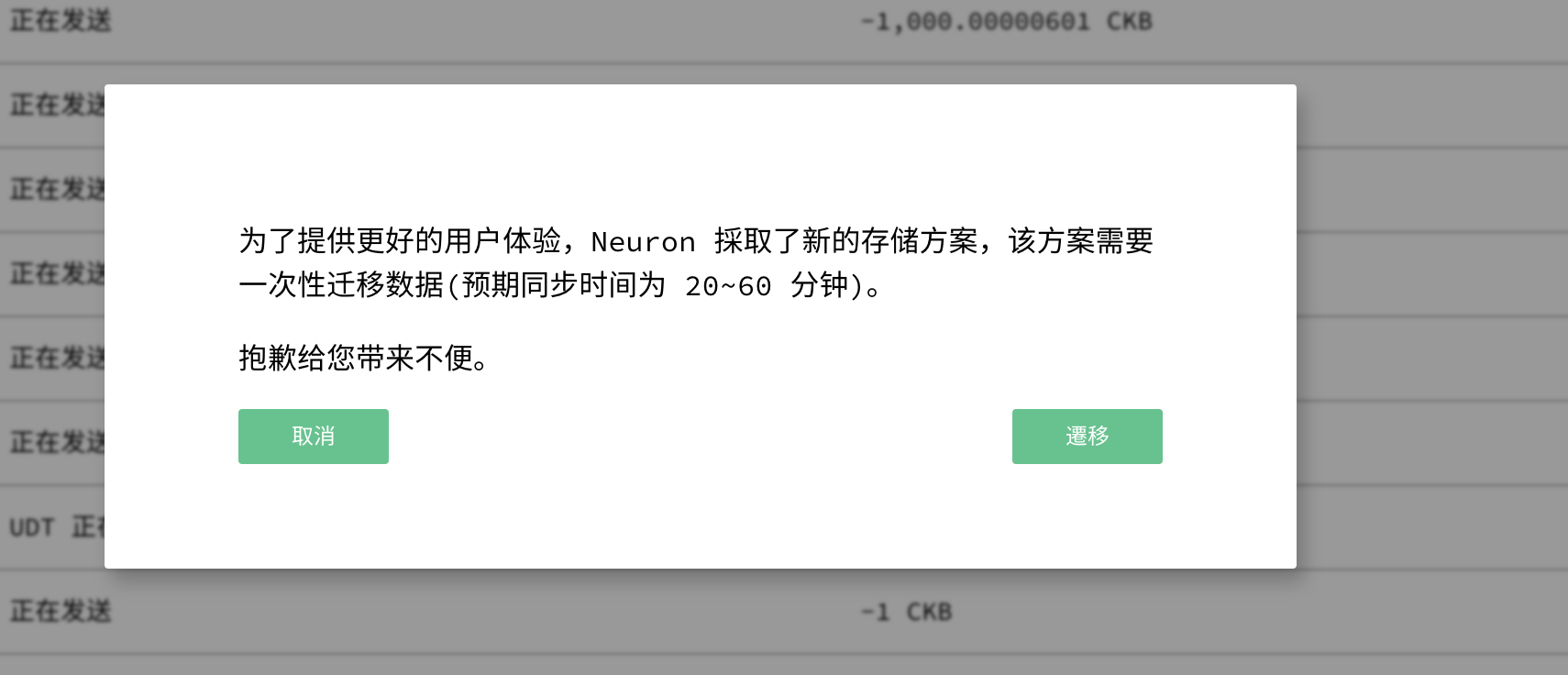
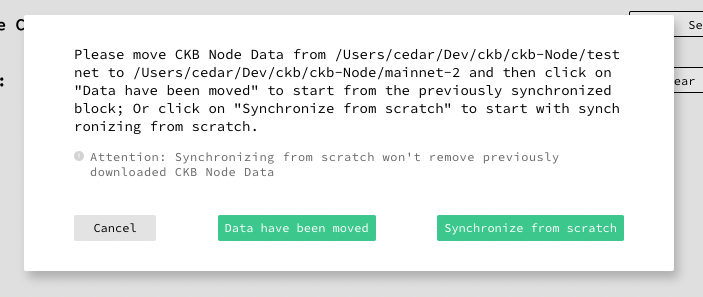
I add a choice for users to choose to migrate or not by b9c8e3a
image

@Keith-CY

Keith-CY commented Nov 6, 2022

Copy link
Copy Markdown
Contributor

I add a choice for users to choose to migrate or not by b9c8e3a image

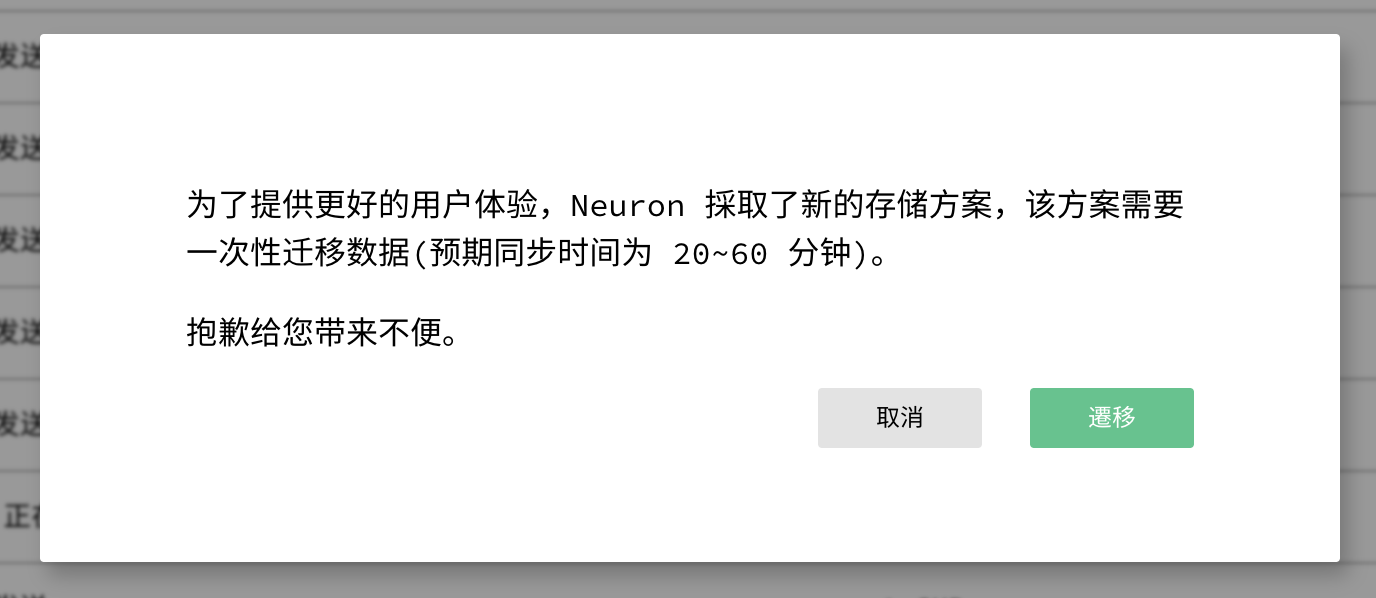
Style of cancel button should be consistent with other components
image

Comment thread packages/neuron-ui/src/components/DataSetting/hooks.ts Outdated
@yanguoyu

yanguoyu commented Nov 7, 2022

Copy link
Copy Markdown
Contributor Author

Style of cancel button should be consistent with other components image

It looks like this now:

image

Comment thread packages/neuron-wallet/src/locales/en.ts Outdated
@Cedar67

Cedar67 commented Nov 7, 2022

Copy link
Copy Markdown
Contributor

When Clicking on the background window area behind the pop-up window, the pop-up window will automatically disappear.

Expected: the pop-up window will always appear unless the button is clicked.

Screen.Recording.2022-11-07.at.19.11.58.mov

@yanguoyu

yanguoyu commented Nov 8, 2022

Copy link
Copy Markdown
Contributor Author

Expected: the pop-up window will always appear unless the button is clicked.

Fixed.

@Cedar67

Cedar67 commented Nov 8, 2022

Copy link
Copy Markdown
Contributor

Expected: the pop-up window will always appear unless the button is clicked.

Fixed.

Verified.

@Cedar67

Cedar67 commented Nov 9, 2022

Copy link
Copy Markdown
Contributor

When Neuron is restarted after clicking Migrate, no migration status is displayed.
Users may not know whether the migration is in progress or how to restart the migration.

Expected: When Neuron is restarted after clicking Migrate, the migration status is displayed.

@yanguoyu

Copy link
Copy Markdown
Contributor Author

When Neuron is restarted after clicking Migrate, no migration status is displayed. Users may not know whether the migration is in progress or how to restart the migration.

Expected: When Neuron is restarted after clicking Migrate, the migration status is displayed.

Neuron can continue to migrate after reopening.

@Cedar67

Cedar67 commented Nov 11, 2022

Copy link
Copy Markdown
Contributor

When Neuron is restarted after clicking Migrate, no migration status is displayed. Users may not know whether the migration is in progress or how to restart the migration.
Expected: When Neuron is restarted after clicking Migrate, the migration status is displayed.

Neuron can continue to migrate after reopening.

Verified: Neuron automatically continues the previous migration normally after restart.

@Cedar67

Cedar67 commented Nov 11, 2022

Copy link
Copy Markdown
Contributor

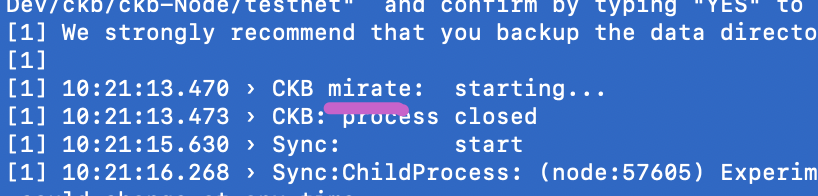
The spelling of this word needs fixing?
Expected: migrate

image

@yanguoyu

Copy link
Copy Markdown
Contributor Author

The spelling of this word needs fixing? Expected: migrate

image

Fixed.

@Cedar67

Cedar67 commented Nov 11, 2022

Copy link
Copy Markdown
Contributor

There is one user experience optimization to consider:

In this scenario, Neuron has no pop-up to prompt the user to choose whether to migrate or not:

  1. An old node Data A has been migrated.
  2. Then, change the Data Settings to another old node Data B that has been migrated in the future.

Now:
The old data B is automatically migrated without a pop-up prompt to confirm.

Expected:
The pop-up prompt is displayed to determine whether to migrate the old data according to the user's choice.

@yanguoyu

Copy link
Copy Markdown
Contributor Author

There is one user experience optimization to consider:

In this scenario, Neuron has no pop-up to prompt the user to choose whether to migrate or not:

  1. An old node Data A has been migrated.
  2. Then, change the Data Settings to another old node Data B that has been migrated in the future.

Now: The old data B is automatically migrated without a pop-up prompt to confirm.

Expected: The pop-up prompt is displayed to determine whether to migrate the old data according to the user's choice.

I think users only need to choose whether migrate once. Once they set the path to old data, they should know why this data is migrating.

@Cedar67

Cedar67 commented Nov 11, 2022

Copy link
Copy Markdown
Contributor

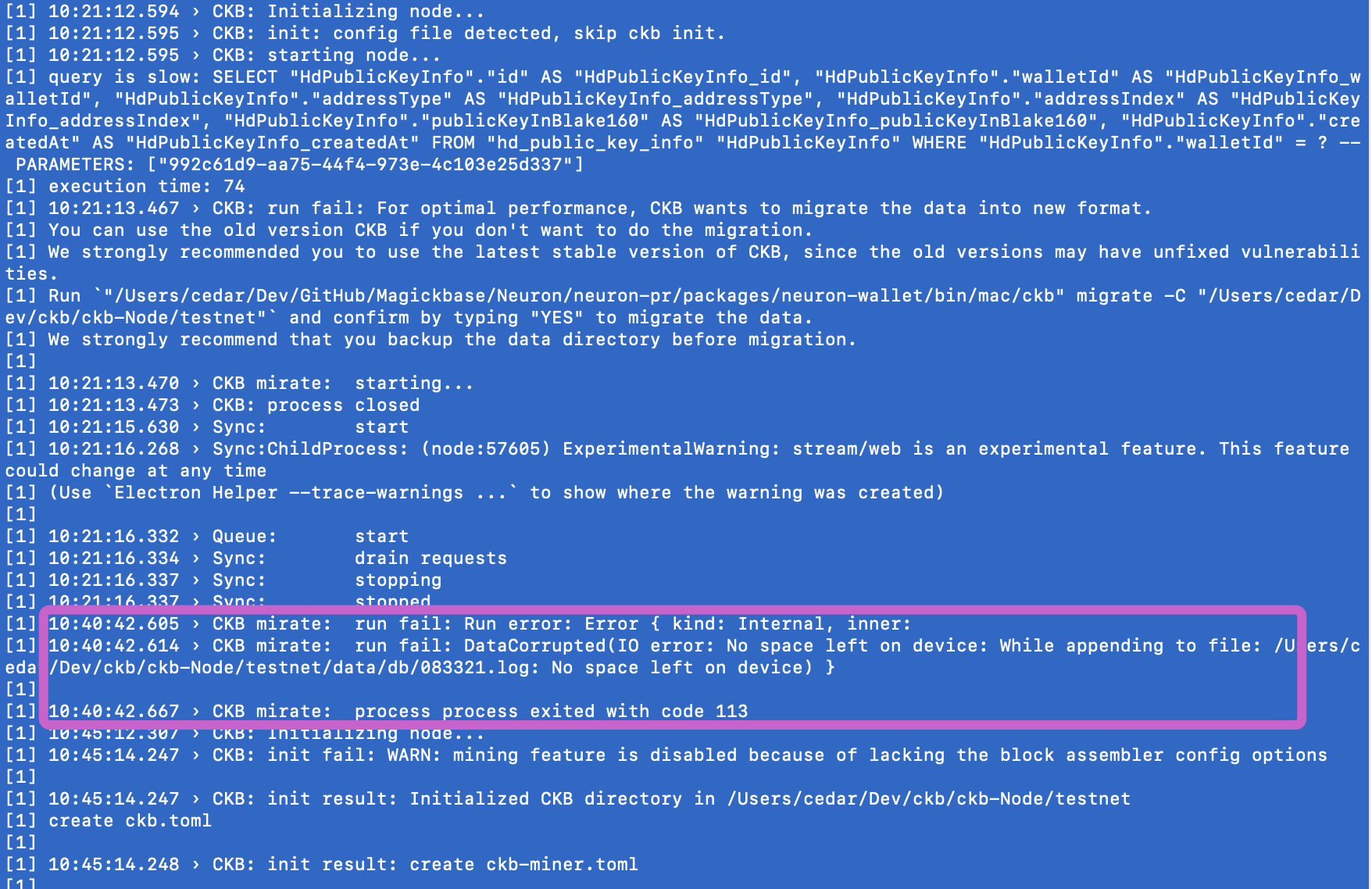
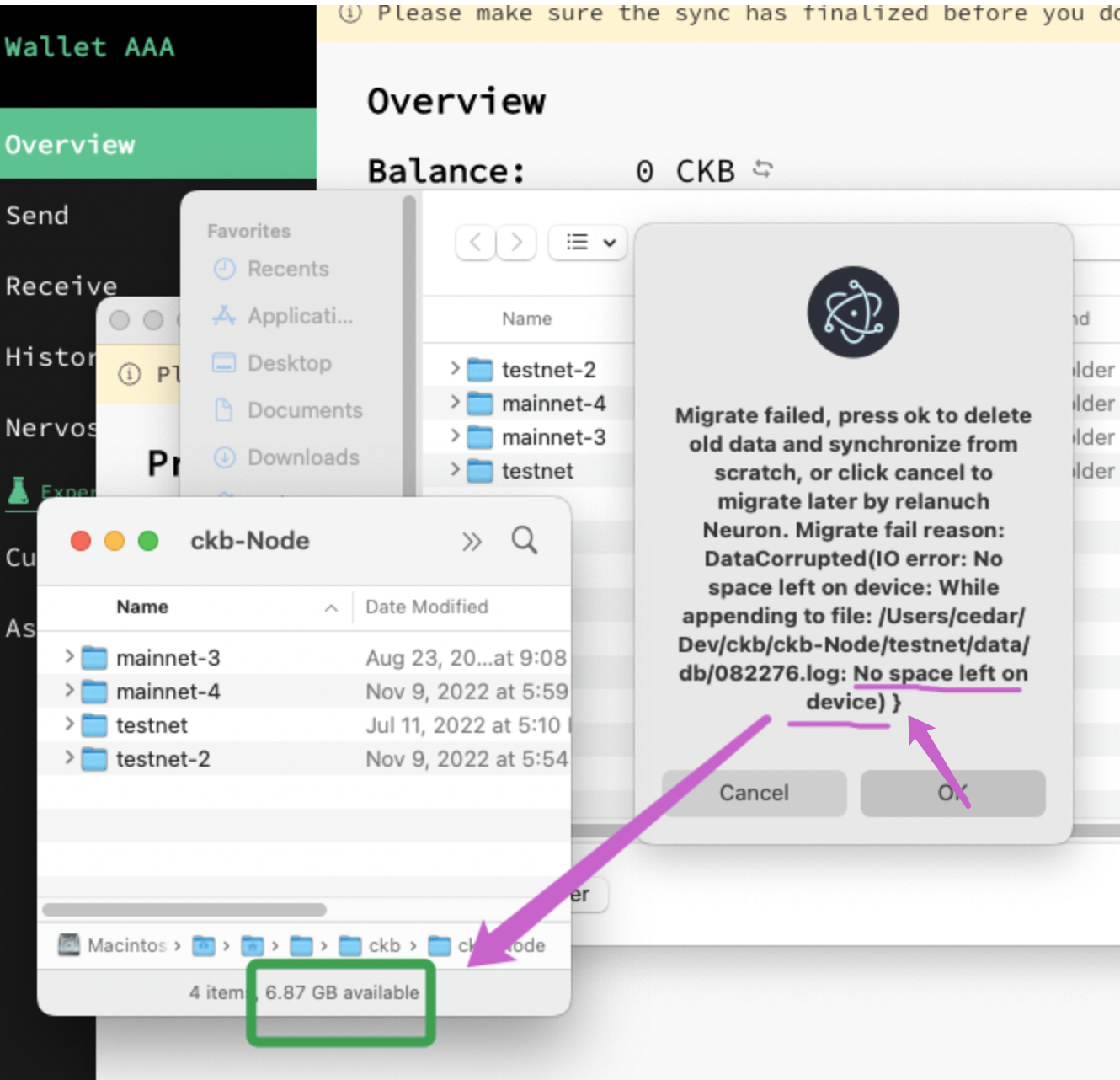
The migration failure was prompted when I still had 6G of space on my local disk.
After clicking the "Confirm" button, the corresponding old Data would be automatically deleted.

Does the migration require any specific local disk space?

1  102112 594

Expected:

  1. In the migration confirmation dialog box, describe the disk space requirements.
  2. When the migration is terminated abnormally, the cause of the failure is displayed.
  3. It is recommended that users be provided with the option to retain old data and suspend migration. Instead of deleting the old data directly.

@Cedar67

Cedar67 commented Nov 11, 2022

Copy link
Copy Markdown
Contributor

There is one user experience optimization to consider:
In this scenario, Neuron has no pop-up to prompt the user to choose whether to migrate or not:

  1. An old node Data A has been migrated.
  2. Then, change the Data Settings to another old node Data B that has been migrated in the future.

Now: The old data B is automatically migrated without a pop-up prompt to confirm.
Expected: The pop-up prompt is displayed to determine whether to migrate the old data according to the user's choice.

I think users only need to choose whether migrate once. Once they set the path to old data, they should know why this data is migrating.

Users may forget about previous migration actions, because the actual users may not care about its impact.
This is an optimization recommendation and has no blocking effect on functionality.

@Cedar67

Cedar67 commented Nov 11, 2022

Copy link
Copy Markdown
Contributor

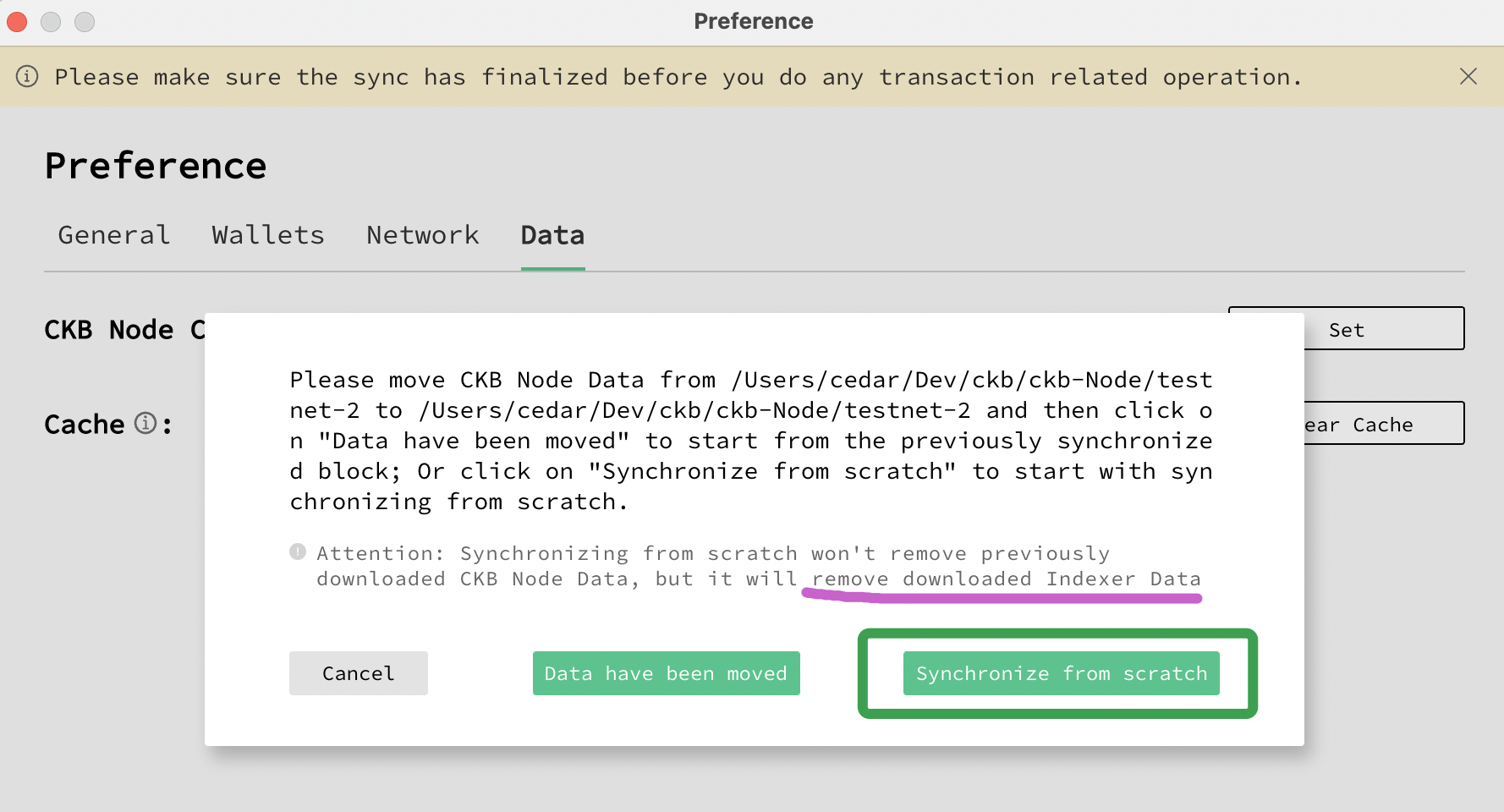
Indexer data was not cleared after Synchronize from scratch was selected.
This is a node data that has been migrated.

image

@Cedar67

Cedar67 commented Nov 11, 2022

Copy link
Copy Markdown
Contributor

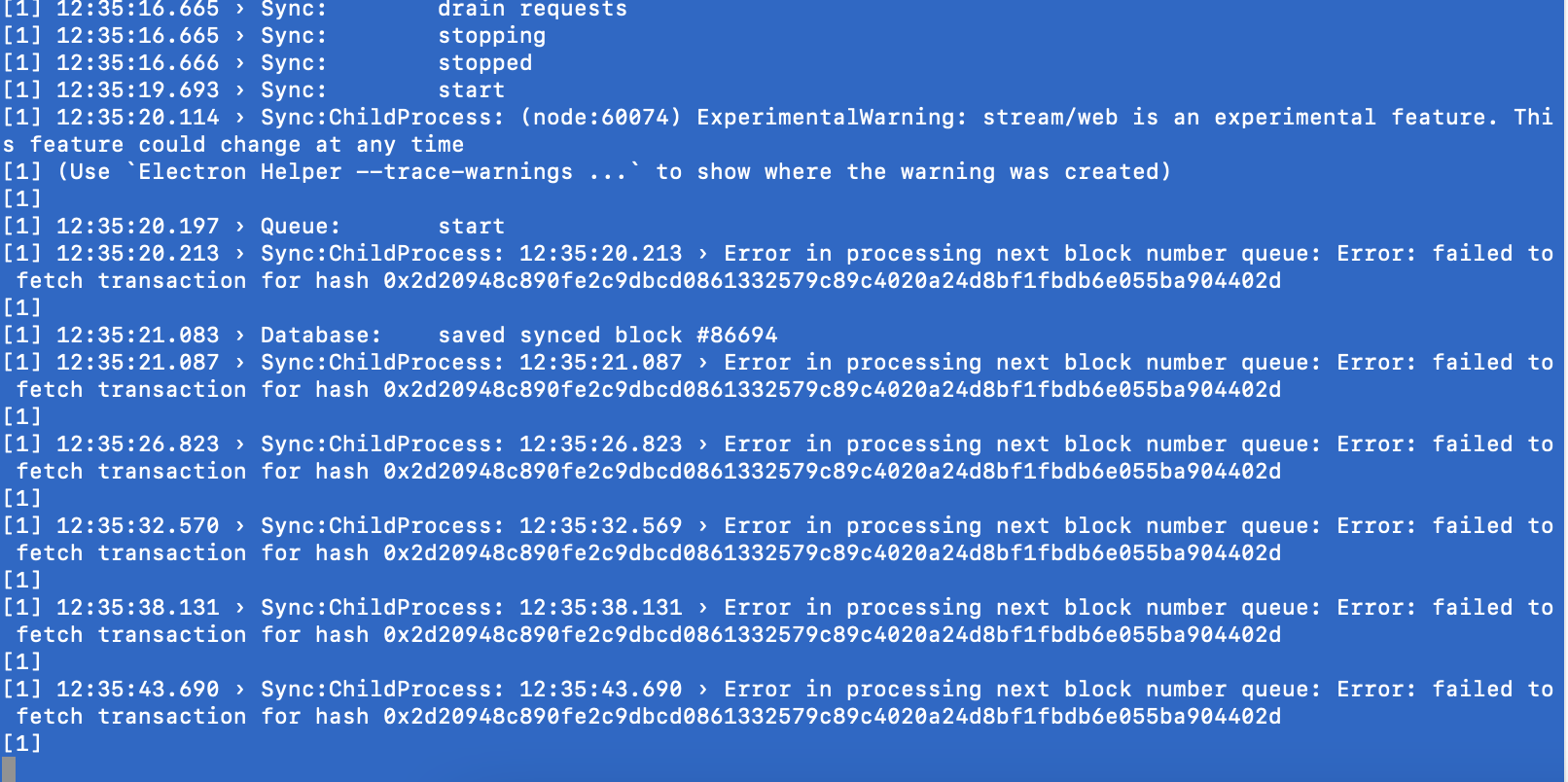
log error when switching to a Node data (This is a newly created node data.)

Pasted Graphic 11

@yanguoyu

Copy link
Copy Markdown
Contributor Author

The migration failure was prompted when I still had 6G of space on my local disk. After clicking the "Confirm" button, the corresponding old Data would be automatically deleted.

Does the migration require any specific local disk space?

1 102112 594

@quake
Can we estimate the disks that need to keep in the migration process?

@yanguoyu

Copy link
Copy Markdown
Contributor Author

Indexer data was not cleared after Synchronize from scratch was selected. This is a node data that has been migrated.

image

Removed tips about indexer.

@yanguoyu

Copy link
Copy Markdown
Contributor Author

The migration failure was prompted when I still had 6G of space on my local disk. After clicking the "Confirm" button, the corresponding old Data would be automatically deleted.

Does the migration require any specific local disk space?

1 102112 594

Expected:

  1. In the migration confirmation dialog box, describe the disk space requirements.
  2. When the migration is terminated abnormally, the cause of the failure is displayed.
  3. It is recommended that users be provided with the option to retain old data and suspend migration. Instead of deleting the old data directly.

Add a cancel button for users to select, and show migrate failed message.

@yanguoyu

yanguoyu commented Nov 19, 2022

Copy link
Copy Markdown
Contributor Author

log error when switching to a Node data (This is a newly created node data.)

Pasted Graphic 11

This is a warning when getting a transaction by tx hash. But the 0x2d20948c890fe2c9dbcd0861332579c89c4020a24d8bf1fbd6e055ba904402d in your screenshot I haven't found the transaction hash on the mainnet or testnet. I don't where is from. Besides, it will not affect functions.
And you can also try clear cache to clear this warning.

@Cedar67

Cedar67 commented Nov 21, 2022

Copy link
Copy Markdown
Contributor

The migration failure was prompted when I still had 6G of space on my local disk. After clicking the "Confirm" button, the corresponding old Data would be automatically deleted.

Does the migration require any specific local disk space?

1 102112 594

Expected:

  1. In the migration confirmation dialog box, describe the disk space requirements.
  2. When the migration is terminated abnormally, the cause of the failure is displayed.
  3. It is recommended that users be provided with the option to retain old data and suspend migration. Instead of deleting the old data directly.

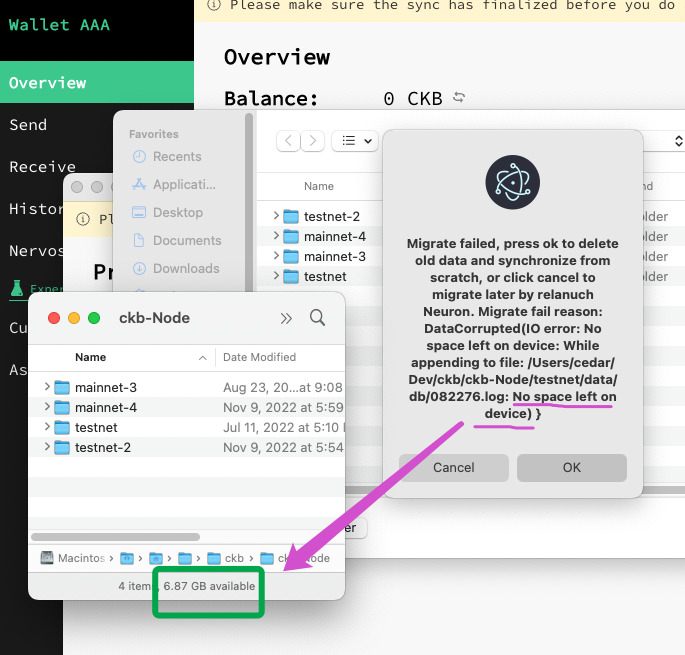
Add conditional info: When this occurs, there is still 6 GB of PC disk space for Node data before starting the migration.

image

@Cedar67

Cedar67 commented Nov 21, 2022

Copy link
Copy Markdown
Contributor

Indexer data was not cleared after Synchronize from scratch was selected. This is a node data that has been migrated.
image

Removed tips about indexer.

Verified.

image

@Cedar67

Cedar67 commented Nov 21, 2022

Copy link
Copy Markdown
Contributor

The migration failure was prompted when I still had 6G of space on my local disk. After clicking the "Confirm" button, the corresponding old Data would be automatically deleted.
Does the migration require any specific local disk space?
1 102112 594
Expected:

  1. In the migration confirmation dialog box, describe the disk space requirements.
  2. When the migration is terminated abnormally, the cause of the failure is displayed.
  3. It is recommended that users be provided with the option to retain old data and suspend migration. Instead of deleting the old data directly.

Add a cancel button for users to select, and show migrate failed message.

  1. The Cancel button and migrate failed message are both displayed now. This is an expected fixed.
  2. At the end of the prompt, an extra curly bracket is displayed. Please confirm.
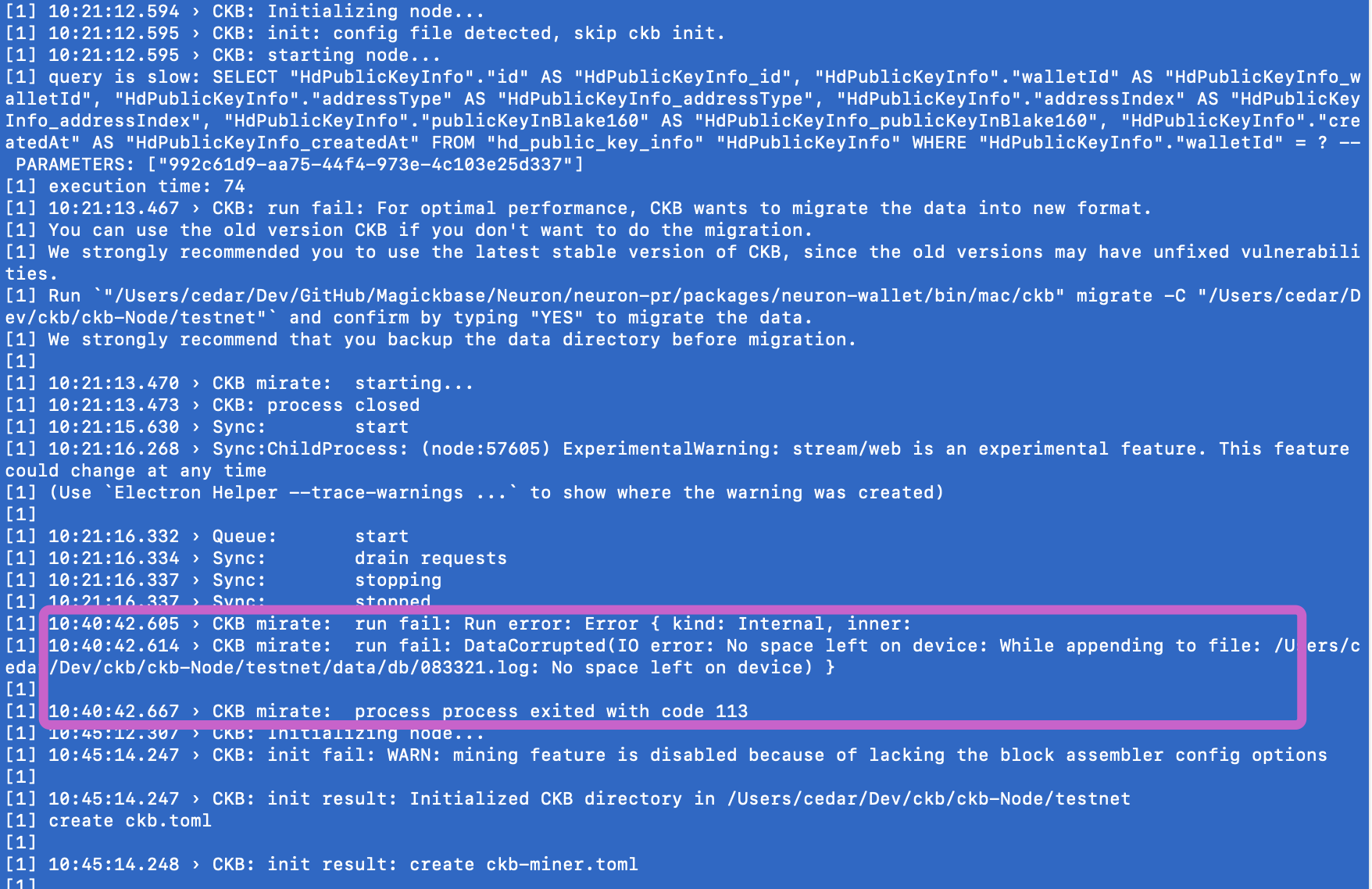
  3. Updated the ckb node to v0.106.0-rc1, there were still unexplained disk space error messages. Please confirm.

image

@yanguoyu

Copy link
Copy Markdown
Contributor Author

Updated the ckb node to v0.106.0-rc1, there were still unexplained disk space error messages. Please confirm.

You can download v0.106.0-rc1 ckb release file, and run migrate with the old data path. This can exclude Neuron effect.
Run like this ./ckb migrate -C old-path --force

@yanguoyu

Copy link
Copy Markdown
Contributor Author

At the end of the prompt, an extra curly bracket is displayed. Please confirm.

This is because the error message includes a bracket at the end.

image

@Cedar67

Cedar67 commented Nov 21, 2022

Copy link
Copy Markdown
Contributor

Updated the ckb node to v0.106.0-rc1, there were still unexplained disk space error messages. Please confirm.

You can download v0.106.0-rc1 ckb release file, and run migrate with the old data path. This can exclude Neuron effect. Run like this ./ckb migrate -C old-path --force

v0.106.0-rc1 ckb Runs cmd ./ckb migrate -C old-path --force complete without error.

image

@Cedar67

Cedar67 commented Nov 25, 2022

Copy link
Copy Markdown
Contributor

The migration failure was prompted when I still had 6G of space on my local disk.

After upgrading to v0.106.0-rc2 of ckb, no disk space error was repeated during the migration.

Ref Magickbase/neuron-public-issues#55 (comment)

Sign up for free to join this conversation on GitHub. Already have an account? Sign in to comment

Labels

None yet

Projects

None yet

Development

Successfully merging this pull request may close these issues.

4 participants