Implement #3175: Add home screen folder/file shortcut widget#5522
Implement #3175: Add home screen folder/file shortcut widget#5522wiwie wants to merge 14 commits into
Conversation


…oid running into shortcut limit

|
IT test failed: https://www.kaminsky.me/nc-dev/android-integrationTests/12797-IT |

Codecov Report
@@            Coverage Diff            @@
##             master    #5522   +/-   ##
=========================================
  Coverage          ?   21.99%
  Complexity        ?        3
=========================================
  Files             ?      398
  Lines             ?    33511
  Branches          ?     4703
=========================================
  Hits              ?     7371
  Misses            ?    24951
  Partials          ?     1189
|
|
IT test failed: https://www.kaminsky.me/nc-dev/android-integrationTests/12803-IT |
|
IT test failed: https://www.kaminsky.me/nc-dev/android-integrationTests/12807-IT |
|
Screenshot test failed, but no output was generated. Maybe a preliminary stage failed. |
|
APK file: https://www.kaminsky.me/nc-dev/android-artifacts/12825.apk |

|
IT test failed: https://www.kaminsky.me/nc-dev/android-integrationTests/12825-IT |
|
Complexity increasing per file
==============================
- src/main/java/com/owncloud/android/ui/helpers/MenuHelper.java  1
See the complete overview on Codacy |

|
APK file: https://www.kaminsky.me/nc-dev/android-artifacts/12827.apk |

|
@tobiasKaminsky the integration test failures seem unrelated to my changes and randomly changing. is this due to technical issues or did I forget something? also: i've trouble coming up with reasonable tests, as adding a shortcut to the homescreen requires user intervention outside the app. how can I incorporate this in automated tests? |


| */ | ||
| public static void inflateItemFileMenu(final MenuInflater inflater, final Menu menu) { | ||
| inflater.inflate(R.menu.item_file, menu); | ||
| menu.findItem(R.id.action_add_shortcut_to_homescreen).setVisible(Build.VERSION.SDK_INT >= Build.VERSION_CODES.O); |

There was a problem hiding this comment.
can't say for sure if it will be the right place, but you might want to check if this needs to be moved/added to FileMenuFilter, while this might not work since (unfortunately) FileMenuFilter isn't used in all places where R.menu.item_fileis being used while your implementation (correctly) is.
So also looping in @tobiasKaminsky @ezaquarii for further discussion

|
looping in @tobiasKaminsky @ezaquarii for feedback and review @wiwie thanks a lot for your PR/contribution. This is highly appreciated. Sorry for letting you wait (this long) we have been busy finishing up the latest stable release ❤️ |

|
@wiwie sorry for coming back so late, but we have currently crazy times… I checked it out and tried to add a widget via long clicking on homescreen, but I cannot find any widget related to NC. |
That is because I haven't implemented it as a widget but as a pinned shortcut. You can add it to your Homescreen for a specific file or folder by selecting a file or folder and choosing the"add to Homescreen" in the hamburger menu. |
|
Nice 👍 Now I can test it :-)
@jancborchardt After that I'll do a code review. |
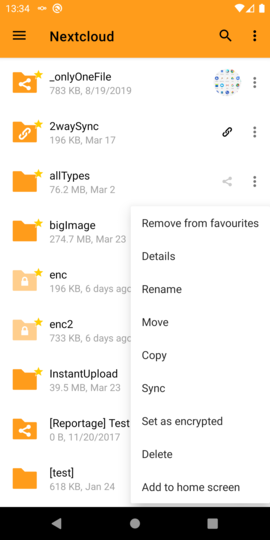
|
Regarding your questions:
|
You can find the color in ThemeUtils.primaryColor(Account account…) |

|
Isn’t it possible to only show this in Android’s widget selector, which then leads to a folder picker? It’s a bit much to have the "Add to home screen" action in the menu of every single folder. |
|
Honestly, I don't see the problem: There are so many entries in the menu already anyways, what is one more for a home screen shortcut? ;-) It is definitely possible, but implementing an Android widget is way more involved than such a shortcut as implemented here. I started looking into it, but didn't have enough time to finish anything and also got quite frustrated by the fact that such a comparably simple functionality should lead to so much code. but maybe it's just me - I'm not experienced in developing for Android at all - this was my first shot at it. For now I don't know when I'll find time to pick this up again. I'm happily using this shortcut implementation for the last 3 months now. I'll wait with looking into @tobiasKaminsky's points, until you guys have decided whether it's desirable at all to merge this shortcut implementation. |

|
@wiwie This PR is behind master and has conflicts. I'd take the opportunity and squash the commits - the history is noisy and doesn't provide any value at this point. |


I take the smiley as you joking, but just to explain: There being so many entries in the menu is exactly the problem, we should not add more, especially not ones which will be used extremely rarely. |
|
Maybe widget pro @dan0xii has some input or can help regarding this? :) |
|
@jancborchardt yes, I get your point. I agree that it's a good idea to reduce the number of menu entries. It was the solution that seemed easiest to implement to me, that's the only reason I chose it. I agree that it's polluting the menus as it is. So just for clarification, you are suggesting the following approach:
Something like this seems to be the cleanest solution to me at least, and I tried implementing it but just ran out of time. I can give it another shot if chances are that it will be merged in. |
|
Yes, that seems like a great plan @wiwie! :) The ability to edit the folder afterwards is even not necessary in the first step, as it's also easy to just remove and recreate. |

Agreed. For a dynamic shortcut: as a middle-ground, if a dynamic shortcut is required you could put it on the topbar/navbar for each sub folder. (Refresh account, sort, grid view, add to home screen). Less noise but if you're deep into a folder hierarchy you could still drop a shortcut to the home screen. PS. Love this widget. Would be using it as soon as it's available. |
|
@dan0xii the navbar/topbar action menu is to be removed, as the actions in it were moved into icons or actions (grid toggle, sort entry, pull to refresh). So I'd still say it would be best to do this via the native widget mechanism? |
|
I am finished with an initial implementation based on widgets without editing functionality as discussed above. Several questions:
|
What would be in this entry? |

|
I understood previous feedback in this PR such that adding the "add to homescreen" to the overflow menu of each file/folder would be too much. @jancborchardt wrote:
hence the alternative idea, making one central place somewhere, that allows to manage homescreen shortcuts. i.e. it could have
maybe I'm misunderstanding. are you talking about a different menu? |

|
I'll close this PR as there was no more feedback from the maintainers. |

|
@wiwie have you seen #6363 ? I mentioned you but you didn't respond, so i am not sure whether you took note of it. I tried to find and describe an alternative solution for implementing shortcuts without the criticized drawbacks for users who aren't interested or not using shortcuts at all and without cluttering the UI for those people. Woul be great to hear your opinion 🙂 |
|
Hi Stefan, thanks for getting back. Sorry, I really hadn't seen your issue. It seems that you really did a well and thorough analysis of how shortcuts are being used in various launchers, way better than I could. So not sure how much I could contribute, but will give it a shot and write my five cents when I have time. |
|
Would be really awesome to keep you contributing in this corner :) I am really appreciated about your engagement, we just need to make sure that it goes into the right direction 😉. So take you time and if you feel happy, just start another PR - i am sure one will jump in and join - let's continue in the other issue then if you agree 🚀 |

8 participants


Resolves #3175.
Testing
Writing tests is very important. Please try to write some tests for your PR.
If you need help, please do not hesitate to ask in this PR for help.