Support custom properties in search API (WebDAV) #35295

Description

How to use GitHub
- Please use the 👍 reaction to show that you are interested into the same feature.
- Please don't comment if you have no relevant information to add. It's just extra noise for everyone subscribed to this issue.
- Subscribe to receive notifications on status change and new comments.
Is your feature request related to a problem? Please describe.
I am working on a project that wants to use Nextcloud as a DMS (Document Management System). We have to use custom properties on files to save some metadata that is needed later for filtering. Unfortunately, it is not possible to get a filtered list of files via search API (https://docs.nextcloud.com/server/latest/developer_manual/client_apis/WebDAV/search.html) because custom properties are not supported. The workaround, which is very insufficient is to use PROPFIND via listening folders API (https://docs.nextcloud.com/server/latest/developer_manual/client_apis/WebDAV/basic.html#listing-folders-rfc4918) to get the desired result and then filter it down in the application.
To achieve that we use the approach that is mentioned here (https://mathiasconradt.medium.com/how-to-assign-custom-meta-data-to-your-documents-on-nextcloud-23356cf3f926) via PROPPATCH and PROPFIND HTTP methods. Sadly, the community app (https://apps.nextcloud.com/apps/customproperties) is not working with the latest stable version 24 of Nextcloud. So it is also not visible via UI.
Describe the solution you'd like
It would be amazing to support custom properties in the search API to make the handling of the application more efficient. It would also lead to fewer requests and help to use Nextcloud in the b2b context and as a DMS.
Describe alternatives you've considered
The workaround is to use the available APIs (listening folders), which are not performant and leads to more requests and longer results.
Additional context
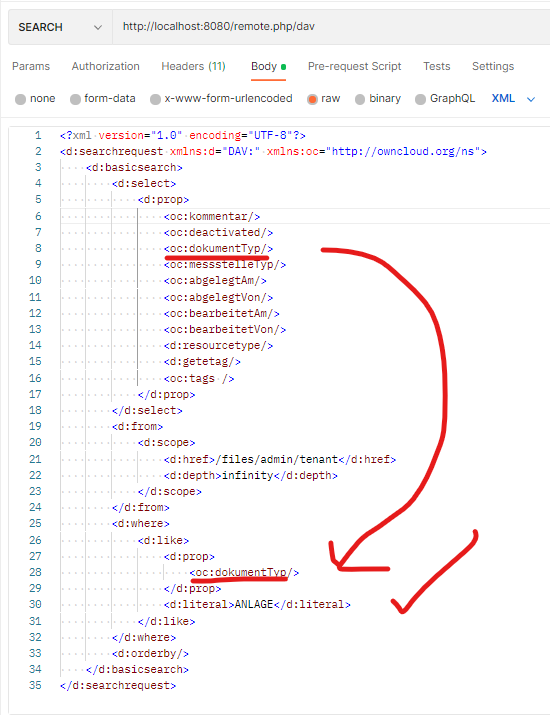
A screenshot of the desired body of the search API request with custom properties (starting with <oc:) and where filter: