 GitHub Community
How to connect cPanel Git Version Control to a GitHub private repository? #40790


-
|
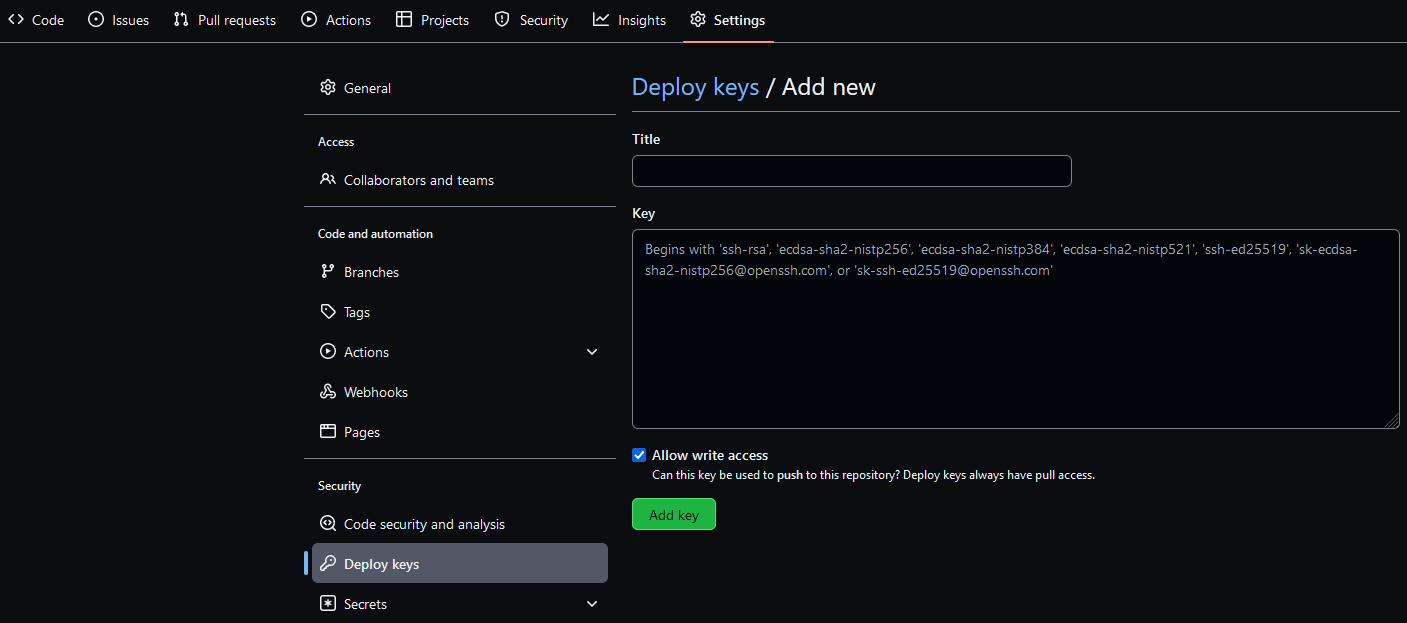
Following #40788, I'd like to connect my hosting's cPanel to a GitHub private repository. I have:
|




Beta Was this translation helpful? Give feedback.
Replies: 3 comments 21 replies
-
|
Well, turns out it's all about step 1:
In other words, step 1 must be:
Note it's not just removing The rest of the steps remain the same. Of course, this limitation of only 1 single filename for the entire GitHub means you can't use Deploy Keys to connect to more than one private repository. |

Beta Was this translation helpful? Give feedback.

-
|
yeah |
Beta Was this translation helpful? Give feedback.

-
Beta Was this translation helpful? Give feedback.

-
|
what if your cpanel don't have a terminal |
Beta Was this translation helpful? Give feedback.
-
|
@achawayne3031 Not sure if it's their in your default create your ssh key section, if not that and you don't have a terminal, you have to contact your hosting provider for activation. Please do some research before buying your hosting package. |
Beta Was this translation helpful? Give feedback.

-
|
If people stumble upon this, there is a way to connect more than one repository. |
Beta Was this translation helpful? Give feedback.

-
|
leave |
Beta Was this translation helpful? Give feedback.

-
|
To authenticate or clone your GitHub repository via SSH, kindly remove the ".git" at the end of the URL and it will work just fine. Example: use "git@github.com:username/repository" instead of "git@github.com:username/repository.git" Please note that an SSH (public) key is required; Repository->Settings->Deploy keys. @Solomon Oki Ochepa - Oki Technologies Ltd. |
Beta Was this translation helpful? Give feedback.

-
|
This does not work |
Beta Was this translation helpful? Give feedback.


Well, turns out it's all about step 1:
id_rsa/id_rsa.pub(also see here).The thing is cPanel does point to using Terminal for this...only to give incorrect instructions to rename it, which fails the whole process.
In other words, step 1 must be:
ssh-keygen -t rsa -b 4096.Note it's not just removing
-f filename, but there's also no need for-C "username@example.com"since the Terminal way adds it automatically anyway.The rest of the steps remain the same.
Of course, this limitation of only 1…