Skip to content

ozalexo/CustomXCodeTemplates

Folders and files

NameName
Last commit message
Last commit date

Latest commit


History

8 Commits


Repository files navigation

CustomXCodeTemplates

Setup and use

  • Clone this repo:
    git clone https://github.com/ozalexo/CustomXCodeTemplates.git /tmp/CustomXCodeTemplates
    
  • Create the following folders to keep own templates:
    mkdir -p ~/Library/Developer/Xcode/Templates/Project\ Templates/XCode\ 10\ Templates/
    
  • Copy template:
    cp -r /tmp/CustomXCodeTemplates/XCode10\ Single\ View\ App.xctemplate ~/Library/Developer/Xcode/Templates/Project\ Templates/XCode\ 10\ Templates/
    
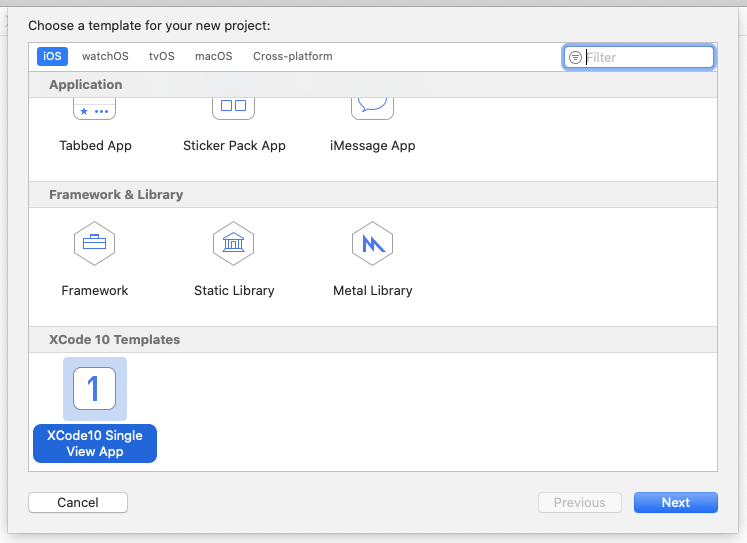
  • Just in case of fire: restart XCode. Now you are able to create pure iOS12 project in XCode 11 beta. Screen Shot 2019-08-16 at 08 22 57
Fixing Xcode’s iPhone XS, XS Max and XR Simulator Names and iOS Versions

Please check that you have appropriate iOS version of iPhone's simulator downloaded.

16 Aug'19: latest version is 12.4, but in XCode 11 beta 5 only 12.2 is available.

https://medium.com/@hacknicity/fixing-xcodes-iphone-xs-xs-max-and-xr-simulator-names-and-ios-versions-f5d7044dc00c

About

Copied "Single View App" template from XCode 10 to use it in XCode 11 for learning purposes

Topics

Resources

Stars

Watchers

Forks

Releases

No releases published

Packages


Contributors