
FrankMD (Frank Markdown) is a simple, feature-rich, self-hosted markdown note-taking app built with Ruby on Rails 8.
The name honors Frank Rosenblatt, inventor of the Perceptron - the pioneering neural network that laid the foundation for modern AI.
fed (frank editor) is the command-line alias.

- No database - Notes are plain markdown files on your filesystem
- Self-hosted - Your data stays on your machine or server
- Docker-ready - One command to start writing
- Blog-friendly - Perfect for drafting posts with live preview
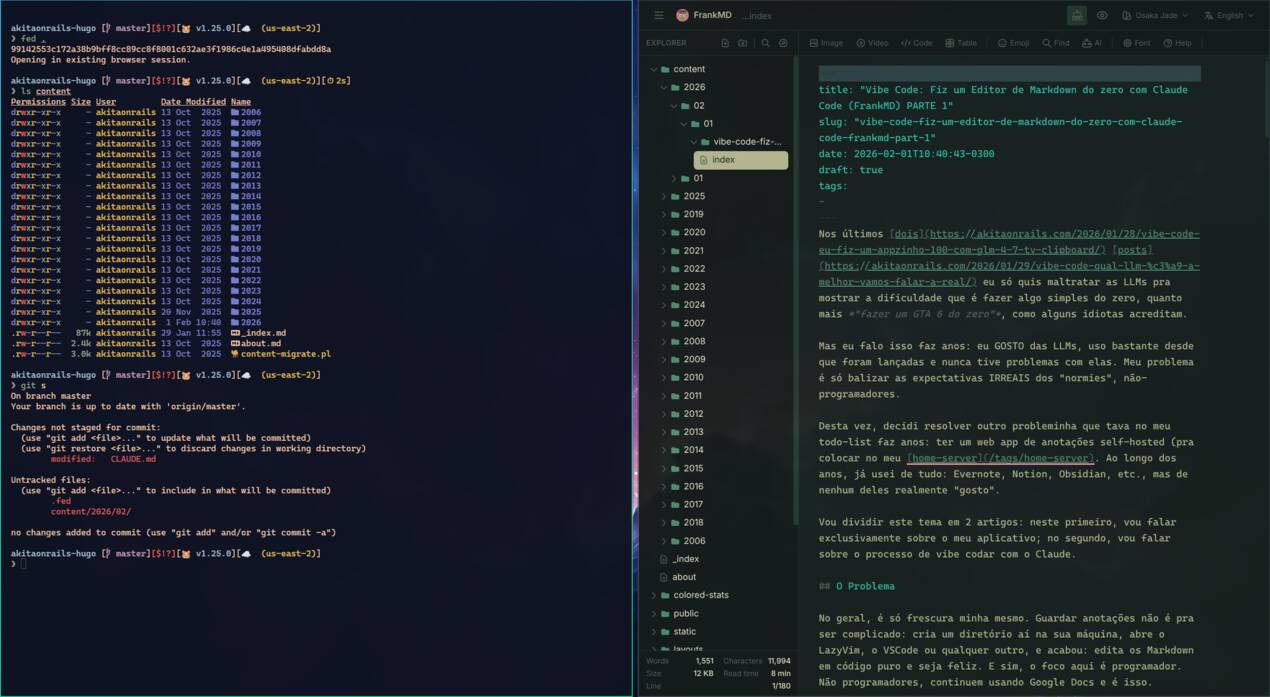
FrankMD running as a desktop app with fed . command
- Clean, distraction-free writing interface
- Syntax highlighting for markdown
- Auto-save with visual feedback
- Typewriter mode for focused writing (cursor stays centered)
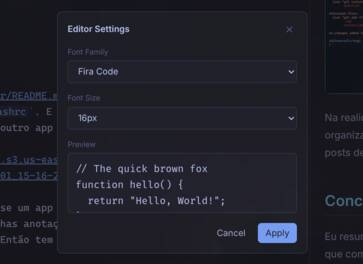
- Customizable fonts and sizes
- Multiple color themes (light/dark variants)
- Offline detection: When the server becomes unreachable, FrankMD disables the editor and shows a warning banner to prevent edits that can't be saved. A "Retry" button lets you manually re-check. The editor re-enables automatically once the connection is restored.
- Content loss protection: If you accidentally delete a large portion of your note (more than 20% and 50+ characters), a warning banner appears with "Undo" and "Save Anyway" buttons, giving you a chance to recover before the deletion is saved.
- Offline backup: While you're editing, FrankMD periodically saves your work to the browser's local storage as a safety net.
- Recovery dialog: If the app detects that a local backup differs from the saved version (e.g., after a crash or lost connection), it shows a side-by-side diff so you can choose to keep the server version or restore the backup.
- Nested folder structure with context menu (right-click to create new notes or folders)
- Drag and drop files and folders
- Quick file finder (
Ctrl+P) sorted by recency - Full-text search with regex support (
Ctrl+Shift+F) - Find and replace with regex support (
Ctrl+H) - Hugo blog post support - Create posts with proper directory structure
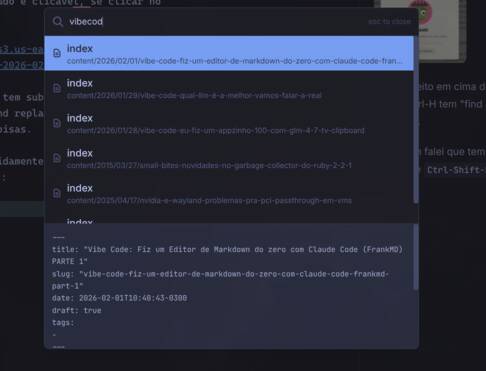
Quick file finder with fuzzy search (Ctrl+P)
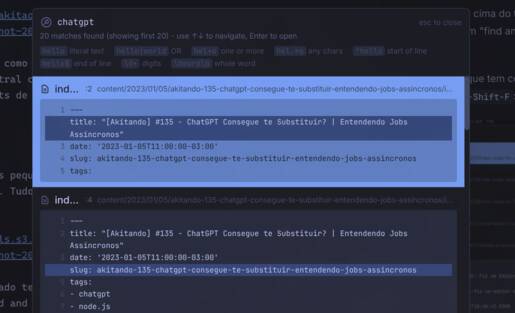
Full-text search with regex support (Ctrl+Shift+F)
Find and replace with regex support (Ctrl+H)
- Live markdown preview panel
- Synchronized scrolling (including typewriter mode)
- Zoom controls
- GitHub-flavored markdown support
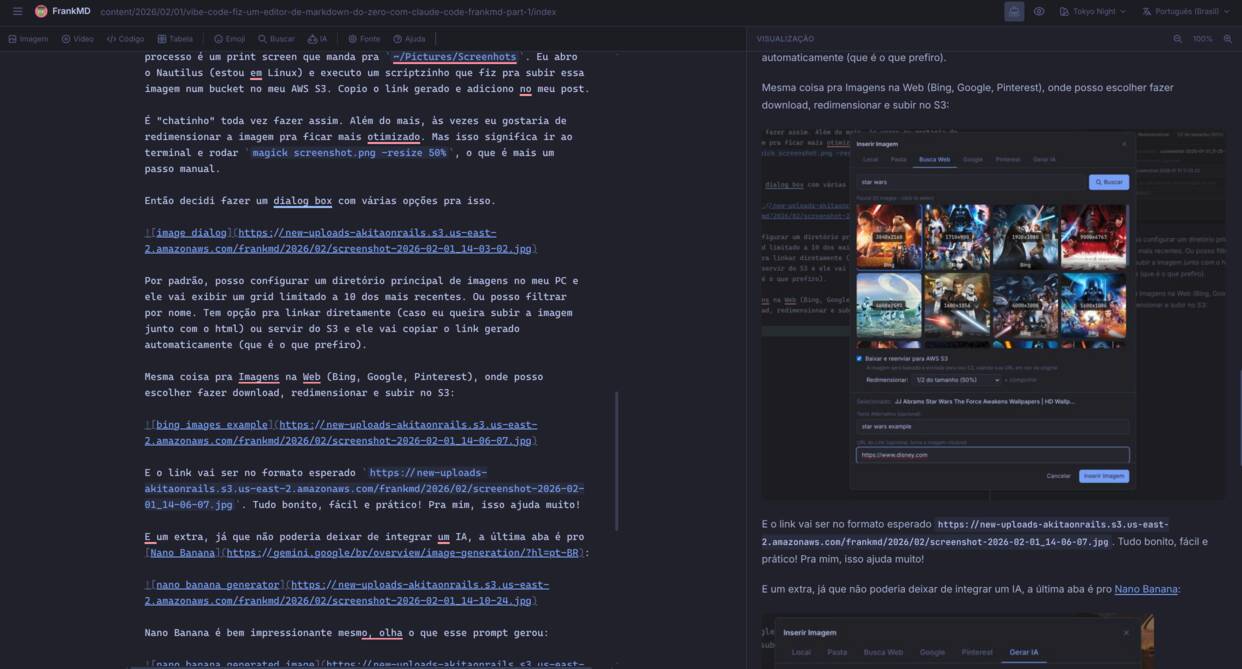
Live preview with synchronized scrolling
- Images: Browse local images, search web (DuckDuckGo), Google Images, Pinterest, or generate with AI
- Videos: Embed YouTube videos with search, or local video files
- Tables: Visual table editor with drag-and-drop rows/columns
- Code blocks: Language selection with autocomplete
- Emoji & Emoticons: Quick picker with search
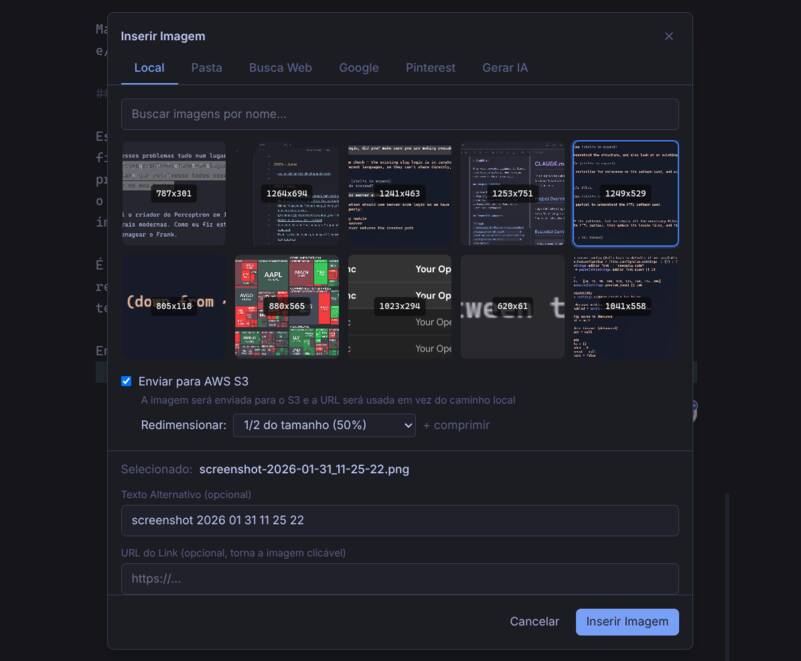
Browse local images from your filesystem
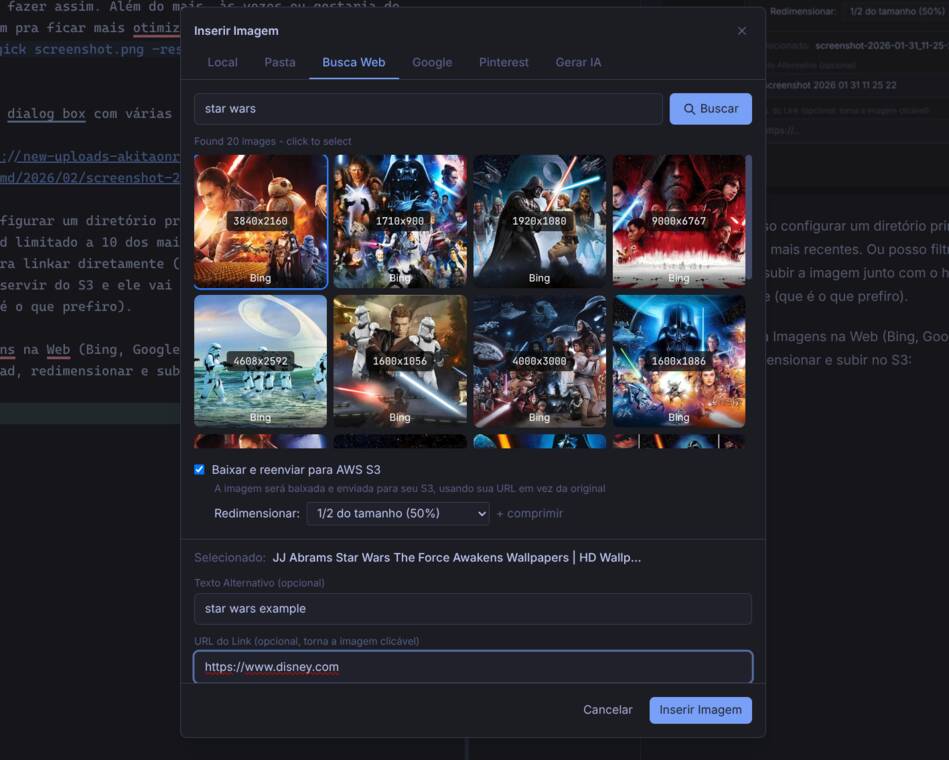
Search images from the web (DuckDuckGo, Google, Pinterest)
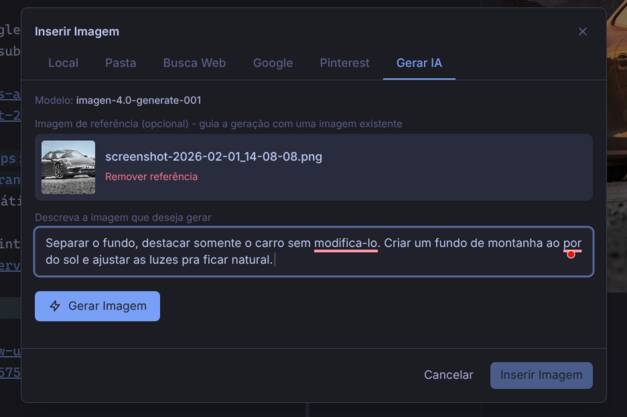
Generate images with AI (requires configured AI provider)

Example AI-generated image: "nano banana"
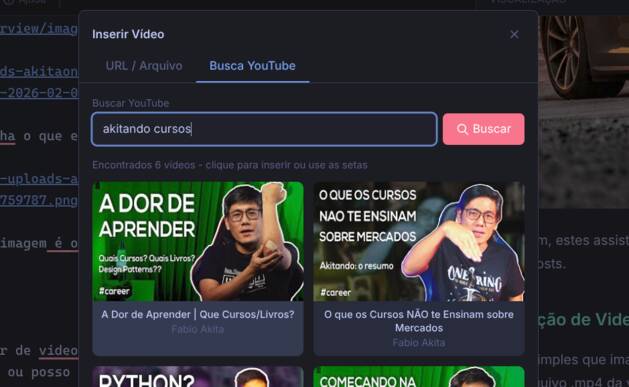
Search and embed YouTube videos
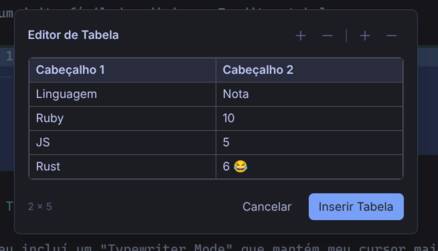
Visual markdown table editor
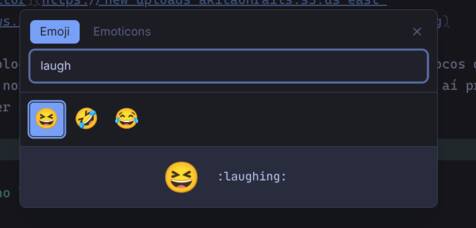
Emoji picker with search
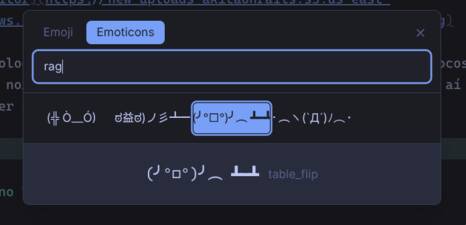
Emoticon picker
- Grammar Check: AI-powered grammar, spelling, and typo correction
- Side-by-side diff view with original and corrected text
- Editable corrections before accepting changes
- Supports Ollama (local), OpenAI, Anthropic, Gemini, and OpenRouter
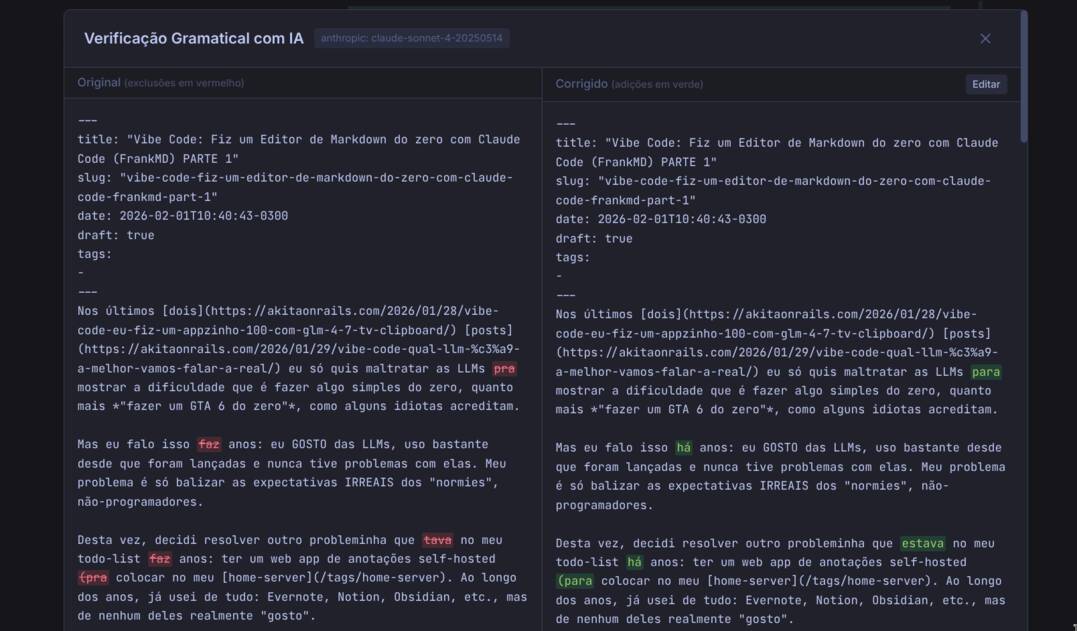
AI grammar checker with side-by-side diff view
- 7 languages: English, Português (Brasil), Português (Portugal), Español, עברית (Hebrew), 日本語 (Japanese), 한국어 (Korean)
- Language picker in the header
- Persistent preference saved to configuration
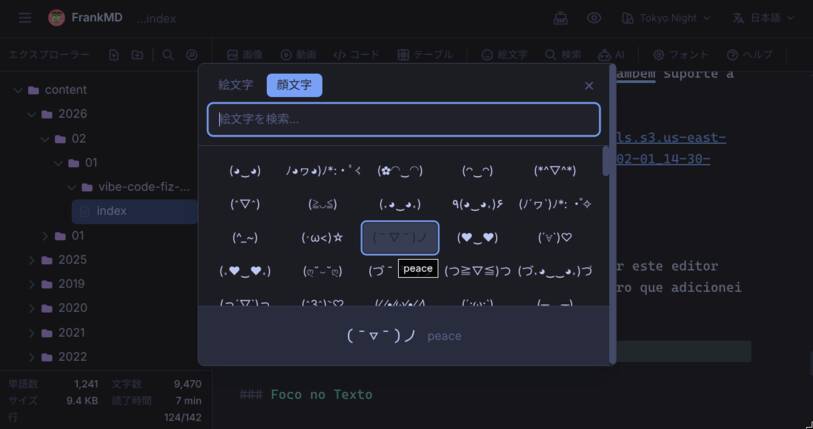
Full interface localization (Japanese example)
- AWS S3 for image hosting (optional)
- YouTube API for video search (optional)
- Google Custom Search for image search (optional)
- AI/LLM providers for grammar checking (optional)
curl -sL https://raw.githubusercontent.com/akitaonrails/FrankMD/master/install.sh | bashThen add to your ~/.bashrc or ~/.zshrc:
source ~/.config/frankmd/fed.shTo update, run the curl command again.
fed ~/my-notes    # open a specific directory
fed .             # open current directory
fed               # open current directory (same as above)
Available commands:
fed [path]- Open FrankMD with notes directoryfed-update- Check for and download updatesfed-stop- Stop the container
For AI features, image hosting, etc., create an env file:
cp ~/.config/frankmd/env.example ~/.config/frankmd/env
# Edit ~/.config/frankmd/env with your API keys

# Then add to ~/.bashrc:
export FRANKMD_ENV=~/.config/frankmd/envFrankMD auto-detects your browser in this order: Chromium → Firefox → Brave → Chrome → Edge. The first one found is used.
To override, set FRANKMD_BROWSER in your ~/.bashrc or ~/.zshrc:
export FRANKMD_BROWSER=brave # or chromium, google-chrome, microsoft-edge, firefoxFor Firefox, enable SSB mode first: about:config → browser.ssb.enabled = true
To run as a persistent service:
# Create notes directory on the host
mkdir -p ~/notes

# Start in background
docker run -d --name frankmd -p 7591:80 \
  -v ~/notes:/rails/notes \
  --restart unless-stopped \
  akitaonrails/frankmd:latest

# Stop
docker stop frankmd

# Start again
docker start frankmd

# Remove
docker rm -f frankmd
Tip: If you hit permission errors, run the container as your user (--user "$(id -u):$(id -g)") or rebuild the image with matching UID/GID.
For a more permanent setup, use the docker-compose.yml in this repo:
Quick reference (full file in docker-compose.yml):
services:
  frankmd:
    image: akitaonrails/frankmd:latest
    container_name: frankmd
    restart: unless-stopped
    ports:
      - "7591:80"
    volumes:
      - ./notes:/rails/notes
    environment:
      - SECRET_KEY_BASE=${SECRET_KEY_BASE}
# Copy defaults and set required values
cp .env.example .env
# Set in .env:
# SECRET_KEY_BASE=$(openssl rand -hex 64)
# UID=$(id -u)
# GID=$(id -g)
# Ensure notes directory exists (or create your NOTES_PATH target)
mkdir -p notes
# Start
docker compose up -dNote: The host directory in NOTES_PATH must exist and be writable by the UID/GID in .env. Avoid sudo docker, which creates root-owned bind mounts; if that happens, fix ownership with chown -R UID:GID <path>.
FrankMD uses a .fed configuration file in your notes directory. This file is automatically created on first run with all options commented out as documentation.
When you open a notes directory for the first time, FrankMD creates a .fed configuration file with all available options commented out. You can uncomment and modify any setting:
# UI Settings
theme = gruvbox
locale = en
editor_font = fira-code
editor_font_size = 16
preview_zoom = 100
sidebar_visible = true
typewriter_mode = false

# Local images path
images_path = /home/user/Pictures

# AWS S3 (overrides environment variables)
aws_access_key_id = your-key
aws_secret_access_key = your-secret
aws_s3_bucket = your-bucket
aws_region = us-east-1

# API Keys
youtube_api_key = your-youtube-key
google_api_key = your-google-key
google_cse_id = your-cse-id

# AI/LLM (configure one or more providers)
# ai_provider = auto
# ollama_api_base = http://localhost:11434/v1
# ollama_model = llama3.2:latest
# openrouter_api_key = sk-or-...
# openrouter_model = openai/gpt-4o-mini
# anthropic_api_key = sk-ant-...
# anthropic_model = claude-sonnet-4-20250514
# gemini_api_key = ...
# gemini_model = gemini-2.0-flash
# openai_api_key = sk-...
# openai_model = gpt-4o-mini
Priority order: File settings override environment variables, which override defaults.
This means you can:
- Set global defaults via environment variables
- Override per-folder using
.fed(e.g., different AWS bucket for different projects) - UI changes (theme, font) are automatically saved to the file
Note: AI credentials have special behavior - if ANY AI key is set in .fed, ALL AI environment variables are ignored. See Per-Folder AI Configuration for details.
The .fed file appears in the explorer panel with a gear icon. You can click it to edit directly in FrankMD:
- The toolbar and preview panel are hidden when editing config files (they only appear for markdown files)
- Changes are auto-saved like any other file
- Live reload: When you save
.fed, the UI immediately applies your changes (theme, font, etc.)
| Setting | Type | Default | Description |
|---|---|---|---|
theme |
string | (system) | Color theme: light, dark, gruvbox, tokyo-night, etc. |
locale |
string | en | Language: en, pt-BR, pt-PT, es, he, ja, ko |
editor_font |
string | cascadia-code | Editor font family |
editor_font_size |
integer | 14 | Font size in pixels (8-32) |
preview_zoom |
integer | 100 | Preview zoom percentage (50-200) |
sidebar_visible |
boolean | true | Show explorer panel on startup |
typewriter_mode |
boolean | false | Enable typewriter mode on startup |
images_path |
string | - | Local images directory path |
aws_access_key_id |
string | - | AWS access key for S3 |
aws_secret_access_key |
string | - | AWS secret key for S3 |
aws_s3_bucket |
string | - | S3 bucket name |
aws_region |
string | - | AWS region |
youtube_api_key |
string | - | YouTube Data API key |
google_api_key |
string | - | Google API key |
google_cse_id |
string | - | Google Custom Search Engine ID |
ai_provider |
string | auto | AI provider: auto, ollama, openrouter, anthropic, gemini, openai |
ai_model |
string | (per provider) | Override model for any provider |
ollama_api_base |
string | - | Ollama API base URL (e.g., http://localhost:11434/v1) |
ollama_model |
string | llama3.2:latest | Ollama model |
openrouter_api_key |
string | - | OpenRouter API key |
openrouter_model |
string | openai/gpt-4o-mini | OpenRouter model |
anthropic_api_key |
string | - | Anthropic API key |
anthropic_model |
string | claude-sonnet-4-20250514 | Anthropic model |
gemini_api_key |
string | - | Google Gemini API key |
gemini_model |
string | gemini-2.0-flash | Gemini model |
openai_api_key |
string | - | OpenAI API key |
openai_model |
string | gpt-4o-mini | OpenAI model |
Environment variables serve as global defaults. They're useful for Docker deployments or when you want the same configuration across all notes directories.
| Variable | Description | Default |
|---|---|---|
NOTES_PATH |
Directory where notes are stored (must be writable by UID/GID when using Docker) | ./notes |
IMAGES_PATH |
Directory for local images | (disabled) |
FRANKMD_LOCALE |
Default language (en, pt-BR, pt-PT, es, he, ja, ko) | en |
SECRET_KEY_BASE |
Rails secret key (required in production) | - |
To upload images to S3 instead of using local paths:
| Variable | Description |
|---|---|
AWS_ACCESS_KEY_ID |
Your AWS access key |
AWS_SECRET_ACCESS_KEY |
Your AWS secret key |
AWS_S3_BUCKET |
S3 bucket name |
AWS_REGION |
AWS region (e.g., us-east-1) |
To enable YouTube video search in the video dialog:
- Go to Google Cloud Console
- Create a project and enable "YouTube Data API v3"
- Create an API key under Credentials
| Variable | Description |
|---|---|
YOUTUBE_API_KEY |
Your YouTube Data API key |
In-app setup: You can also configure this directly in the .fed file:
youtube_api_key = your-youtube-api-keyWhen not configured, the YouTube Search tab shows setup instructions with a link to this documentation.
To enable Google Images tab (in addition to the free web search):
- Go to Google Cloud Console
- Create a project and enable "Custom Search API"
- Create an API key under Credentials
- Go to Programmable Search Engine
- Create a search engine with "Search the entire web" enabled
- Enable "Image search" in settings
- Copy the Search Engine ID (cx value)
| Variable | Description |
|---|---|
GOOGLE_API_KEY |
Your Google API key |
GOOGLE_CSE_ID |
Your Custom Search Engine ID |
In-app setup: You can also configure this directly in the .fed file:
google_api_key = your-google-api-key
google_cse_id = your-custom-search-engine-id
When not configured, the Google Images tab shows setup instructions with a link to this documentation.
Note: Google Custom Search has a free tier of 100 queries/day.
FrankMD includes an AI-powered grammar and spelling checker. Click the "AI" button in the editor toolbar to check your text. The AI will fix grammar errors, spelling mistakes, typos, and punctuation while preserving your writing style and markdown formatting.
Supported Providers (priority order in auto mode):
- OpenAI - GPT models
- Anthropic - Claude models
- Google Gemini - Gemini models
- OpenRouter - Multiple providers, pay-per-use
- Ollama - Local, free, private
When multiple providers are configured, FrankMD automatically uses the first available one in the priority order above. You can override this with ai_provider = <provider>.
Run AI models locally on your machine with no API costs:
- Install Ollama from ollama.com
- Pull a model:
ollama pull llama3.2:latest - Configure in
.fed:
ollama_api_base = http://localhost:11434/v1
ollama_model = llama3.2:latest
Note for Docker users: Use host.docker.internal instead of localhost:
ollama_api_base = http://host.docker.internal:11434/v1Access multiple AI providers through one API:
- Get an API key from openrouter.ai
- Configure in
.fed:
openrouter_api_key = sk-or-...
openrouter_model = openai/gpt-4o-miniUse Anthropic's Claude models:
- Get an API key from console.anthropic.com
- Configure in
.fed:
anthropic_api_key = sk-ant-...
anthropic_model = claude-sonnet-4-20250514Use Google's Gemini models:
- Get an API key from aistudio.google.com
- Configure in
.fed:
gemini_api_key = ...
gemini_model = gemini-2.0-flashUse OpenAI's GPT models:
- Get an API key from platform.openai.com
- Configure in
.fed:
openai_api_key = sk-...
openai_model = gpt-4o-miniBy default, FrankMD uses the first configured provider in priority order (OpenAI → Anthropic → Gemini → OpenRouter → Ollama). To force a specific provider:
ai_provider = anthropicTo override the model for any provider:
ai_model = claude-3-opus-20240229Important: If you set ANY AI credential in .fed, ALL AI-related environment variables are ignored for that folder. This allows per-folder AI configuration that completely overrides your global ENV settings.
For example, if you have OPENAI_API_KEY and OPENROUTER_API_KEY set as environment variables, but add this to .fed:
anthropic_api_key = sk-ant-your-keyFrankMD will:
- Use only Anthropic (ignoring OpenAI and OpenRouter from ENV)
- Pick up changes immediately when you save
.fedfrom the editor
This is useful for:
- Using different AI providers for different projects
- Testing new providers without changing your global config
- Overriding ENV vars set in Docker/shell profiles
| Provider | Default Model |
|---|---|
| Ollama | llama3.2:latest |
| OpenRouter | openai/gpt-4o-mini |
| Anthropic | claude-sonnet-4-20250514 |
| Gemini | gemini-2.0-flash |
| OpenAI | gpt-4o-mini |
Usage:
- Click the "AI" button in the toolbar while editing a note
- Review the side-by-side diff showing original and corrected text
- Edit the corrected text if needed
- Click "Accept Changes" to apply corrections
| Shortcut | Action |
|---|---|
Ctrl+N |
New note |
Ctrl+S |
Save now |
Ctrl+P |
Find file by path |
Ctrl+Shift+F |
Search in file contents |
Ctrl+F |
Find in file |
Ctrl+H |
Find and replace |
Ctrl+G |
Go to line |
| Shortcut | Action |
|---|---|
Ctrl+E |
Toggle sidebar |
Ctrl+Shift+V |
Toggle preview panel |
Ctrl+\ |
Toggle typewriter mode |
Ctrl+L |
Toggle line numbers |
Ctrl+Shift++ |
Increase editor width |
Ctrl+Shift+- |
Decrease editor width |
Tab |
Indent line/block |
Shift+Tab |
Unindent block |
| Shortcut | Action |
|---|---|
Ctrl+B |
Bold |
Ctrl+I |
Italic |
Ctrl+M |
Open text format menu |
Ctrl+Shift+E |
Emoji picker |
| Shortcut | Action |
|---|---|
F1 |
Open help dialog |
Escape |
Close dialogs |
Typewriter mode (Ctrl+\) is designed for focused, distraction-free writing:
Normal mode (default):
- Explorer panel visible on the left
- Preview panel available
- Editor uses normal scrolling
Typewriter mode:
- Explorer panel hidden
- Preview panel closed for maximum focus
- Editor centered horizontally on the screen
- Cursor stays centered in the middle of the editor (50% viewport height)
- As you type, the text scrolls to keep your writing position fixed
- Adjust editor width with
Ctrl+Shift++andCtrl+Shift+-
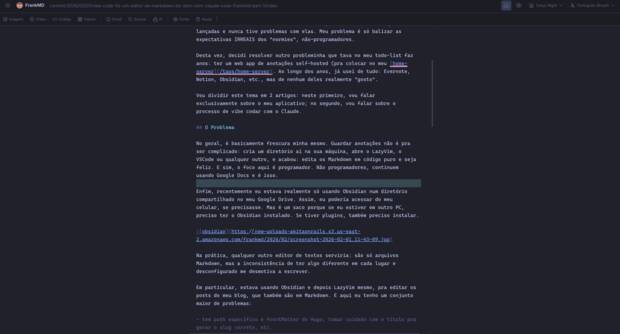
Typewriter mode: distraction-free writing with centered cursor
This mimics the experience of a typewriter where your typing position stays constant on the page, reducing eye movement and helping maintain focus during long writing sessions.
FrankMD includes built-in support for creating Hugo-compatible blog posts. When you click the "New Note" button (or press Ctrl+N), you can choose between:
- Empty Document - A plain markdown file
- Hugo Blog Post - A properly structured Hugo post
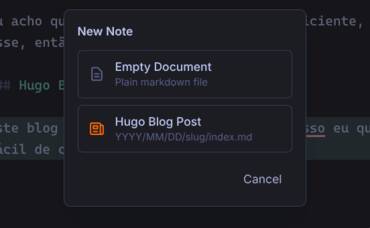
New note dialog with Hugo blog post option
When you create a Hugo blog post with a title like "My Amazing Post Title", FrankMD will:
- Create the directory structure:
YYYY/MM/DD/my-amazing-post-title/ - Create
index.mdinside with Hugo frontmatter:
---
title: "My Amazing Post Title"
slug: "my-amazing-post-title"
date: 2026-01-30T14:30:00-0300
draft: true
tags:
-
---
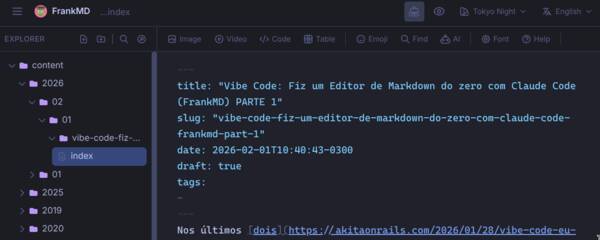
Hugo blog post with automatic frontmatter generation
The slug is automatically generated from the title:
- Converts to lowercase
- Replaces accented characters (a→a, e→e, c→c, n→n, etc.)
- Removes special characters
- Replaces spaces with hyphens
Examples:
- "Conexao a Internet" →
conexao-a-internet - "What's New in 2026?" →
whats-new-in-2026 - "Codigo & Programacao" →
codigo-programacao
When embedding YouTube videos, FrankMD can insert a Hugo shortcode ({{< youtube >}}) instead of raw HTML. Check the "Use Hugo shortcode" checkbox in the video dialog to enable this.
The inserted shortcode looks like:
{{< youtube id="dQw4w9WgXcQ" title="Video Title" >}}
To use this in your Hugo blog, create the shortcode file at layouts/shortcodes/youtube.html in your Hugo project:
<div class="embed-container">
  <iframe
    src="https://www.youtube.com/embed/{{ .Get "id" }}"
    title="{{ with .Get "title" }}{{ . }}{{ else }}YouTube video player{{ end }}"
    frameborder="0"
    allow="accelerometer; autoplay; clipboard-write; encrypted-media; gyroscope; picture-in-picture; web-share"
    referrerpolicy="strict-origin-when-cross-origin"
    allowfullscreen>
  </iframe>
</div>
Then add the responsive CSS to your stylesheet (e.g. assets/css/custom.css or your theme's styles):
.embed-container {
  position: relative;
  padding-bottom: 56.25%; /* 16:9 aspect ratio */
  height: 0;
  overflow: hidden;
  max-width: 100%;
}

.embed-container iframe {
  position: absolute;
  top: 0;
  left: 0;
  width: 100%;
  height: 100%;
}
Note: Hugo ships with a built-in youtube shortcode, but it uses a different syntax ({{< youtube dQw4w9WgXcQ >}} with a positional parameter). The custom shortcode above matches the named-parameter format (id="...", title="...") that FrankMD generates, and gives you full control over the markup and styling.
FrankMD includes 18 built-in color themes, plus automatic Omarchy theme sync:
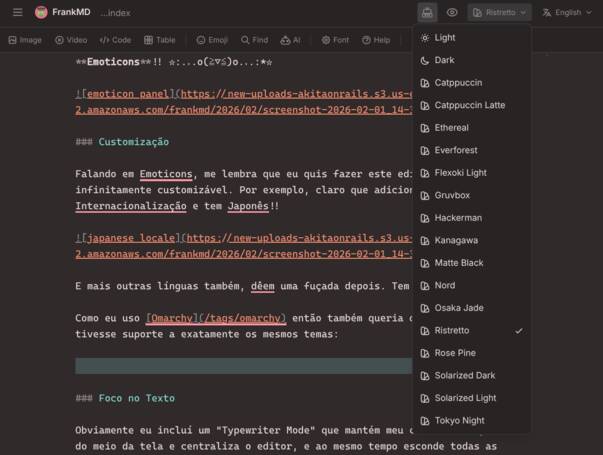
Theme picker dropdown
| Theme | Description |
|---|---|
| Light | Clean light theme |
| Dark | Standard dark theme |
| Catppuccin | Soothing pastel dark theme |
| Catppuccin Latte | Soothing pastel light theme |
| Ethereal | Dreamy, soft colors |
| Everforest | Warm green nature theme |
| Flexoki Light | Inky light theme |
| Gruvbox | Retro groove color scheme |
| Hackerman | Matrix-style green on black |
| Kanagawa | Inspired by Katsushika Hokusai's art |
| Matte Black | Pure dark minimal theme |
| Nord | Arctic, north-bluish palette |
| Osaka Jade | Japanese-inspired jade colors |
| Ristretto | Deep coffee tones |
| Rose Pine | All natural pine, faux fur and mystery |
| Solarized Dark | Classic dark color scheme |
| Solarized Light | Classic light color scheme |
| Tokyo Night | Vibrant night theme |
Omarchy auto-sync: If you run the Omarchy desktop environment, FrankMD detects your terminal theme and adds it as a selectable "Omarchy" option. Switching your terminal theme updates FrankMD in real time.
Change themes from the dropdown in the top-right corner. Your preference is saved to the .fed file.
For secure remote access without opening ports:
-
Install cloudflared: https://developers.cloudflare.com/cloudflare-one/connections/connect-apps/install-and-setup/
-
Authenticate:
cloudflared tunnel login
-
Create a tunnel:
cloudflared tunnel create frankmd
-
Add to your
docker-compose.yml:services: frankmd: # ... existing config ... cloudflared: image: cloudflare/cloudflared:latest container_name: cloudflared restart: unless-stopped command: tunnel --no-autoupdate run --token ${CLOUDFLARE_TUNNEL_TOKEN} environment: - CLOUDFLARE_TUNNEL_TOKEN=${CLOUDFLARE_TUNNEL_TOKEN} depends_on: - frankmd
-
Configure the tunnel in Cloudflare Zero Trust dashboard to point to
http://frankmd:80 -
Add your tunnel token to
.env:CLOUDFLARE_TUNNEL_TOKEN=your-tunnel-token
-
Access via your configured domain (e.g.,
notes.yourdomain.com)
Security Note: Consider adding Cloudflare Access policies to restrict who can access your notes.
- Ruby 3.4+
- Node.js 20+ (for Tailwind CSS)
- Bundler
# Clone the repository
git clone https://github.com/akitaonrails/FrankMD.git
cd FrankMD

# Install Ruby dependencies
bundle install

# Start development server (includes Tailwind watcher)
bin/dev
Visit http://localhost:3000
# Run ALL checks (lint + security + tests) — same as CI
bin/ci

# Run Ruby tests only
bin/rails test

# Run JavaScript tests only
npx vitest run

# Run specific test file
bin/rails test test/controllers/notes_controller_test.rb

# Run with verbose output
bin/rails test -v
Always run bin/ci before pushing to ensure CI will pass.
app/
├── controllers/
│   ├── notes_controller.rb        # Note CRUD operations
│   ├── folders_controller.rb      # Folder management
│   ├── images_controller.rb       # Image browsing & S3 upload
│   ├── youtube_controller.rb      # YouTube search API
│   ├── ai_controller.rb           # AI grammar checking API
│   ├── config_controller.rb       # .fed configuration
│   └── translations_controller.rb # i18n API for JavaScript
├── models/
│   ├── note.rb                # Note ActiveModel
│   ├── folder.rb              # Folder ActiveModel
│   └── config.rb              # Configuration management
├── services/
│   ├── notes_service.rb           # File system operations
│   ├── images_service.rb          # Image handling & S3
│   ├── ai_service.rb              # AI/LLM integration
│   └── omarchy_theme_service.rb   # Omarchy desktop theme sync
├── javascript/
│   └── controllers/
│       ├── app_controller.js          # Main Stimulus controller
│       ├── theme_controller.js        # Theme management
│       ├── locale_controller.js       # Language/i18n management
│       └── table_editor_controller.js # Table editing
└── views/
    └── notes/
        ├── index.html.erb     # Single-page app
        ├── _header.html.erb   # Top bar with GitHub link
        ├── _sidebar.html.erb  # File explorer
        ├── _editor_panel.html.erb
        ├── _preview_panel.html.erb
        └── dialogs/           # Modal dialogs
# Build locally
docker build -t frankmd .

# Run locally
mkdir -p notes
docker run -p 7591:80 -v $(pwd)/notes:/rails/notes frankmdMIT License - see LICENSE for details.
- Fork the repository
- Create a feature branch (
git checkout -b feature/amazing-feature) - Make your changes following the guidelines below
- Run
bin/cito verify everything passes - Commit (
git commit -m 'Add amazing feature') - Push (
git push origin feature/amazing-feature) - Open a Pull Request
Before submitting a PR, ensure:
- Rebase from master — always rebase on the latest
masterbefore opening a PR. Merge commits are not accepted. bin/cipasses — run it locally. This checks rubocop style, brakeman security scan, bundler-audit, importmap audit, Ruby tests, and JavaScript tests. PRs that fail CI will not be reviewed.- Tests included — every new feature or bug fix must include tests. Ruby tests go in
test/, JavaScript tests go intest/javascript/. Untested PRs will be sent back. - Focused scope — one PR should do one thing. Don't mix unrelated changes (e.g., a new feature + linter fixes + refactoring). If you spot something unrelated to fix, open a separate PR.
This is a Rails 8 app. Follow Rails 8 idioms and conventions:
- Turbo Streams for server-rendered updates — file tree updates, CRUD operations on files/folders, and any server-driven DOM update must use Turbo Stream responses. Do not build HTML in JavaScript from JSON API responses.
@rails/request.jsfor fetch calls — useget,post,patch,destroyfrom@rails/request.jsinstead of rawfetch(). It handles CSRF tokens and Turbo Stream content negotiation automatically.- Stimulus Outlets for controller communication — use Stimulus Outlets (
static outlets = [...]) instead of manualquerySelector+getControllerForElementAndIdentifierlookups. - Config via
Config.get()— never readENV["KEY"]directly in controllers or services. UseConfig.new.get("key_name")which respects the.fedfile > ENV > default priority chain. Seeapp/models/config.rbfor the schema. - No sessions — this app is sessionless. Do not use
session[]for state. All persistent state goes through the.fedconfig file.
- Ruby follows the project's
.rubocop.yml. Runbin/rubocop -ato auto-fix most issues. - JavaScript has no linter configured, but follow the existing patterns: ES module imports, Stimulus controller conventions, no semicolons.
- Keep changes minimal. Don't add extra error handling, comments, or abstractions beyond what's needed for the task.
| Component | Memory |
|---|---|
| Rails container (Puma + Thruster) | ~115 MiB |
| Browser tab (Brave/Chrome) | ~340 MB |
| Total | ~455 MB |
| Type | Lines | LOC |
|---|---|---|
| JavaScript | 13,793 | 10,081 |
| Views (ERB) | 2,953 | 2,633 |
| Models | 904 | 706 |
| Controllers | 850 | 652 |
| Total source | ~18,500 | ~14,100 |
| Type | Tests |
|---|---|
| JavaScript (Vitest) | 1,379 |
| Ruby (Minitest) | 425 |
| Total | 1,804 |