
This is a project where you can track TV shows and movies, to remember which episode did you stop at, if you have already completed a movie or TV, is watching, is on hold, is dropped or plan to watch it
-
Create a file called
.env.localand type this variables -
DATABASE_URL -
postgresql://postgres:password@localhost:5432/mydb -
NEXTAUTH_URL -
http://localhost:3000 -
NEXTAUTH_SECRET -
secret -
MOVIEDB_API_KEY - Get an api key here
Optional
- PATH_TO_DELETE_ACCCOUNTS -
http://localhost:3333/api/delete_accounts
Requirements
- Node.js 22 LTS
- npm (bundled with Node 22)
Install dependencies:
npm installUsing prisma CLI:
Just for using prisma CLI, the DATABASE_URL needs to be in .env file, when done you can remove
npx prisma generate

# For local database development
npx prisma migrate dev

# For online database production
npx prisma db push
Start server:
npm run dev
# Or
npm run build
npm start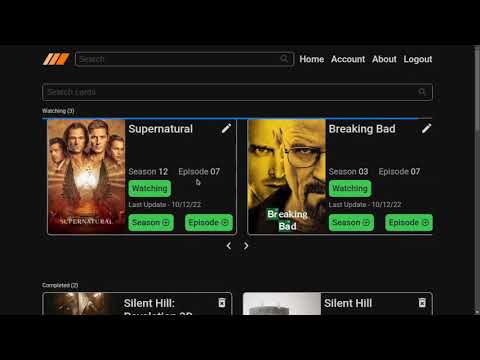
The easiest way to deploy your Next.js app is to use the Vercel Platform from the creators of Next.js.
Check out our Next.js deployment documentation for more details.
Project dependencies updated to run on Node.js 22 LTS and Next.js 14.x. If you are upgrading from the earlier 2022 version:
- Install Node.js 22 LTS.
- Remove existing node_modules and lock file, then reinstall.
- Run
npx prisma generate(handled automatically on install via postinstall script). - Review environment variables (no changes required) and run
npm run dev.
If you face issues with legacy cached Prisma clients during development, stop the dev server and remove the .next folder before restarting.