Schedule Tracker for Primavera P6. Avoid increased project costs, delays, and errors.

Time is your most precious asset, we can help you reclaim it! Increase your Primavera P6 scheduling efficiency with Schedule Tracker by Witty Finch Engineering. Streamline your workflows by seamlessly tracking and managing multiple projects and schedule updates.
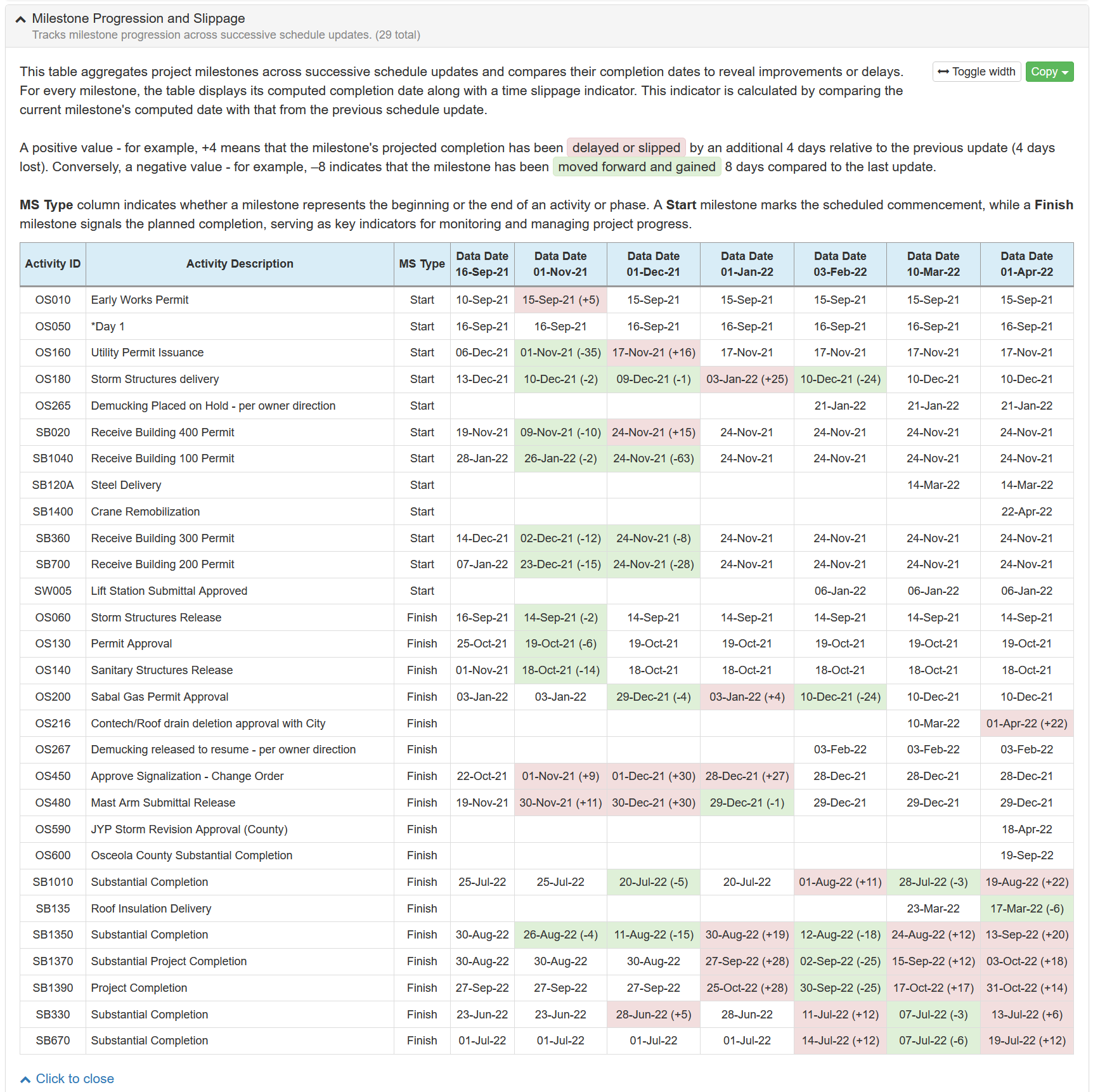
Upload and manage Critical Path Method (CPM) baseline schedules in the widely-used Primavera P6® format (XER). Compare schedule updates, changes, delays, costs, critical path activities, milestone slippage over the entire project timeline, generate easy to export reports and charts.
Optimized for mobile use, Schedule Tracker ensures you're always just a tap away from your projects. Our interface is designed for ease of use, enhancing the efficiency of tracking multiple schedule updates on the go.
A fully automated Primavera P6 schedule analysis that adheres to industry-standard methodologies. Schedulers achieve superior accuracy and efficiency, saving hours on reviews and reporting.
-
Project Progress Status
Monitors the overall status of the project, tracking progress against the planned schedule. -
Activities Added
Lists activities that were added. -
Activities Deleted
Lists activities that were removed. -
Activity Predecessors Added
Lists changes in predecessor activities. -
Activity Predecessors Deleted
Lists changes in predecessor activities. -
Activity Predecessors Added (Visualizer/Claim Digger Style)
Lists changes in predecessor activities, formatted in the specific style of Visualizer/Claim Digger. -
Activity Predecessors Deleted (Visualizer/Claim Digger Style)
Lists changes in predecessor activities, formatted in the specific style of Visualizer/Claim Digger. -
Activity Successors Added (Visualizer/Claim Digger Style)
Lists changes in successor activities, formatted in the specific style of Visualizer/Claim Digger. -
Activity Successors Deleted (Visualizer/Claim Digger Style)
Lists changes in successor activities, formatted in the specific style of Visualizer/Claim Digger. -
Activity Original Durations Changed
Tracks changes to the original durations of activities. -
Activities Became Critical
Lists activities that have become critical, indicating potential risks to project timelines. -
Activities with Changed Lag Time
Shows how lag time changed between activities. -
Activities with Changed Calendars
Lists activities that changed their calendars. -
Activity Descriptions Changed
Identifies changes in activity descriptions.
-
Longest Path
Identifies the sequence of activities that determine the project's duration. -
Longest Path Comparison
Compares changes in longest paths between selected schedule updates. -
Critical Activities
Lists activities that are critical to project completion. -
Actual Start Date
Tracks the actual start dates of activities. -
Actual Finish Date
Tracks the actual finish dates of activities. -
Activities with Missing Predecessors
Identifies activities without defined predecessor activities. -
Activities with Missing Successors
Identifies activities without defined successor activities. -
Activities with Identical Descriptions
Identifies activities with duplicate descriptions. -
Activities with Future Actual Dates
Flags activities that have actual dates reported beyond the data date. -
Out-of-sequence Work
Detects work performed out of the planned sequence.
-
Original vs Actual Durations
Compares original and actual durations for completed activities in a specific schedule update. -
Original vs Actual Durations - Overall
Compares original planned durations with actual durations for all activities. -
Critical Start Delays - Should Have Started
Identifies activities that were scheduled to begin by a specific date but have not yet started. -
Critical Start Delays with Limited Total Float (SHS)
Same as above, but only shows activities with float time of 30 days or less. -
Critical Finish Delays - Should Have Finished
Identifies activities that were planned to be completed by a specific date but have not yet finished. -
Critical Finish Delays with Limited Total Float (SHF)
Same as above, but only shows activities with float time of 30 days or less.