A native macOS client for Open WebUI. Chat with your self-hosted AI — right from your Mac.




Download · Report Bug · Request Feature
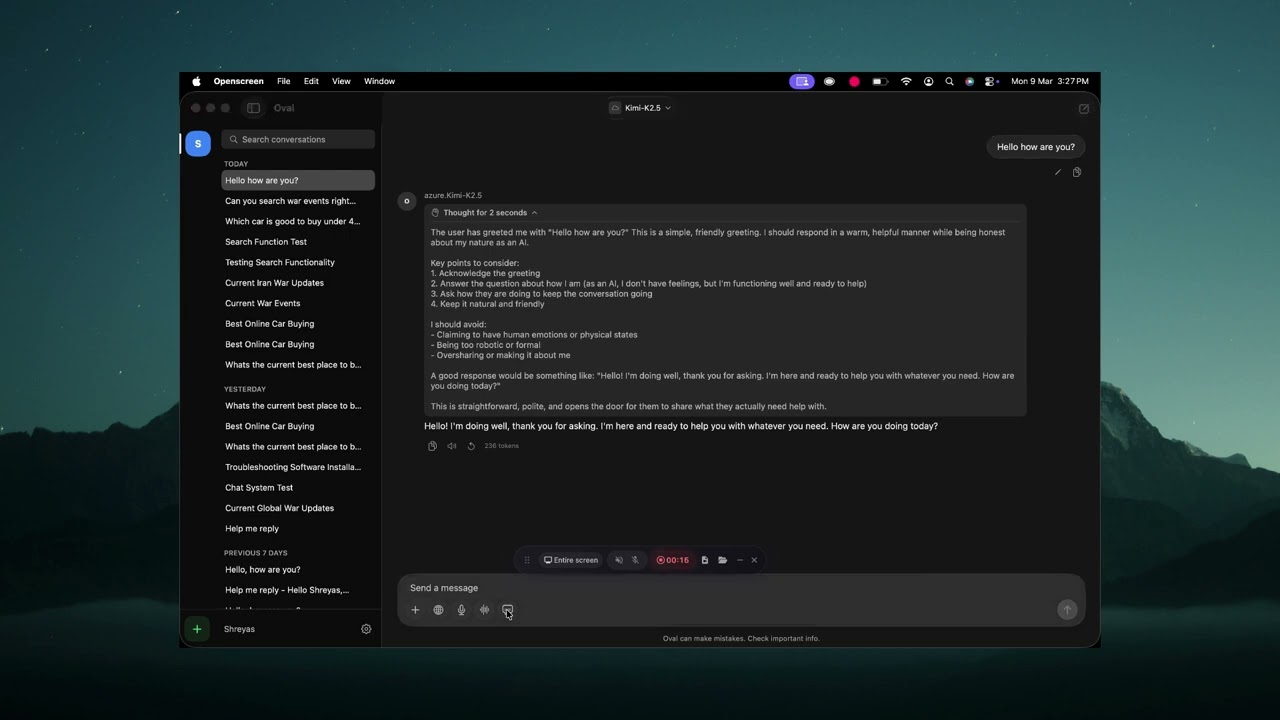
- Real-time streaming chat with full markdown rendering (headings, bold, italic, code blocks with syntax highlighting and copy)
- Model selection from all models on your Open WebUI server
- Conversation management — search, time-grouped sidebar (Today / Yesterday / Previous 7 Days / etc.)
- Chat persistence — conversations saved to your server, synced with the web UI
- Auto-generated titles for new conversations
- Multi-server support — add, switch, and manage multiple Open WebUI servers
- Global hotkey (
Ctrl+Shift+Space) — Spotlight-style floating chat window, always accessible - Paste to chat (
Ctrl+Shift+V) — paste clipboard content into a new quick chat - Compact input mode that expands into a full conversation view
- File and image attachments — drag & drop, Cmd+V paste, or file picker
- Web search toggle for retrieval-augmented generation
- Voice input with on-device speech-to-text (Apple Speech framework)
- Floating voice window — ChatGPT-style compact window, draggable, stays on top
- Text-to-speech — native macOS TTS for assistant responses
- Chat play button — hear any assistant message read aloud
- Instant stop — TTS stops mid-sentence when you hit stop
- Light and dark mode matching Open WebUI's design system
- Liquid Glass UI effects (macOS Tahoe)
- Always on top mode
- Launch at login
- Menu bar icon with quick access
- Esc to close windows
- Keyboard shortcuts throughout (Cmd+N, Cmd+F, Cmd+Shift+C, etc.)
| Login | Sidebar & Conversations |
|---|---|
 |
 |
| Chat with Markdown & Code | Quick Chat (Ctrl+Shift+Space) |
|---|---|
 |
 |
| Voice Mode |
|---|
 |
- macOS 26.0 (Tahoe) or later
- An existing Open WebUI server
- Oval does not host or provide AI models — it connects to your server
Download the latest .dmg from the Releases page, open it, and drag Oval to your Applications folder.
The app is signed with Developer ID and notarized by Apple. It should open without any Gatekeeper warnings.
Coming soon.
- Clone the repository:
git clone https://github.com/shreyaspapi/Oval.git
cd Oval- Open in Xcode:
open OpenwebUI/OpenwebUI.xcodeproj-
Select the OpenwebUI scheme, set your signing team, and build (Cmd+B).
-
Run (Cmd+R).
Note: Requires Xcode 26.2+ with the macOS 26 SDK.
| Shortcut | Action |
|---|---|
Ctrl+Shift+Space |
Toggle Quick Chat |
Ctrl+Option+Space |
Toggle main window |
Ctrl+Shift+V |
Paste clipboard into new Quick Chat |
Cmd+N |
New conversation |
Cmd+F |
Search conversations |
Cmd+Shift+C |
Copy last assistant response |
Cmd+Option+T |
Toggle always on top |
Cmd+, |
Settings |
Esc |
Close window |
Native SwiftUI app with macOS native TTS for voice playback.
OpenwebUI/
├── OpenwebUIApp.swift          # App entry point, window & menu config
├── ContentView.swift           # Root router (loading → connect → chat)
├── Models/
│   └── DataModels.swift        # All data models
├── Services/
│   ├── AppState.swift          # Main app state (@Observable)
│   ├── OpenWebUIClient.swift   # HTTP client (auth, models, chats, streaming)
│   ├── ConfigManager.swift     # Disk persistence for server configs
│   ├── VoiceModeManager.swift       # Voice conversation pipeline
│   ├── VoiceModeWindowManager.swift # Floating NSPanel for voice mode
│   ├── TTSManager.swift        # TTS playback (native macOS)
│   ├── SpeechManager.swift     # On-device speech-to-text (Apple Speech)
│   ├── HotkeyManager.swift     # Global keyboard shortcuts (CGEvent tap)
│   ├── MiniChatWindowManager.swift  # Floating NSPanel for Quick Chat
│   ├── LaunchAtLoginManager.swift   # SMAppService wrapper
│   ├── TrayManager.swift       # Menu bar status item
│   └── NotificationManager.swift
├── Theme/
│   └── AppColors.swift         # Adaptive color system (light/dark)
└── Views/
    ├── Chat/                   # Main chat UI
    │   ├── ChatView.swift      # Layout (ServerRail | Sidebar | Detail)
    │   ├── ChatAreaView.swift  # Messages + input + drag/drop
    │   ├── ChatInputView.swift # Input bar with attachments, mic, web search
    │   ├── VoiceModeView.swift # Voice conversation UI (floating window)
    │   ├── MiniChatView.swift  # Quick Chat UI
    │   ├── MessageBubbleView.swift
    │   ├── MarkdownTextView.swift
    │   └── ...
    ├── InstallationView.swift  # Login/connect screen
    └── Controls/
        └── VoiceModelSettingsView.swift  # Voice model download & selection
- No data collection — no analytics, no telemetry, no tracking
- All network traffic goes directly between your Mac and your Open WebUI server
- Credentials stored locally in the app's sandboxed container
- Voice TTS uses macOS native speech synthesis
See PRIVACY_POLICY.md for the full privacy policy.
Contributions are welcome! Here's how to help:
- Bug reports — Create an issue with steps to reproduce
- Feature requests — Create an issue describing the feature
- Questions & feedback — Use GitHub Discussions
This project is licensed under the GNU General Public License v3.0 — see the LICENSE file for details.
Oval is an independent, third-party application and is not officially affiliated with the Open WebUI project.
Oval is free and open source. If you find it useful, consider supporting development:


Thank you to everyone who sponsors this project:
Become the first sponsor! GitHub Sponsors or Buy Me a Coffee
- Open WebUI team for creating an amazing self-hosted AI interface
- Apple for SwiftUI and the macOS platform
