Follow the instructions below to send logs stored on AWS S3 to Logentries.
- Forwarding AWS ELB and CloudFront logs
- (make sure to set ELB/CloudFront to write logs every 5 minutes)
- When forwarding these logs, the script will format the log lines according to Logentries KVP spec to make them easier to analyze
- Forwarding OpenDNS logs
- Log in to your Logentries account
- Add a new token based log
- Optional: repeat to add second log for debugging
-
Create a new Lambda function

-
Choose the Python blueprint for S3 objects
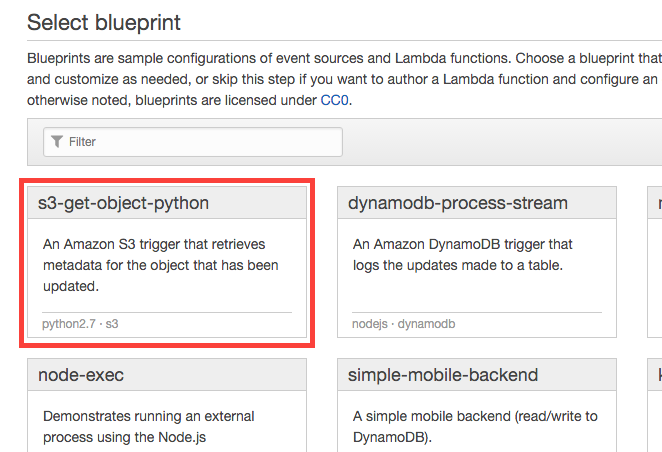
-
Configure event sources:
- Select S3 as event source type
- Choose the bucket log files are being stored in
- Set event type "Object Created (All)"

-
Configure function:
- Give your function a name
- Set runtime to Python 2.7

-
Edit code:
- Edit the contents of
le_config.py - Replace values of
log_tokenanddebug_tokenwith tokens obtained earlier. - Create a .ZIP file, containing the updated
le_config.py,le_lambda.pyandle_certs.pem- Make sure the files are in the root of the ZIP archive, and NOT in a folder
- Choose "Upload a .ZIP file" in AWS Lambda and upload the archive created in previous step

- Edit the contents of
-
Lambda function handler and role
- Change the "Handler" value to
le_lambda.lambda_handler - Create a new S3 execution role (your IAM user must have sufficient permissions to create & assign new roles)

- Change the "Handler" value to
-
Allocate resources:
- Set memory to 1536 MB (script only runs for seconds at a time)
- Set timeout to a high value, just below of log file creation frequency
- Below example is configured for ELB logs written every 5 minutes

-
Enable function:
- Select "Enable now"
- Click "Create function"

