Make Tabs flexible#704
Conversation


|
|


|
Besides, the overflow issue(#691) also happens on desktop platform. This bug fix is not only for mobile platform |
|
apply this style only for mobile devices is not enough |

This comment has been minimized.
This comment has been minimized.
|
Emm ...maybe it looks a little strange... |
|
Ok, no need to fix tabs. I'll fix it bmyself. Because there are really hard and bug hard too. |
|
@ivan-nginx I have updated the code, you can check again |
|
No changes. Tabs still jumping.
|

This is a flat design, not intended to be materialized. This is consistent with the design of NexT
Cannot be implemented by CSS and flex alone |
|
@ivan-nginx What's your opinion? If you would like to fix the bug yourself, I'll close this PR. Hope this provides some ideas. |
|
Stay it open. Just give me access to your repo to let me possibility push changes into this PR directly. |
|
No problem, I will handle the repo's write permissions. |

|
@ivan-nginx And your fifth point:
It looks terrible if you have three cols of tabs with different width |
|
I have updated some code, tabs will no longer shaking now |


|
@ivan-nginx @stevenjoezhang new style, just tried it |
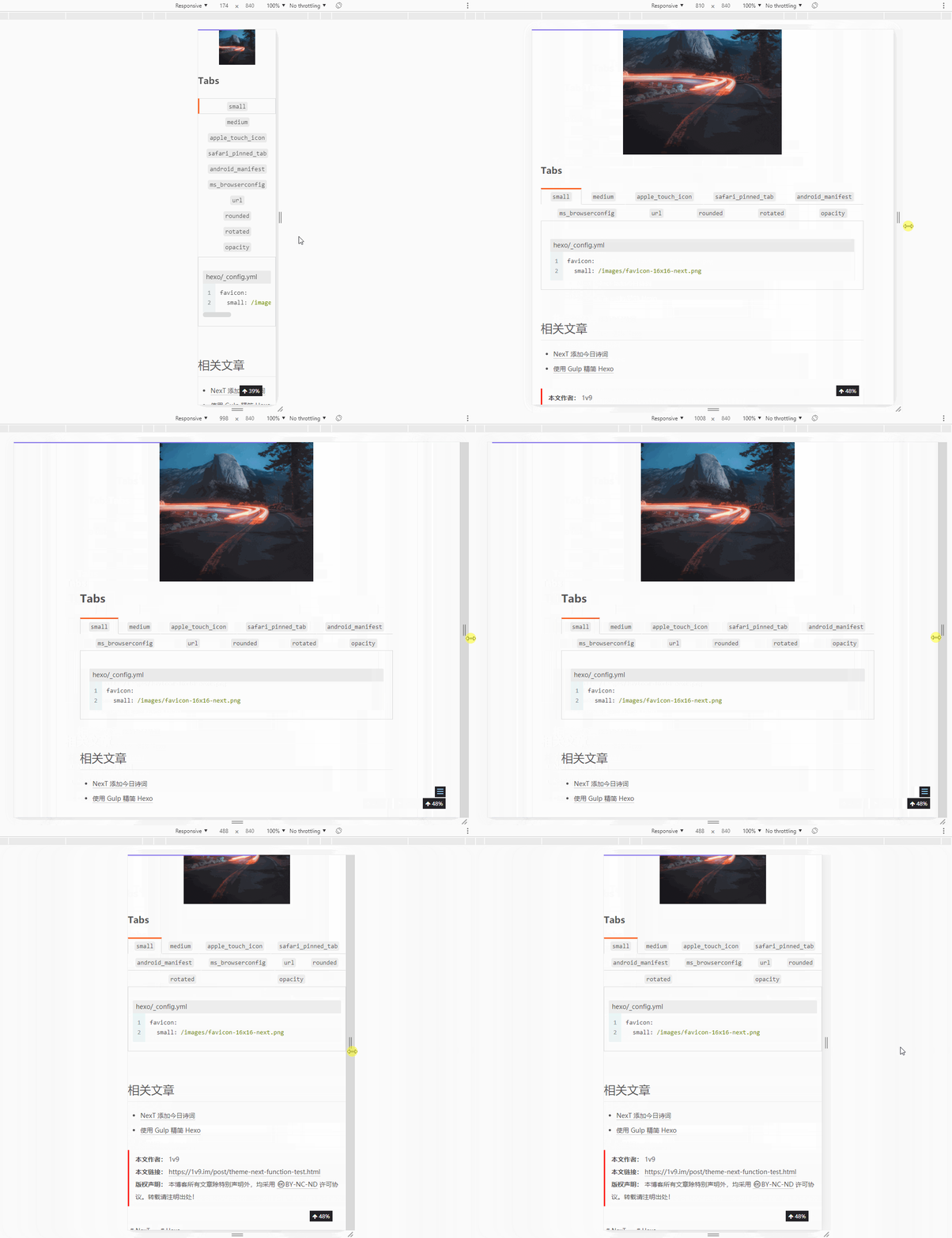

* Update tabs.styl
3 participants


PR Checklist
Please check if your PR fulfills the following requirements:
PR Type
What kind of change does this PR introduce?
What is the current behavior?
Issue resolved: #691
What is the new behavior?
Classical Win XP Design
How to use?
In NexT
_config.yml:Does this PR introduce a breaking change?
Source code
{% tabs favicon %}

<!-- tab <code>small</code> -->
{% code lang:yml hexo/_config.yml %}
favicon:
  small: /images/favicon-16x16-next.png
{% endcode %}
<!-- endtab -->

<!-- tab <code>medium</code> -->
{% code lang:yml hexo/_config.yml %}
favicon:
  medium: /images/favicon-32x32-next.png
{% endcode %}
<!-- endtab -->

<!-- tab <code>apple_touch_icon</code> -->
{% code lang:yml hexo/_config.yml %}
favicon:
  apple_touch_icon: /images/apple-touch-icon-next.png
{% endcode %}
<!-- endtab -->

<!-- tab <code>safari_pinned_tab</code> -->
{% code lang:yml hexo/_config.yml %}
favicon:
  safari_pinned_tab: /images/logo.svg
{% endcode %}
<!-- endtab -->

<!-- tab <code>android_manifest</code> -->
{% code lang:yml hexo/_config.yml %}
favicon:
  android_manifest: /images/manifest.json
{% endcode %}
<!-- endtab -->

<!-- tab <code>ms_browserconfig</code> -->
{% code lang:yml hexo/_config.yml %}
favicon:
  ms_browserconfig: /images/browserconfig.xml
{% endcode %}
<!-- endtab -->

<!-- tab <code>url</code> -->
For first test you can uncomment `/images/avatar.gif` value near the `avatar.url` setting to see default avatar:

{% code lang:yml next/_config.yml %}
avatar:
  url: /images/avatar.gif
{% endcode %}

Then you need to specify your own avatar. It can be done one of the ways below:

{% subtabs avatar1 %}
<!-- tab {% label success@Hexo directory %} -->
Put your avatar under {% label info@site directory %} `source/uploads/` (create directory if it doesn't exists).
And then change option to `avatar: /uploads/avatar.png`.
<!-- endtab -->

<!-- tab NexT directory -->
Put your avatar under {% label primary@theme directory %} `source/images/`.
And then change option to `avatar: /images/avatar.png`.

{% note info %}
Current site uses avatar under {% label primary@theme directory %} from file located in `next/source/images/apple-touch-icon-next.png` with following config:

{% code lang:yml hexo/_config.yml %}
theme_config:
  avatar:
    url: /images/apple-touch-icon-next.png
    rounded: true
    opacity: 1
    rotated: false
{% endcode %}

{% endnote %}
<!-- endtab -->

<!-- tab Absolute URL from Internet -->
You also can specify any external URL with absolute path to image: `http(s)://example.com/avatar.png`
<!-- endtab -->
{% endsubtabs %}
<!-- endtab -->

<!-- tab <code>rounded</code> -->
Set up rounded of avatar by changing the value of `avatar.rounded`:

* `true` → Avatar will be rounded.
* **`false`** → Avatar will be squared.

{% code lang:yml next/_config.yml %}
avatar:
  rounded: false
{% endcode %}
<!-- endtab -->

<!-- tab <code>rotated</code> -->
Set up rotated of avatar by changing the value of `avatar.rotated`:

* `true` → Avatar will be rotate under the mouse hovering.
* **`false`** → Avatar will not rotate under the mouse hovering.

{% code lang:yml next/_config.yml %}
avatar:
  rotated: false
{% endcode %}

<!-- endtab -->

<!-- tab <code>opacity</code> -->
The value of opacity should be choose from 0 to 1 to set the opacity of the avatar:

* **`1`** → Avatar will be in default opacity style.
* `0` → Avatar will be transparent.

{% code lang:yml next/_config.yml %}
avatar:
  opacity: 1
{% endcode %}
<!-- endtab -->
{% endtabs %}