Describe the bug
It seems like a recent update to the Overseer may have broken the base css, causing many elements on the page to transparent, including the add options and hovering tool tips.
Theme Install Method (Don't skip)
NGINX Variable
Application Info (Don't skip)
- Version : 7404d68143e830df73b9d2779a6d7ea65bc9fd4f
- Branch : Develop
- Linuxserver
To Reproduce
Steps to reproduce the behavior:
- Apply any theme to Overseer
- Check the elements on the page.
Expected behavior
Would expect there to be no transparent elements on Overseer
Screenshots
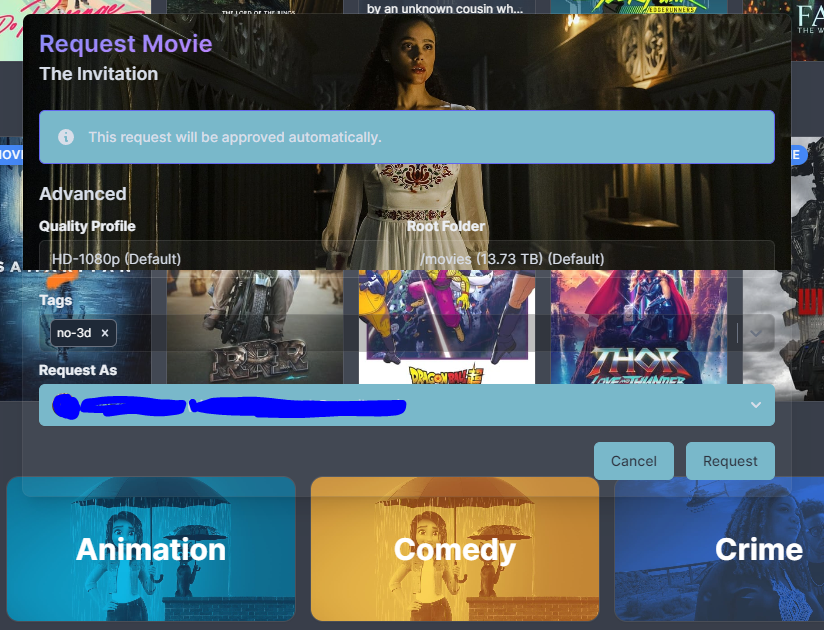
Here we see since the bottom half of the box and drop down menus all transparent. I am currently using the Nord theme.
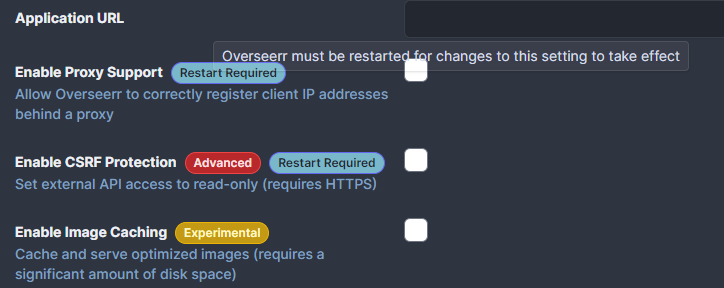
Here we see a hovering tool tip exhibiting the same behaviour
Desktop (If applicable) (please complete the following information):

Describe the bug
It seems like a recent update to the Overseer may have broken the base css, causing many elements on the page to transparent, including the add options and hovering tool tips.
Theme Install Method (Don't skip)
NGINX Variable
Application Info (Don't skip)
To Reproduce
Steps to reproduce the behavior:
Expected behavior
Would expect there to be no transparent elements on Overseer
Screenshots
Here we see since the bottom half of the box and drop down menus all transparent. I am currently using the Nord theme.
Here we see a hovering tool tip exhibiting the same behaviour
Desktop (If applicable) (please complete the following information):