The Billywig is a vivid sapphire blue insect from the world of Harry Potter and approximately half an inch long. The speed of the Billywig means that it is rarely noticed by Muggles, and wizards and witches only spot it once they have been stung. It also has a long, thin stinger at the bottom of its body and anyone stung by a Billywig will suffer giddiness, followed by levitation.
HTML email template with two-column layouts, fluid rows and images, and web fonts.
- Uses SCSS architecture and BEM methodology
- Uses
gulp-inline-cssto inline CSS into a node'sstyleattribute - Uses
gulp-html-replaceto inject<style>containing media queries into<head> - Uses BrowserSync and LiveReload for development
- Compresses and copies linked images in HTML file into respective distribution folder(s)
As simple as:
npm i;
| This | Does |
|---|---|
gulp dist |
Builds HTML file with embedded CSS (only containing MQs) and inlined CSS |
gulp serve |
Runs gulp dist and fires up your localhost with hot-reloading |
gulp |
Runs gulp dist |
Run gulp serve or gulp dist to see the example found in src/sample.
This template was tested using selected clients provided by Litmus in October 2018 and plays nice with the following clients:
- Apple Mail 10, 11
- Outlook on Windows 7: 2003, 2007, 2010, 2013, 2016
- Outlook 2011 (OSX 10.11)
- Outlook 2016 (macOS 10.12)
- Outlook 2019 (Windows 10)
- Android 6: Gmail App, Google Inbox, Samsumg Mail
- iOS 10.3.2: Gmail App, Inbox by Gmail
- iPhone 6S (iOS 10.3)
- iOS 11: iPad (Retina), iPad Mini
- iOS 11.3.1: iPhone 7, iPhone 7+, iPhone 8, iPhone 8+, iPhone SE, iPhone X
- iOS 12: iPhone XS
- G Suite: Chrome, Explorer, Firefox
- Gmail: Chrome, Explorer, Firefox
- Inbox by Gmail: Chrome, Firefox
- Office 365: Chrome, Explorer, Firefox
- Outlook.com: Chrome, Explorer, Firefox
- Yahoo! Mail: Chrome, Explorer, Firefox
- As of September 2018, Gmail is the second most popular email client used, though the platform (web or mobile) is not specified. [1]
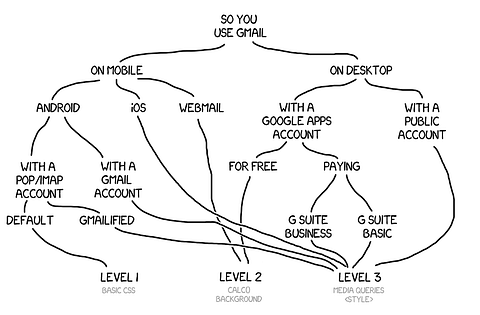
- Gmail has several clients and each offers different levels of CSS support. [10]
- Gmail clips emails larger than 102kb and shows this message below the email:
... which opens the email in a new window. [6]
[Message clipped] View entire message - Gmail strips styles embedded in the
<head>if it contains bad/broken syntax or exceeds the 8,192 character limit. [6, 11] - Animated GIFs are not supported in Outlook 2007, 2010, and 2013. The animation won't play and the first frame is shown instead. [7]
- Responsive images
Setting inline width and height attributes on image tags (ie,width="100" height="100") may cause media query overrides to be ignored, even with the!importantdeclaration present. This was experienced on isolated cases with Gmail on the Google Pixel. - Line heights
Outlook 2003 and 2010 acceptsline-heightvalues only in percentage[8] (ie,1.1is not supported but110%is). Through our own testing and tinkering, we have also discovered that a value less than 70%, or not in percentage, will result in the font face appearing cropped off. - Responsive stacking
Modifying thedisplayandwidthproperties of table cells within media queries provides more consistency across platforms compared to having floating tables. [9] - If you're trying to send the email using the "Copy and paste into Gmail" method (where you open the email in a browser, 'Copy all', compose a new email in the Gmail web client, and paste), remove any inline CSS width properties (ie,
width: 100%) if you wish to preserve the responsive feature of the email. Also, media queries (usually embedded in thehead) are removed and you'll lose even more media-query based responsive features.
- Email Client Market Share by Litmus
"This leaderboard of the most popular webmail, desktop, and mobile email clients is compiled from data collected worldwide by Litmus Email Analytics, and displays up-to-date figures for the top 10 email clients. These statistics are automatically updated each month ..." - The Ultimate Guide to CSS by Campaign Monitor
"A complete breakdown of the CSS support for the most popular mobile, web and desktop email clients on the planet." - Limitations of HTML Email by Mailchimp
Mailchimp's overview on what you may, may not, or should use with caution when it comes to crafting HTML emails. - Email Client CSS Support by Mailchimp
Mailchimp's breakdown of CSS support across mobile, web, and desktop email clients. - All You Need to Know About Web Fonts in Email by Campaign Monitor
"We partnered with Jaina Mistry to bring you heaps of web font know-how in this guide so you can use web fonts in your email campaigns like a pro." - Developing HTML Emails for Gmail: 12 Things You Must Know by Email on Acid
- A Guide to Animated GIFs in Email by Litmus
"First, not every email client supports animated GIFs. Outlook 2007, 2010 and 2013 won’t show the animation. Instead, they will show the first frame." - Line-height not working in Outlook 2010 for HTML Email on Stack Overflow
- Responsive Column Layouts by Mailchimp
This article covers two methods in achieving two-column layouts: one using media queries, the other use aligned tables. - Trying to make sense of Gmail CSS support (after the 2016 update) by Rémi Parmentier
"... if you have a CSS problem in Gmail, it is very important to know which version of Gmail you’re talking about." - Gmail Update: A Closer Look at Google’s Rendering Refresh by Campaign Monitor
"... Google will now be supporting embedded stylesheets, including media queries, across all their clients ..." - The Ultimate Guide to Web Fonts by Litmus
An article that covers support of web fonts among email clients and methods of implementing them in your email. - Bulletproof background images by Campaign Monitor
"Use rock-solid background images in your HTML email with some help from VML and CSS." - Bulletproof email buttons by Campaign Monitor
"Design gorgeous buttons using progressively enhanced VML and CSS."