[2단계 - 장바구니] 유세지(김용래) 미션 제출합니다.#113
Conversation


 EungyuCho
left a comment
EungyuCho
left a comment
EungyuCho
left a comment
There was a problem hiding this comment.
안녕하세요 세지님~ 리뷰가 조금 늦었네요 🙏
미션 완성하신다고 고생하셨어요!
세지님의 테코톡.. 기대되네요 😮
숨 꾹 참고 기다리고 있을게요!
우선 질문을 볼까요?~
나름 복잡성을 최대한 줄였다고 생각했지만, 근본적인 복잡함은 남아있어 더 좋은 방법을 생각해보고 있습니다. 혹시 이런 경우에 참고할 수 있는 키워드가 있을까요?
FlexWrapper 컴포넌트의 복잡성을 줄이는 방법을 질문해주신 것 같은데요!
라이브러리처럼 범용적으로 사용한다면 지금 작성해주신대로가 가장 현명하다고 생각해요.
디자인 시안이 있고 통일성 있게 컴포넌트 크기를 조정할 수 있다면 이런식으로 가능할 것 같아요.
const Example = () => (
  <Box flexCenter>
    <Text as='h2'>아사 블로그</Title>
    <Button theme="primary" size="lg">팔로우 하기</Button>
  </Box>
)
위 size나 theme 속성처럼 좁은 선택지를 주고 해당 속성에 따라 여러 css 스타일을 변경해주면 더 간단하게 해결할 수 있다고 생각해요. 이전처럼 컴포넌트가 유동적으로 스타일을 변경해주기는 힘들겠지만.. 디자인 시안에 따라서 복잡성을 줄여볼 수 있는 방법이라 생각해요.. 😅
요건 어디까지 말랑말랑한 컴포넌트를 만들어주는게 편할지 다시 정해보시면 좋을 것 같아요~
아사님이 생각하시는 리덕스는 어떤지 궁금해요 !!
최근에는 서버의 데이터를 그대로 사용하는 경우가 많아 react-query를 주로 사용했었어요.
날것의 redux로 실제 프로젝트를 해본적은 없지만 saga까지 약간 만져본 경험으로는... 좋지 않았던 것 같네요 😅
작성해야하는 코드가 너무 많아서 불만족스러웠고 reselect로 최적화도 해줘야하고.. 😢
그래서 저는 fetching 라이브러리(react-query)와 가벼운 recoil, jotai를 선택하거나 모듈화가 필요하다면 mobx를 주로 사용하고 있어요. 저는 간단한게 좋아요
createStore를 사용하셨을 때 함수가 deprecated된걸 확인하셨을텐데요~
deprecated된 이유를 보시면 redux 팀도 비슷한 고민을 하고있었던 걸 볼 수 있어요 🙂
되도록 피드백 기간내로, 안되면 혼자서라도 꼭 해보겠습니다!
피드백 기간이 끝나고 머지가 되더라도 계속 이어가도 무방합니당 😆
벌써 주말이 끝났네요! 월요일인데 이번주도 힘내시길 바래요~~
이번주도 힘내서 달려봅시다 😎
| "predeploy": "npm run build", | ||
| "deploy": "gh-pages -d build" | ||
| "deploy": "gh-pages -d build", | ||
| "chromatic": "npx chromatic --project-token=e68e7f4dc3ee" |
There was a problem hiding this comment.
오.. 처음보는 스크립트... 이 토큰은 노출해도 상관없나요? 😮
There was a problem hiding this comment.
오.. 안됩니다... 세상에... 😮
| export const 상수 = { | ||
| 최소_주문수량: 1, | ||
| 최대_주문수량: 99, | ||
| }; |
There was a problem hiding this comment.
한글 네이밍이 간결하지만 표현하고자 하는 도메인이 복잡하지 않을땐 영어로 사용해도 괜찮을 것 같다는 생각이 드네요 ㅎㅎ
그리고 어떤 상수보다 어떤 내용에 대한 상수인지가 변수명으로 더 적당하지 않을까요? 🤔
There was a problem hiding this comment.
한글 변수는 복잡한 내용을 간결하고 명확하게 나타내는 장점이 있지만,
영어로 된 코드에서 마주치면 확실히 이질감이 드는 느낌이에요.
그래도 타입과 상수까지는 복잡하지 않더라도 한글로 통일하려고 했던게
나름대로의 일관성을 지키려는 시도였는데 생각해보니 굳이 지켜줄 필요는 없는 규칙이었던 것 같아요 😊
말씀하신 것처럼 상수에 대한 네이밍으로는 고민이 많았어요.
보통 이런 경우에는 간단히 Number 정도로만 지정해주었는데 한글로 번역하자니 숫자....?
너무 큰 범위에서 설정 한 것 같고, 주문수량 으로 한정하자니 너무 작은 범위 같고...
매직넘버가 그렇게 많은 프로젝트가 아니지만, 우선은 숫자 정도로 변경할게요!
변경하면서도 확신이 안드네요 😭
There was a problem hiding this comment.
한글로 네이밍을 지어야 한다는 강박관념에 안빠져도 괜찮을 것 같아요😆
한글로 한다면 주문정도가 적당할거같네요 🙂
| const deleteSelectedItem = () => { | ||
| if (checkedList <= 0) { | ||
| return; | ||
| } | ||
|
|
||
| setCheckedList([]); | ||
| }; |
There was a problem hiding this comment.
setCheckedList([]); 역할만 본다면 clearCheckboxItems 메서드명이 조금 더 낫다고 생각이 드는데요~
저는 모든 체크박스 아이템을 비운다는 점에 집중해야한다고 생각해요.
사용하는 곳에서 선택된 상품들을 삭제하려다보니 자연스럽게 네이밍이 훅으로 섞여들어온 것 같은데!.. 어떻게 생각하실까요 ㅎㅎ
There was a problem hiding this comment.
사용하는 곳에서 선택된 상품들을 삭제하려다보니 자연스럽게 네이밍이 훅으로 섞여들어온 것 같은데
정확합니다...! 먼저 컴포넌트 단에서 기능을 구현하고, 훅으로 분리해주면서 네이밍을 수정해주지 않았어요.
저도 사용 컴포넌트 기준이 아닌, 훅을 기준으로 네이밍이 정해져야 하는게 맞다고 생각합니다!
| useEffect(() => { | ||
| if (state.length > 0) { | ||
| if (checkedList.length >= state.length) { | ||
| setSelectAllChecked(true); | ||
| } else { | ||
| setSelectAllChecked(false); | ||
| } | ||
| } | ||
| }, [state, checkedList]); |
There was a problem hiding this comment.
| useEffect(() => { | |
| if (state.length > 0) { | |
| if (checkedList.length >= state.length) { | |
| setSelectAllChecked(true); | |
| } else { | |
| setSelectAllChecked(false); | |
| } | |
| } | |
| }, [state, checkedList]); | |
| useEffect(() => { | |
| if (state.length === 0) { | |
| return; | |
| } | |
| if (checkedList.length === state.length) { | |
| setSelectAllChecked(true); | |
| } else { | |
| setSelectAllChecked(false); | |
| } | |
| }, [state, checkedList]); |
Early return!~
There was a problem hiding this comment.
앗 코멘트를 다시보다 생각난건데
 useEffect(() => {
    if (state.length === 0) {
      return;
    }

    const allChecked = checkedList.length === state.length;

    setSelectAllChecked(allChecked);
  }, [state, checkedList]);
요게 더 깔끔하겠네요 👀
| useEffect(() => { | ||
| if (state.length > 0) { | ||
| if (checkedList.length >= state.length) { | ||
| setSelectAllChecked(true); | ||
| } else { | ||
| setSelectAllChecked(false); | ||
| } | ||
| } | ||
| }, [state, checkedList]); |
There was a problem hiding this comment.
💡 장바구니에 있던 1개의 상품이 삭제되었을 때 전체 선택이 해제가 되어야한다
| expect(reducers(initialCartItems, addCartList(product, []))).toEqual({ | ||
| products: { | ||
| items: [], | ||
| errorMessage: null, | ||
| }, | ||
| product: { | ||
| item: {}, | ||
| errorMessage: null, | ||
| }, | ||
| cart: { | ||
| items: [ | ||
| { | ||
| id: 3, | ||
| thumbnail: 'https://storybook.takealook.kr/image/potato.jpg', | ||
| name: '왕 감자', | ||
| price: 5000000, | ||
| count: 1, | ||
| isChecked: true, | ||
| }, | ||
| ], | ||
| }, | ||
| snackbar: { | ||
| visible: false, | ||
| message: '', | ||
| }, | ||
| }); |
There was a problem hiding this comment.
reducer를 분리해서 테스트하는게 불가능하다면 toEquals의 인자로 들어가는 데이터를 cartItem정보만 넣어서 검증할 수 있게 함수로 바꿔보는게 좋을거같아요 👀
There was a problem hiding this comment.
CombineReducer를 해줘서 reducer를 분리하기가 어려워졌는데
이것도 일종의 코드 부채(?) 가 될 것 같은 느낌이에요 😥
초기 상태와 업데이트 함수를 선언해서 사용해주었습니다 👀
| cartList.every((item) => { | ||
| if (item.id === product.id) { | ||
| isExist = true; | ||
| count = Number(item.count) + 1; | ||
| return false; | ||
| } | ||
| return true; | ||
| }); |
There was a problem hiding this comment.
Array.prototype.find가 더 알맞지 않았을까요? 🤔
There was a problem hiding this comment.
find를 사용하는 쪽이 더 명시적인 느낌이네요...! 😭
const foundExistProduct = cartList.find((item) => item.id === product.id);| <CommonStyled.FlexWrapper margin="0" width="100%" justifyContent="space-between"> | ||
| <Styled.Title>{name}</Styled.Title> | ||
| <IconButton onClick={onClickDeleteButton} icon={아이콘_코드.DELETE} /> | ||
| </CommonStyled.FlexWrapper> |
There was a problem hiding this comment.
요게 네이밍에 Wrapper가 들어간건 의도하신걸까요?
여기선?..!
There was a problem hiding this comment.
아.......... 의도가... 아닙니다... 😅
| const Template = (args) => ( | ||
| <> | ||
| <Global styles={GlobalStyles} /> | ||
| <Provider store={store}> | ||
| <BrowserRouter> | ||
| <Routes> | ||
| <Route path="*" element={<Layout {...args} />} /> | ||
| </Routes> | ||
| </BrowserRouter> | ||
| </Provider> | ||
| </> | ||
| ); |
There was a problem hiding this comment.
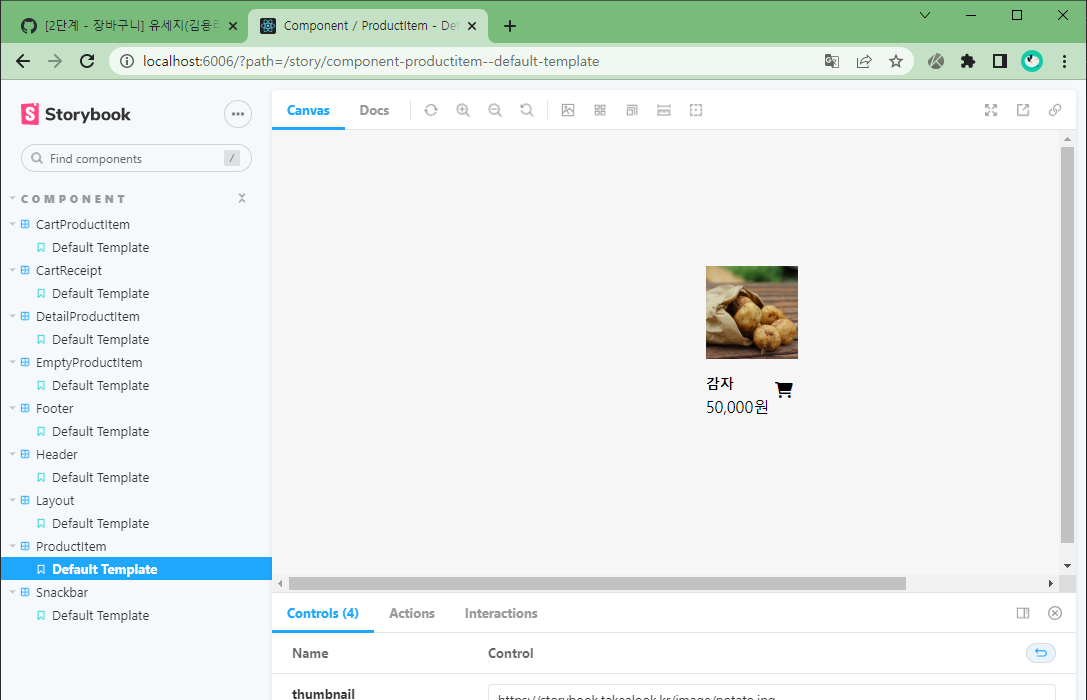
스토리북 템플릿이 반복되는 것 같은데 해당 템플릿을 StorybookWrapper 컴포넌트로 만드는건 어떨까요~!
(전역설정이 가능한걸로 알고있긴한데...? 혹시 안되셨나요 ㅜㅜ)
There was a problem hiding this comment.
템플릿 반복을 컴포넌트로 빼주는건 얼핏 떠올렸었는데
전역 설정도 가능한지는 몰랐네요!
컴포넌트로 만들어주는 대신 전역에서 한 번만 주입해주었습니다!
There was a problem hiding this comment.
세지님 혹시 DetailProductItem, ProductItem 스토리북이 정상적으로 스토리가 렌더링되나요?..
There was a problem hiding this comment.
테스트용 snackbar store를 전역에서 로드해주며
Provider가 꼬이면서 기존 product 상태를 불러오지 못했던것 같아요!
snackbar config를 원래 자리로 내려주고, snackbar 스토리북에서만 불러오는 것으로
해결해주었습니다!! 꼼꼼히 확인하고 PR 드렸어야 하는데 죄송해요 😥
| import * as Styled from './styles'; | ||
|
|
||
| const Cart = () => { | ||
| const { items: cartList } = useSelector((state) => state.cart); |
There was a problem hiding this comment.
몇번 사용되는 selector같은데 useCartItem으로 분리해보면 어떨까요?
There was a problem hiding this comment.
훅을 이렇게도 사용할 수 있네요! 좋은 방법인 것 같아요 👍👍


|
아사님!!! 😭 기다려주셔서 정말 감사합니다! chromatic 명령어의 토큰을 지우며 현재 public 디렉토리에 있는 msw 파일의 체크섬 변수도 함께 혹시 public 디렉토리 내에는 환경 변수 적용이 불가능한 걸까요..? |

public 디렉터리에서도 html파일에서는 정확히 어떻게 실행되는지 구조를 모르겠기도하고.. 위에 적혀있듯이 mock service worker가 프로덕션에 함께 번들링 되지도 않고.. |
EungyuCho
left a comment
EungyuCho
left a comment
There was a problem hiding this comment.
안녕하세요 세지님 👀
페이먼츠 미션도 하셔야할텐데 장바구니 미션 피드백까지 병행하시느라 쉽지 않으셨을텐데 잘 반영해주셨네요!
스토리북에 조금 문제가 남아있는 것 같긴 하지만 우선 병행하는게 쉽지 않으실 것 같아 추가적인 구현은 세지님의 몫으로 넘기고 approve하겠습니다...!
정말 고생 많으셨어요!! 🎉
| DefaultTemplate.args = { | ||
| thumbnail: 'https://storybook.takealook.kr/image/potato.jpg', | ||
| name: '감자', | ||
| price: 50000, |
There was a problem hiding this comment.
가격이랑 상품 수량을 렌더링으로만 사용하다보니 인터렉션을 해도 렌더링 된 데이터가 바뀌지 않는점이 조금 아쉽긴하네요 😭
요건,, 조금 번잡해질 수 있으니 다음 기회에 바꿔보는 것도 좋겠습니당
There was a problem hiding this comment.
인터렉션을 통해서 데이터 변경도 확인할 수 있도록 수정해볼게요!
좋은 지적 감사합니다 🥰
| useEffect(() => { | ||
| if (state.length > 0) { | ||
| if (checkedList.length >= state.length) { | ||
| setSelectAllChecked(true); | ||
| } else { | ||
| setSelectAllChecked(false); | ||
| } | ||
| } | ||
| }, [state, checkedList]); |
There was a problem hiding this comment.
앗 코멘트를 다시보다 생각난건데
 useEffect(() => {
    if (state.length === 0) {
      return;
    }

    const allChecked = checkedList.length === state.length;

    setSelectAllChecked(allChecked);
  }, [state, checkedList]);
요게 더 깔끔하겠네요 👀

2 participants


📢 프로젝트 결과물은 아래 링크를 확인해주세요!
🚩 데모 페이지
📕 스토리북 페이지
안녕하세요, 아사님!
좋은 주말 보내고 계신가요? 저는 이번 미션에선 유독 버그가 많이 터져서 디버깅하느라 이틀을 보냈네요 😥
힘들었지만 그만큼 많이 배우고 즐겼던 시간인 것 같아요. 새로 알게 된 내용도 많았고, 재밌는 라이브러리도 많이 발견했네요!
시간적 여유가 더 있었다면 구현해보고 싶은 것들이 많았지만, 일정 상 다음으로 미루고 빠르게 제출해야 할 것 같아요. (다음주 테코톡을 준비하러 가야하네요...😭)
혹시 "이런걸 더 구현해보면 좋겠다" 하는 기능이나 기술적인 부분이 있다면
되도록 피드백 기간내로, 안되면 혼자서라도 꼭 해보겠습니다!
부담없이 남겨주세요 😊
구현한 요구사항이에요
🚩 기능 요구사항
✔️ 테스트 요구사항
이렇게 구현했어요
질문 사항
복잡해진 레이아웃
이번 피그마 시안에서 레이아웃이 복잡해짐에 따라, 만들어줘야 할 컴포넌트도 많아졌습니다.
요구사항에 맞는 스타일 컴포넌트를 모두 작성하자니 너무 많아지는 스타일 파일의 관리도 어렵고,
하나하나 붙여줘야 할 네이밍도 고역이어서 하나씩 만들어주는 것은 포기하였습니다.
대신, 공통적으로 가지는 요소를 최대한 분리하여 상세한 속성은 인라인으로 넘겨주는 방법을 선택했습니다.
예시로, 장바구니 페이지에 많이 들어간
FlexWrapper스타일 컴포넌트 입니다.나름 복잡성을 최대한 줄였다고 생각했지만, 근본적인 복잡함은 남아있어 더 좋은 방법을 생각해보고 있습니다.
혹시 이런 경우에 참고할 수 있는 키워드가 있을까요?
리덕스.. 이대로 괜찮은걸까?
리덕스를 사용하며 동작 방식이 눈에 익다보니 지금은 흐름이 조금 읽히는 것 같은데,
아무리 생각해도 엄청나게... 큰 프로젝트가 아니라면 굳이 flux 패턴을 고집하기 보다는
context API 를 통해서 유동적으로 구조를 짜주는게 오히려 더 효율적일 수 있어보여요.
미션의 규모가 작아서 그런지 불편하다는 느낌이 한 켠에 남아있네요...
게다가 airbnb 홈페이지에서도 리덕스를 걷어내주고 있다는 이야기를 듣고 보니
과연 리덕스가 모든 프로젝트에서 사용해야 할 만큼 좋은 아키텍쳐를 만들어 줄 수 있나? 에 대한 의문이 들어요.
제 지식과 경험이 짧아 그런것일지 모르겠지만 😭 아사님이 생각하시는 리덕스는 어떤지 궁금해요 !!
step을 진행하며 조금씩이지만 리덕스 (flux 패턴) 에 대한 이해가 생기는 것 같아요 :)
이번 step2도 잘 부탁드리겠습니다! 좋은 주말 보내세요 😊