👉 Support this work via GitHub Sponsors
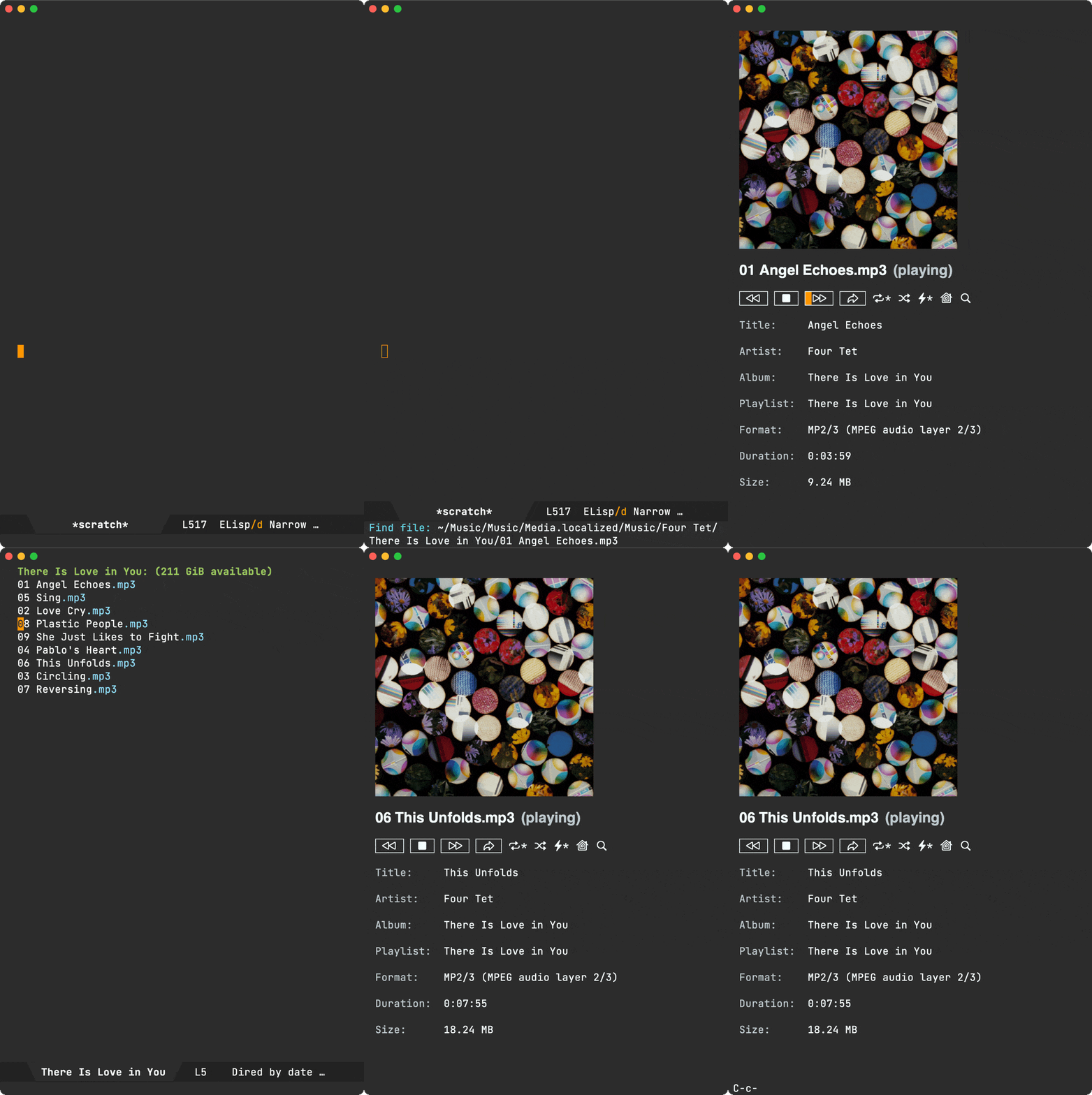
An Emacs major mode to open media (audio/video) files like any other file (via find-file, dired, etc).
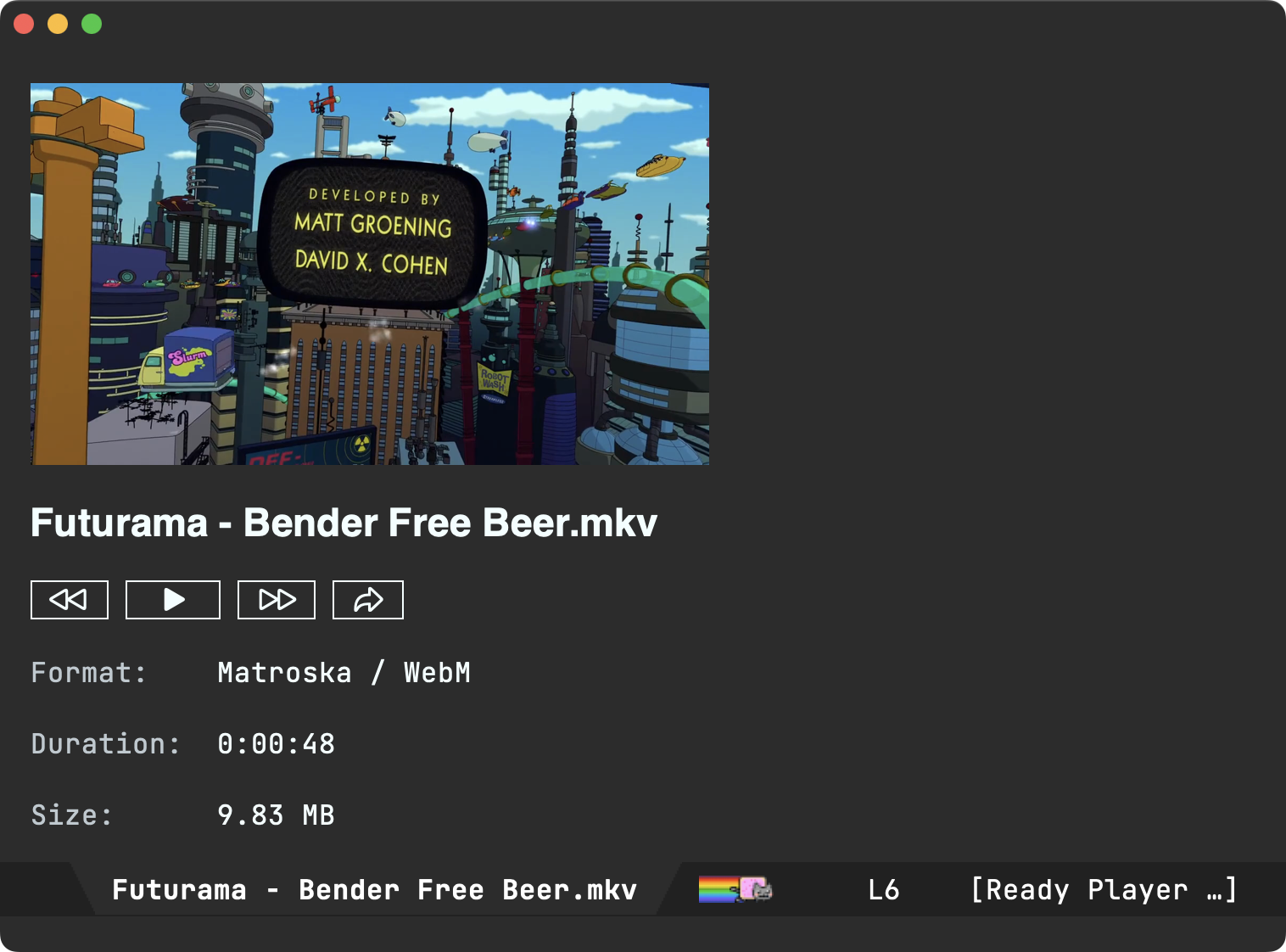
Previewing videos is also supported.
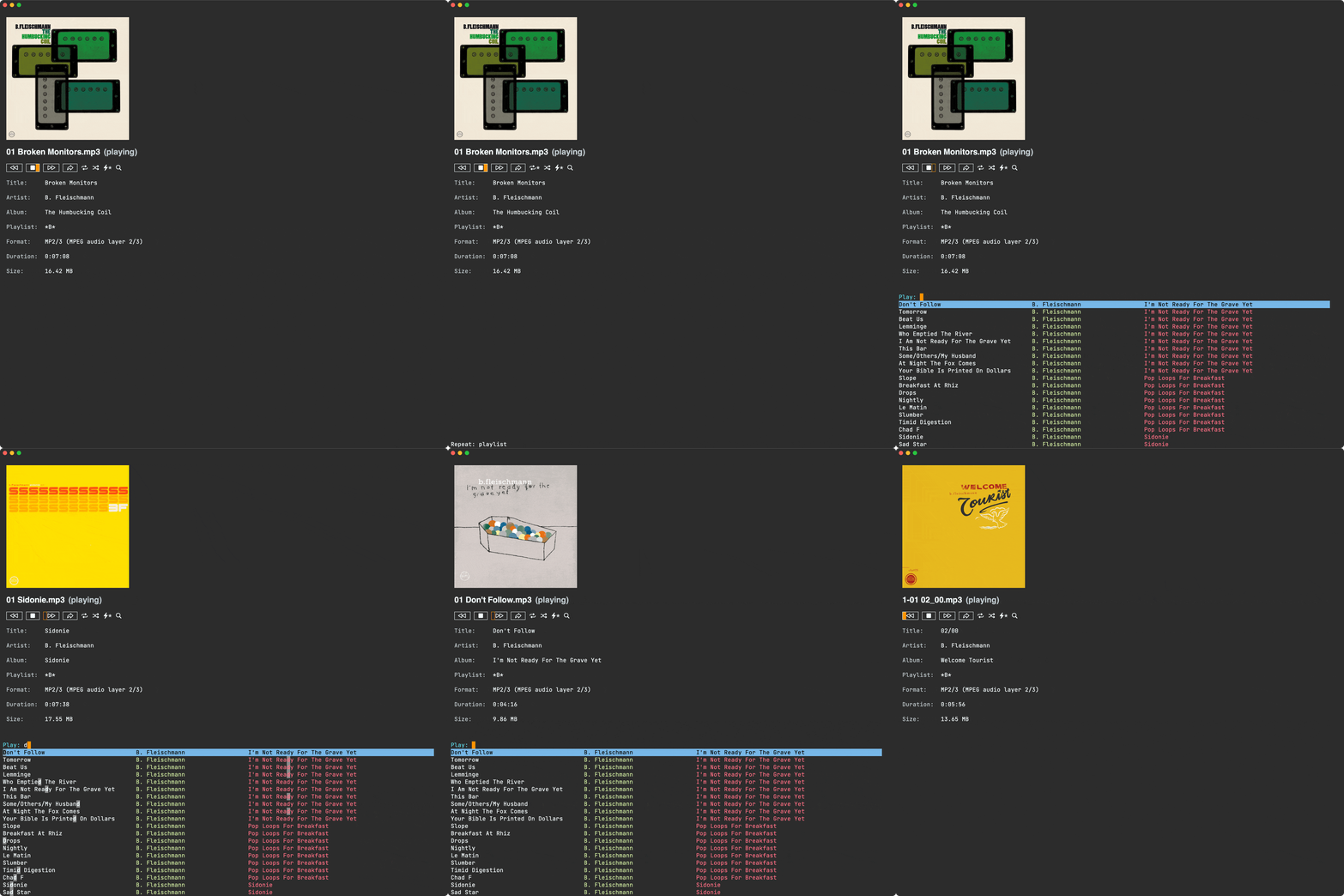
Optionally, there are additional features like indexing and searching.
This package is available on MELPA.
If you just want Emacs to recognize and open media files (find-file, dired, etc.), this is all you need:
(use-package ready-player
  :ensure t
  :config
  (ready-player-mode +1))
To customize supported media files, set ready-player-supported-media before toggling ready-player-mode.
(setq ready-player-my-media-collection-location "path/to/my/media/collection")From then onwards, you can directly open your collection via M-x ready-player (unless you were last playing something else). If you want to explicitly open your media collection, invoke M-x ready-player-open-my-media-collection.
You can bookmark your favourite media files using ready-player-toggle-bookmark (bound to K in the player buffer). Bookmarked files are marked with a ★ symbol.
To browse and play your bookmarked files:
M-x ready-player-search-bookmarks(bound tok): Search through your bookmarks with a completing-read interface showing title, artist, and album.M-x ready-player-open-my-bookmarks: Open all bookmarked files in adiredbuffer for playback.
Bookmarks are stored using Emacs’ built-in bookmark system, so they persist across sessions.
| TAB | ready-player-next-button | Navigate to next button. |
| SPC | ready-player-toggle-play-stop | Toggle play/stop of media. |
| g | ready-player-reload-buffer | Reload media from file. |
| r | ready-player-toggle-repeat | Cycle through repeat settings: file, directory, off. |
| f | ready-player-seek-forward | Seek forward. |
| q | ready-player-quit | Quit `ready-player-major-mode’ window and kill buffer. |
| d | ready-player-view-dired-playback-buffer | View associated `dired’ playback buffer. |
| s | ready-player-toggle-shuffle | Toggle shuffle setting. |
| b | ready-player-seek-backward | Seek backward. |
| a | ready-player-toggle-autoplay | Toggle autoplay setting. |
| o or e | ready-player-open-externally | Open visited file in default external program. |
| n | ready-player-next | Open the next media file in the same directory. |
| c | ready-player-open-my-media-collection | Open my media collection from `ready-player-my-media-collection-location’. |
| i | ready-player-show-info | Show playback info in the echo area. |
| p | ready-player-previous | Open the previous media file in the same directory. |
| m | ready-player-mark-dired-file | Mark the current file in the appropriate `dired’ buffer(s). |
| <backtab> | ready-player-previous-button | Navigate to previous button. |
| u | ready-player-unmark-dired-file | Unmark the current file in the appropriate `dired’ buffer(s). |
Global bindings are under the C-c m prefix. If you prefer not to have these bindings disable them with:
(setq ready-player-set-global-bindings nil)| C-c m SPC | ready-player-toggle-play-stop | Toggle play/stop of media. |
| C-c m r | ready-player-toggle-repeat | Cycle through repeat settings: file, directory, off. |
| C-c m m | ready-player-view-player | Toggle switching between player buffer and previous buffer. |
| C-c m s | ready-player-toggle-shuffle | Toggle shuffle setting. |
| C-c m a | ready-player-toggle-autoplay | Toggle autoplay setting. |
| C-c m n | ready-player-next | Open the next media file in the same directory. |
| C-c m c | ready-player-open-my-media-collection | Open my media collection from `ready-player-my-media-collection-location’. |
| C-c m i | ready-player-show-info | Show playback info in the echo area. |
| C-c m p | ready-player-previous | Open the previous media file in the same directory. |
| C-c m / | ready-player-search | Search the `dired’ playlist for playback (experimental). |
You can optionally toggle media recognition on and off interactively via M-x ready-player-mode.
ready-player-mode relies on command line utilities to play media.
By default, ready-player-mode will try to use either mpv, vlc, ffplay, or mplayer (in that order). Customize ready-player-open-playback-commands to your preference.
Install either of these using your favorite method.
On macOS:
brew install mpvMetadata is extracted using ffprobe, which comes bundled with ffmpeg.
Install using your favorite method.
On macOS:
brew install ffmpegready-player-mode prefers ffmpegthumbnailer to generate thumbnails, but will fallback to ffmpeg otherwise.
Install using your favorite method.
On macOS:
brew install ffmpegthumbnailerIf you’d like to use different utilities to play video and audio, you can use ready-player-open-playback-commands for this with something like:
(setq ready-player-open-playback-commands
      '((ready-player-is-audio-p "mpg123")
(ready-player-is-video-p "mpv")))Ready player avoids auto-advancing video files to prevent awkward switching between video window and Emacs.
If you’d like to play all video files as audio (no video stream playback) and auto-advance via repeat, use the following settings:
;; Recognize video files as audio.
(setq ready-player-supported-audio (append ready-player-supported-audio
                                           ready-player-supported-video))
;; Don't recognize any file as video.
(setq ready-player-supported-video nil)

;; Disable video stream playback (mpv player)
(setq ready-player-open-playback-commands
'(("mpv" "--audio-display=no" "--video=no" "--input-ipc-server=<<socket>>")))If you have SF symbol rendering in Emacs on macOS, you can use enable usage in buttons by invoking (ready-player-macos-use-sf-symbols)
prior to (ready-player-mode +1):
(ready-player-macos-use-sf-symbols)
(ready-player-mode +1)Default icons are ◁◁ ▶ ■ ▷▷ ➦ ⇆. These can be customized (see all icon variables). I’m happy to take suggestions for improving default icons.
| Custom variable | Description |
|---|---|
| ready-player-hide-modeline | Non-nil means hide the mode line in buffer. |
| ready-player-open-playback-commands | Command line utilities to try for playback. |
| ready-player-show-thumbnail | Non-nil means display file’s thumbnail if available. |
| ready-player-mode | Non-nil if Ready-Player mode is enabled. |
| ready-player-supported-audio | Supported audio media. |
| ready-player-open-externally-icon | Open externally button icon string, for example: “➦”. |
| ready-player-cache-thumbnails | Non-nil means cache thumbnails. |
| ready-player-open-my-media-collection-icon | Open my collection icon string, for example: “⌂”. |
| ready-player-metadata-separator | Set the separator between metadata rows (default is ’ |
| ready-player-autoplay-icon | Autoplay icon string, for example: “⏻”. |
| ready-player-set-global-bindings | Non-nil means bind global keys under `ready-player-minor-mode-map-prefix’. |
| ready-player-cache-metadata | Non-nil means cache metadata. |
| ready-player-multi-buffer | Non-nil means enable opening multiple buffers with parallel playback. |
| ready-player-thumbnail-max-pixel-height | Maximum thumbnail pixel height. |
| ready-player-repeat | Continue playing if there’s more media in directory or playlist. |
| ready-player-stop-icon | Stop icon string, for example: “■”. |
| ready-player-shuffle-icon | Shuffle icon string, for example: “⤮”. |
| ready-player-always-load-directory-recursively | Non-nil means load directory recursively without prompt. |
| ready-player-shuffle | Next media item is selected at random within current directory. |
| ready-player-display-action | Choose how to display the `ready-player-major-mode’ buffer. |
| ready-player-ask-for-project-sustainability | Ask for project sustainability with a button. |
| ready-player-minor-mode-map | `ready-player’ minor mode map. |
| ready-player-major-mode-syntax-table | Syntax table for `ready-player-major-mode’. |
| ready-player-autoplay | Non-nil means automatically start playing when media file opens. |
| ready-player-display-dired-playback-buffer-display-action | Choose how to display the associated playback `dired’ buffer. |
| ready-player-repeat-icon | Repeat icon string, for example: “⇆”. |
| ready-player-major-mode-abbrev-table | Abbrev table for `ready-player-major-mode’. |
| ready-player-dired-mode | Non-nil if Ready-Player-Dired mode is enabled. |
| ready-player-mode-hook | Hook run after entering or leaving `ready-player-mode’. |
| ready-player-supported-media | Supported media types. |
| ready-player-major-mode-map | Keymap for `ready-player’. |
| ready-player-dired-mode-hook | Hook run after entering or leaving `ready-player-dired-mode’. |
| ready-player-play-icon | Play button icon string, for example: “▶”. |
| ready-player-search-icon | Search icon string, for example: “⌕”. |
| ready-player-supported-video | Supported video media. |
| ready-player-major-mode-hook | Hook run after entering `ready-player-major-mode’. |
| ready-player-minor-mode-map-prefix | The global bindings prefix used in `ready-player-minor-mode’. |
| ready-player-my-media-collection-location | Path to your media collection. |
| ready-player-help-icon | Search icon string, for example: “⁈”. |
| ready-player-previous-icon | Previous button icon string, for example: “◁◁”. |
| ready-player-next-icon | Next button icon string, for example: “▷▷”. |
| TAB | ready-player-next-button | Navigate to next button. |
| SPC or C-c m SPC | ready-player-toggle-play-stop | Toggle play/stop of media. |
| ready-player-mode | Toggle Ready Player mode media file recognition. | |
| g | ready-player-reload-buffer | Reload media from file. |
| r or C-c m r | ready-player-toggle-repeat | Cycle through repeat settings: file, directory, off. |
| f | ready-player-seek-forward | Seek forward. |
| ready-player-set-album-artwork | Select image and set as album artwork. | |
| q | ready-player-quit | Quit `ready-player-major-mode’ window and kill buffer. |
| ready-player-version | Show Ready Player Mode version. | |
| ready-player-download-album-artwork | Download album artwork to media directory. | |
| C-c m m | ready-player-view-player | Toggle switching between player buffer and previous buffer. |
| ready-player–transient-toggle-autoplay | Autoplay transient toggle. | |
| ready-player-toggle-modeline | Toggle displaying the mode line. | |
| d | ready-player-view-dired-playback-buffer | View associated `dired’ playback buffer. |
| ready-player-load-dired-buffer | Load a `dired’ buffer. | |
| s or C-c m s | ready-player-toggle-shuffle | Toggle shuffle setting. |
| ready-player-play | Start media playback. | |
| b | ready-player-seek-backward | Seek backward. |
| ready-player–transient-toggle-shuffle | Shuffle transient toggle. | |
| a or C-c m a | ready-player-toggle-autoplay | Toggle autoplay setting. |
| o or e | ready-player-open-externally | Open visited file in default external program. |
| ready-player-stop | Stop media playback. | |
| ready-player–refresh | Refresh buffer interface without reloading file. | |
| n or C-c m n | ready-player-next | Open the next media file in the same directory. |
| ? | ready-player-menu | Ready Player Menu. |
| ready-player-download-album-artwork-and-set-metadata | Download album artwork set media metadata. | |
| c or C-c m c | ready-player-open-my-media-collection | Open my media collection from `ready-player-my-media-collection-location’. |
| C-c m m | ready-player | Toggle switching between player buffer and previous buffer. |
| ready-player-lookup-song | Look up current song on Discogs. | |
| ready-player-dired-mode | Toggle display of media info as overlays in `dired.’. | |
| ready-player-major-mode | Major mode to preview and play media files. | |
| ready-player-load-directory | Load all media from directory (experimental). | |
| i or C-c m i | ready-player-show-info | Show playback info in the echo area. |
| p or C-c m p | ready-player-previous | Open the previous media file in the same directory. |
| ready-player–transient-toggle-repeat | Repeat transient toggle. | |
| k | ready-player-search-bookmarks | Search the bookmarked files. |
| m | ready-player-mark-dired-file | Mark the current file in the appropriate `dired’ buffer(s). |
| ready-player-reindex-session | Re-index current ready player session. | |
| <backtab> | ready-player-previous-button | Navigate to previous button. |
| ready-player-open-my-bookmarks | Open bookmarked media files. | |
| K or C-c m k | ready-player-toggle-bookmark | Toggle currently played file bookmark. |
| u | ready-player-unmark-dired-file | Unmark the current file in the appropriate `dired’ buffer(s). |
| / or C-c m / | ready-player-search | Search the `dired’ playlist for playback (experimental). |
| ready-player-load-m3u-playlist | Load an .m3u playlist. | |
| ready-player–transient-toggle-bookmark | Bookmark transient toggle. | |
| ready-player-load-last-known | Attempt to load last known media. |
👉 Support this work via GitHub Sponsors
If you prefer to center the buffer content, especially when working
with large screens, you can use olivetti-mode to achieve
this. olivetti-mode is a lightweight Emacs package that centers text
in the buffer, making it more readable and visually appealing.
Note that olivetti-mode does not perform “true centering” (i.e.,
centering each line individually). Instead, it centers the entire
buffer content by adding padding to the left and right, effectively
creating a centered column of text. This approach ensures consistent
alignment and avoids visual distractions caused by uneven line
lengths.
To enable centering for ready-player, add the following configuration
to your Emacs setup:
(use-package olivetti
  :defer t
  :ensure t
  :init
  (defun my-center-ready-player-on ()
    "Enable olivetti-mode and visual-line-mode for ready-player."
    (setq olivetti-body-width 0) ; Or a number to control the amount of chars to be centered
    (olivetti-mode 1)            ; Enable olivetti-mode
    (visual-line-mode 1))        ; Enable/Disable visual-line-mode for text wrapping of your liking

  ;; Hook into ready-player's major mode
  (add-hook 'ready-player-major-mode-hook #'my-center-ready-player-on))
This configuration will automatically center the buffer content
whenever ready-player is active. You can adjust the
olivetti-body-width value to control the width of the centered text.
Although olivetti-mode handles edge cases well and is a robust solution
for centering text, if you prefer not to use olivetti-mode, there are
alternatives like perfect-margin, centered-window-mode, or darkroom,
which you can configure similarly.
- [ ] Consider using svg and minibuffer to propose new downloaded image for artwork.