| Category | Badges |
|---|---|
| Project |    |
| CI/CD |   |
| Quality |   |
| Package |  |
| Meta |  |

AmpyFin is an advanced AI-powered trading system designed to trade within the NASDAQ-100. It leverages machine learning and algorithmic trading strategies to make data-driven investment decisions.
The primary goal of AmpyFin as an open source project is to:
- Democratize Algorithmic Trading: Make proven trading frameworks available for everyone to use freely
- Provide Transparency: Offer insights into how machine learning can be applied to financial markets
- Fill a Gap: Contribute to the open source community where there are few published frameworks for effective trading systems
- Enable Collaboration: Create a platform for traders and developers to build upon and improve together
While there are many theoretical trading models in academic literature, AmpyFin aims to bridge the gap between theory and practice with a working implementation that the community can use, study, and enhance.
For a comprehensive guide on how to use AmpyFin, check out our YouTube tutorial playlist.
- yfinance: Primary source for historical price data and technical indicators
- Financial Modeling Prep API: Retrieves NASDAQ-100 tickers for market insights
- Polygon API: Alternative source for real-time market data if needed
- MongoDB: Securely stores all data and trading logs for historical analysis
AmpyFin uses a ranked ensemble learning system that dynamically evaluates each strategy's performance and adjusts their influence in the final decision accordingly.
- Mean Reversion: Predicts asset prices will return to their historical average
- Momentum: Capitalizes on prevailing market trends
- Arbitrage: Identifies and exploits price discrepancies between related assets
- AI-Driven Custom Strategies: Continuously refined through machine learning
Each strategy is evaluated based on performance metrics and assigned a weight using a sophisticated ranking algorithm. The system adapts to changing market conditions by prioritizing high-performing strategies.
| Component | Description |
|---|---|
control.py |
Configuration interface for trading parameters |
trading_client.py |
Executes trades based on algorithmic decisions |
ranking_client.py |
Evaluates and ranks trading strategies |
TradeSim/main.py |
Training and testing environment for strategies |
strategies/* |
Implementation of various trading algorithms |
helper_files/* |
Utility functions for client operations |
utils/* |
General utility functions for data processing |
- Python 3.8+
- MongoDB
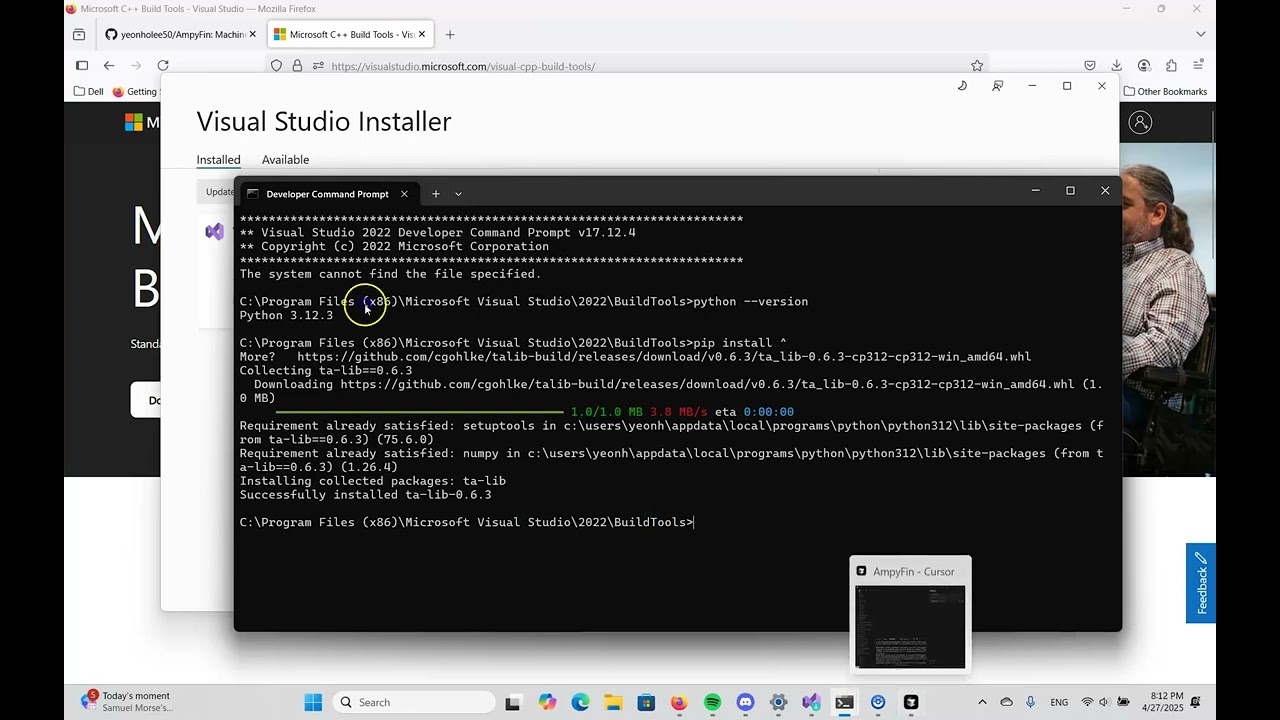
- TA-Lib
- Clone the repository
git clone https://github.com/yeonholee50/AmpyFin.git
cd AmpyFin- Install dependencies
pip install -r requirements.txt- Install TA-Lib
TA-Lib is required for technical indicators. Installation options:
- Configure API keys
You need to sign up for the following services to obtain API keys:
- Polygon.io - For market data
- Financial Modeling Prep - For financial data
- Alpaca - For trading execution
- Weights & Biases - For experiment tracking
Create a .env file based on the template:
POLYGON_API_KEY = "your_polygon_api_key"
FINANCIAL_PREP_API_KEY = "your_fmp_api_key"
API_KEY = "your_alpaca_api_key"
API_SECRET = "your_alpaca_secret_key"
BASE_URL = "https://paper-api.alpaca.markets"  # Paper trading (safe for testing)
# BASE_URL = "https://api.alpaca.markets"      # Live trading (uses real money)
WANDB_API_KEY = "your_wandb_api_key"
MONGO_URL = "your_mongo_connection_string"
⚠️ IMPORTANT: The default configuration uses Alpaca's paper trading environment. To switch to live trading (using real money), change the BASE_URL to "https://api.alpaca.markets". Only do this once you've thoroughly tested your strategies and understand the risks involved.
- Set up MongoDB
- Create a MongoDB cluster (e.g., via MongoDB Atlas)
- Configure network access for your IP address
- Update the connection string in
.env
- Run the setup script
python setup.pyThis initializes the database structure required for AmpyFin.
Start the ranking and trading systems in separate terminals:
python ranking_client.py
python trading_client.pyThese are separate operations that can be performed with the TradeSim module:
- Set the mode in
control.py:
mode = 'train'- Run the training module:
python TradeSim/main.py- Set the mode in
control.py:
mode = 'test'- Run the testing module:
python TradeSim/main.py- Set the mode in
control.py:
mode = 'push'- Push your model to MongoDB:
python TradeSim/main.pyFor live trading, it's recommended to:
- Train the system by running
ranking_client.pyfor at least two weeks, or - Train using the TradeSim module and push changes to MongoDB before executing trades
This ensures the system has properly ranked strategies before making investment decisions.
log/system.log: Tracks major system events and errorslog/rank_system.log: Records ranking-related events and updates
Contributions are welcome! Please review the Contributing Guide.
This project is licensed under the MIT License. See the LICENSE file for details.