Skip to content

Add validation to requestCall page and add policy check#5169

Merged
Jag96 merged 5 commits into
Expensify:mainfrom
parasharrajat:request-call
Sep 10, 2021
Merged

Add validation to requestCall page and add policy check#5169
Jag96 merged 5 commits into
Expensify:mainfrom
parasharrajat:request-call

Conversation

@parasharrajat

@parasharrajat parasharrajat commented Sep 9, 2021

Copy link
Copy Markdown
Member

Details

#4861 (comment)

Fixed Issues

$ #4861

Tests | QA Steps

  1. Go to staging.new.expensify.com
  2. Login with any account
  3. Search for Concierge
  4. Click on the Call icon
  5. Don't write anything on the phone number and click call.
  6. Nothing should happen.
  7. Enter a phone number and click call.

Tested On

  • Web
  • Mobile Web
  • Desktop
  • iOS
  • Android

Screenshots

Web | Mobile Web | Desktop

image
image

iOS

Android

Screenshot 2021-09-10 00:52:18

@parasharrajat parasharrajat requested a review from a team as a code owner September 9, 2021 19:20
@MelvinBot MelvinBot requested review from Jag96 and removed request for a team September 9, 2021 19:20
@parasharrajat

Copy link
Copy Markdown
Member Author

@Jag96 Please let me know if you want to add the Phone number validation on the frontend as well.

@Jag96

Jag96 commented Sep 9, 2021

Copy link
Copy Markdown
Contributor

@parasharrajat yes I think we should add the phone number validation you mentioned in your proposal to this as well 👍

@parasharrajat

Copy link
Copy Markdown
Member Author

@Jag96 one Question:
What should I do?

  1. I can disable the button until the phone is valid.
  2. I can let the button enabled for invalid phone and validate the number on submit and then show red border around the input with a message Please provide a valid phone number.
  3. I can show the red border as soon as the user starts typing and shown, until the entered number is not correct. I don't feel this is right as another part of the app does not follow this.

@Jag96

Jag96 commented Sep 9, 2021

Copy link
Copy Markdown
Contributor

Good question, commented in slack to see what the best way to handle this would be.

@parasharrajat

Copy link
Copy Markdown
Member Author

@Jag96 Updated. Please let me know the error message and its translation in Spanish.

@Jag96

Jag96 commented Sep 9, 2021

Copy link
Copy Markdown
Contributor

@parasharrajat let's use this one:

growlMessageInvalidPhone: 'That doesn’t look like a valid phone number. Try again with the country code.\ne.g. +15005550006',

We no longer show it in a growl, so maybe update the name of it to errorMessageInvalidPhone instead

@parasharrajat

Copy link
Copy Markdown
Member Author

Sure. thanks

@parasharrajat

Copy link
Copy Markdown
Member Author

Updated.

@Jag96 Jag96 left a comment

Copy link
Copy Markdown
Contributor

Choose a reason for hiding this comment

The reason will be displayed to describe this comment to others. Learn more.

Based on the updates in slack can you update this to use the solution in step 2 of #5169 (comment) so the submit button isn't disabled?

@parasharrajat

Copy link
Copy Markdown
Member Author

Ok.
Now, How should we manage the behavior?

  1. Button is always active.
  2. User enters wrong phone, we show That doesn’t look like a valid phone number. Try again with the country code. e.g. +15005550006 error.
  3. But what if user tries to submit without any phone number, Will the error be shown? if so, what will be the error message?
  4. There are first and last name fields, Growl is shown when any of them is empty. Is this the correct behavior?

@Jag96

Jag96 commented Sep 10, 2021

Copy link
Copy Markdown
Contributor

Button is always active.

👍

User enters wrong phone, we show That doesn’t look like a valid phone number. Try again with the country code. e.g. +15005550006 error.

👍

But what if user tries to submit without any phone number, Will the error be shown? if so, what will be the error message?

We can show an error and use

noPhoneNumber: 'Please enter a phone number including the country code e.g +447814266907',
if the phone number is blank on submit.

There are first and last name fields, Growl is shown when any of them is empty. Is this the correct behavior?

Yes, that's using a different component so I'd leave that functionality the same for this PR. It looks like the growl is using success though (Growl.success(this.props.translate('requestCallPage.growlMessageEmptyName'))), can you update it to use error instead?

@parasharrajat

Copy link
Copy Markdown
Member Author

@Jag96 Updated

Comment thread src/pages/RequestCallPage.js Outdated
this.setState({phoneNumberError: this.props.translate('requestCallPage.errorMessageInvalidPhone')});
}
}}
onChangeText={phoneNumber => this.setState({phoneNumber, phoneNumberError: ''})}

Copy link
Copy Markdown
Contributor

Choose a reason for hiding this comment

The reason will be displayed to describe this comment to others. Learn more.

It looks like clearing the phoneNumberError here is causing the error message to disappear as soon as the user starts typing, so the user can't see the phone number example as they type. Can you set the phoneNumberError to empty inside the onSubmit function instead so the error message remains until they resubmit?

Copy link
Copy Markdown
Member Author

Choose a reason for hiding this comment

The reason will be displayed to describe this comment to others. Learn more.

Yeah

@parasharrajat

Copy link
Copy Markdown
Member Author

Done

@Jag96 Jag96 left a comment

Copy link
Copy Markdown
Contributor

Choose a reason for hiding this comment

The reason will be displayed to describe this comment to others. Learn more.

LGTM, thanks for updating!

@Jag96 Jag96 merged commit 193ebc9 into Expensify:main Sep 10, 2021
@OSBotify

Copy link
Copy Markdown
Contributor

✋ This PR was not deployed to staging yet because QA is ongoing. It will be automatically deployed to staging after the next production release.

@OSBotify

Copy link
Copy Markdown
Contributor

🚀 Deployed to staging by @Jag96 in version: 1.0.97-1 🚀

platform result
🤖 android 🤖 success ✅
🖥 desktop 🖥 success ✅
🍎 iOS 🍎 success ✅
🕸 web 🕸 success ✅

@isagoico

Copy link
Copy Markdown

@parasharrajat @Jag96 is this change behind a beta? This is working for us in expensifail accounts only. Gmail accounts are giving us an error and the PR is a fail.

@parasharrajat

Copy link
Copy Markdown
Member Author

I was using private email and I will test using Gmail email.

@isagoico

Copy link
Copy Markdown

@parasharrajat Should these tests pass with a gmail too? or is it expected that an error is shown there?

@parasharrajat

parasharrajat commented Sep 14, 2021

Copy link
Copy Markdown
Member Author

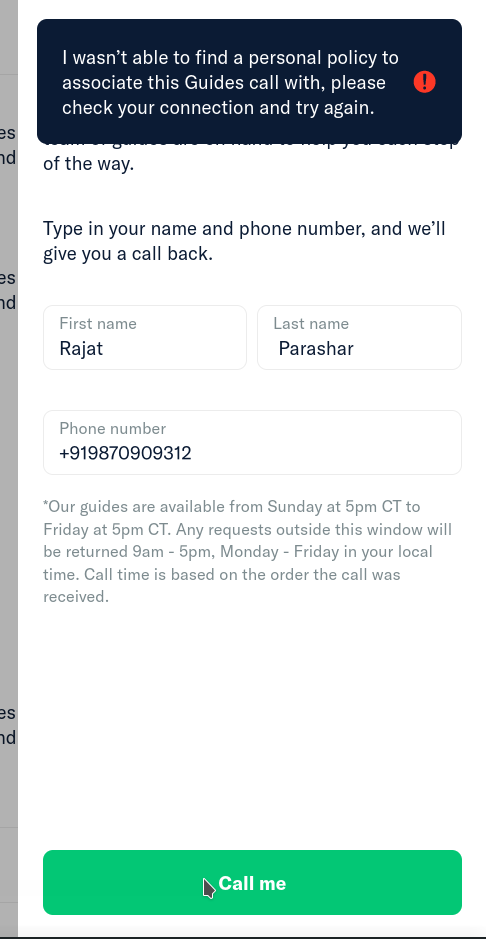
@isagoico For me, I don't see any error till step 6.

On 7, I see which makes sense, I don't have any workspaces for this account.

Screenshot 2021-09-14 21:35:54

@Jag96

Jag96 commented Sep 14, 2021

Copy link
Copy Markdown
Contributor

@isagoico the free plan is still under beta, so if the user isn't on the beta they will see this error message. Gmail users won't be on the beta so it is normal for them to see this error.

@isagoico

Copy link
Copy Markdown

Ohh ok got it. Thanks! Looks like we cab check it off then 🎉

@botify

botify commented Sep 15, 2021

Copy link
Copy Markdown

This has been deployed to production and is now subject to a 7-day regression period.
If no regressions arise, payment will be issued on 2021-09-22. 🎊

@OSBotify

Copy link
Copy Markdown
Contributor

🚀 Deployed to production by @francoisl in version: 1.0.98-1 🚀

platform result
🤖 android 🤖 success ✅
🖥 desktop 🖥 success ✅
🍎 iOS 🍎 success ✅
🕸 web 🕸 success ✅

@parasharrajat parasharrajat deleted the request-call branch November 20, 2023 13:07
Sign up for free to join this conversation on GitHub. Already have an account? Sign in to comment

Labels

None yet

Projects

None yet

Development

Successfully merging this pull request may close these issues.

5 participants