Describe the bug
Short: Dataset thumbnail image HTTP 404 Not Found after image file deleted from dataset (thumbnail should have been removed but was not).
Long: After creating a new dataset and uploading files (nested in a variety of folders and subfolders), the dataset was automatically given a thumbnail of an extracted image file preview contained within the dataset. Later, many files were removed from the dataset, including all image files. File deletion was performed in a Google Chrome browser with the Clowder UI. Following deletion of files, the dataset's thumbnail was not removed (expected behavior being it should be removed when the image files were deleted). Instead, a missing image link with alt-text remained. Inspecting the image showed a link to a fileThumbnail (.com/fileThumbnail/{thumbnail_id}), which produced a HTTP 404 error.
To Reproduce
Steps to reproduce the behavior:
- Create a new dataset
- Upload files inside folders and nested folders (with an image file somewhere)
- Observe if the dataset receives a thumbnail (expected)
- Delete image files
- Observe if the dataset no longer has a thumbnail (expected behavior) or a missing thumbnail link remains (unexpected behavior)
Expected behavior
Datasets may gain a thumbnail of an unloaded image file that has a preview extracted. Datasets should have their thumbnail removed if the image file is deleted (thumbnail also deleted).
Screenshots
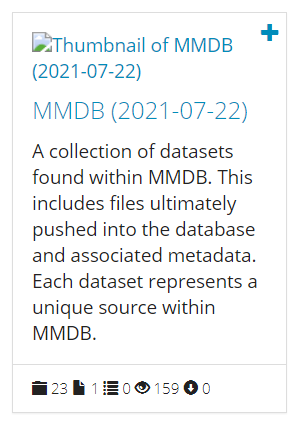
Desktop (please complete the following information):
- OS: Windows 10
- Browser: Google Chrome (v93.0.4577.82) and Edge (v93.0.961.52)
- Clowder Version: 1.18.1#642 branch:master sha1:3e27a5411234172a69fb446e103d1e70b95398e4
Additional context
The dataset, folders, and files were all created/uploaded using Clowder APIs. File deletion was performed in-browser. Image preview extraction was automatically initiated upon file upload (default behavior), not initiated by the user manually.


Describe the bug
Short: Dataset thumbnail image HTTP 404 Not Found after image file deleted from dataset (thumbnail should have been removed but was not).
Long: After creating a new dataset and uploading files (nested in a variety of folders and subfolders), the dataset was automatically given a thumbnail of an extracted image file preview contained within the dataset. Later, many files were removed from the dataset, including all image files. File deletion was performed in a Google Chrome browser with the Clowder UI. Following deletion of files, the dataset's thumbnail was not removed (expected behavior being it should be removed when the image files were deleted). Instead, a missing image link with alt-text remained. Inspecting the image showed a link to a fileThumbnail (.com/fileThumbnail/{thumbnail_id}), which produced a HTTP 404 error.
To Reproduce
Steps to reproduce the behavior:
Expected behavior
Datasets may gain a thumbnail of an unloaded image file that has a preview extracted. Datasets should have their thumbnail removed if the image file is deleted (thumbnail also deleted).
Screenshots

Desktop (please complete the following information):
Additional context
The dataset, folders, and files were all created/uploaded using Clowder APIs. File deletion was performed in-browser. Image preview extraction was automatically initiated upon file upload (default behavior), not initiated by the user manually.