Skip to content

Feature/sieve filter - #3334

Closed
dehnhardt wants to merge 6 commits into
nextcloud:masterfrom
dehnhardt:feature/sieveFilter
Closed

Feature/sieve filter#3334
dehnhardt wants to merge 6 commits into
nextcloud:masterfrom
dehnhardt:feature/sieveFilter

Conversation

@dehnhardt

@dehnhardt dehnhardt commented Jun 30, 2020

Copy link
Copy Markdown
Collaborator

This PR provides an interface to the Managesieve protocol.
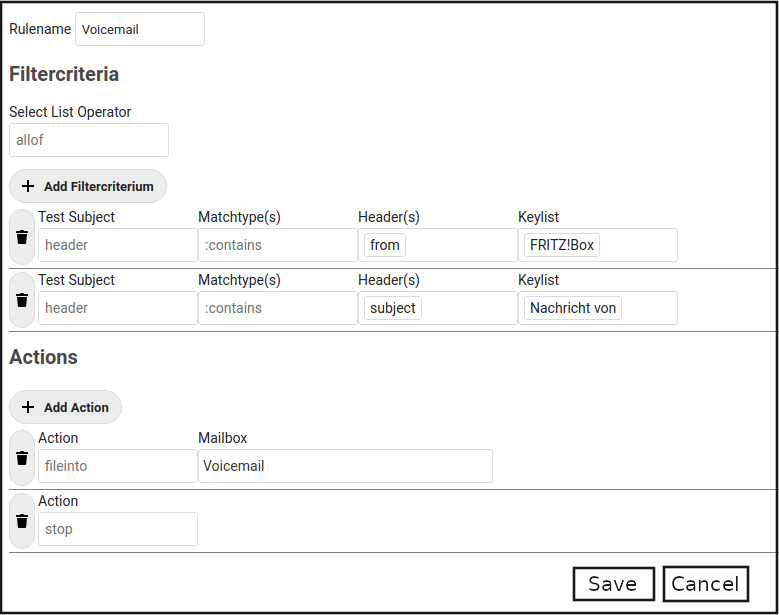
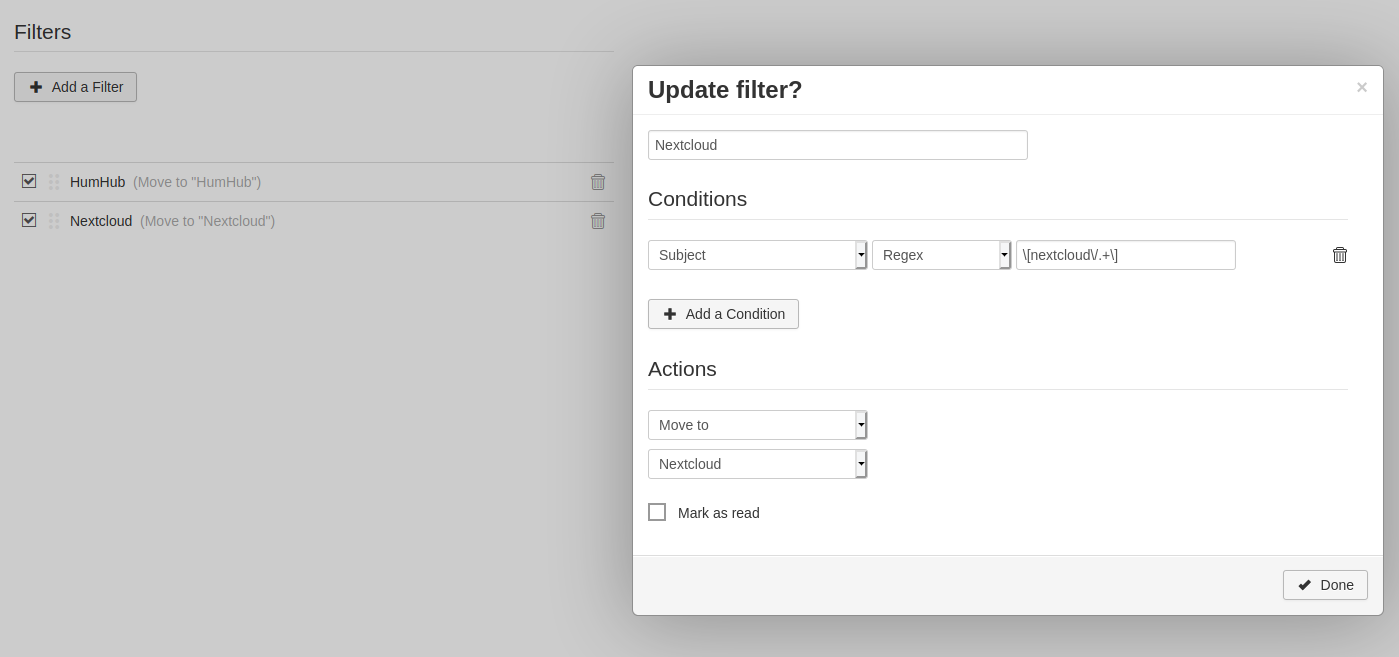
The user interface is somewhat more complex. For clarification I have added a screenshot.
I would be happy to receive constructive criticism about it, as I am not sure if it is understandable (Maybe @jancborchardt?).

Filterconfig

The elements (according to numbering):

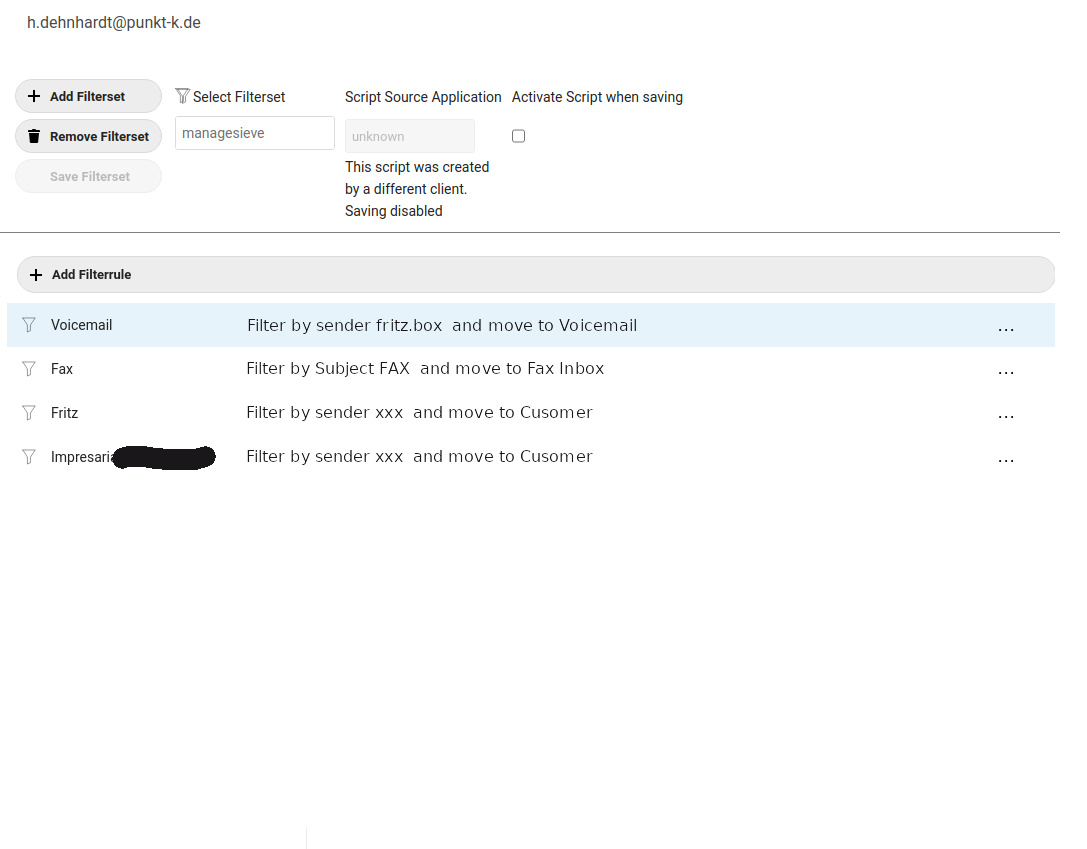
  1. The filter sets: A Sievefilter is a file with several instructions. I call these files filter sets in the following - the name of the filter set is the file name. Unfortunately, almost every Managesieve Client creates its own filter set, which is often enriched with its own information (usually in the comments). Filtersets not created by Nextcloud Mail can currently be viewed and edited, but not yet saved. If the creating program of the filter set is recognized, it will be displayed under 'Script Source Application'. Only one filter set can be active at a time. This is indicated by the checkbox 'activate script when saving'. If this is set for a script and the script is saved, the script is activated. (Unchecking the checkbox does not work, only selecting another script)
    Filter sets can be added. Deleting filter sets is currently without function.
  2. Filtercriteria: A filter set consists of any number of if/elsif/else statements and associated actions. It has become common practice to give each if statement a name and treat it as a 'standalone filter'. (Elseif and Else statements are currently recognized, but probably lead to undefined results. I don't know of any Sieveclient that supports this) The name is usually given by a comment before the IF statement. A syntax that is recognized here has become established for several applications. If no name is recognized, the filter rules are numbered consecutively. The name cannot be changed and is not saved.
  3. Filter tests: Each filter rule can consist of any number of tests, of which either all or at least one must apply. This is done with more than one test via the drop-down box 'Select List Operator'.
  4. Actions: For each mail to which the tests apply, actions can be defined.

A few more remarks about the implementation:

  • After trying an existing parser (the only one I found and which Pierlon also had in his implementation Filter mails with Sieve #1822) I decided to write my own, because in my opinion the 'parsing' of the results of the existing parser in the frontend is more complex than parsing the scripts. But since it is clear to me that this might be too short, I defined an interface so that the parser can be replaced.
  • No data about the filters is stored in the 'central' store, because it is only used during the processing of the filters, but not for the further operation of the mail client.
  • The Managesieve Account can only be created after an IMAP account has been created. The server and user name are taken over from the IMAP account as default. If the test of the access data fails, the error message of the server is displayed and the sieve account is disabled. After a new enabler the data can be changed and saved again.
    image

@dehnhardt dehnhardt linked an issue Jun 30, 2020 that may be closed by this pull request
3 tasks
@dehnhardt
dehnhardt requested a review from ChristophWurst June 30, 2020 06:42
@jancborchardt

Copy link
Copy Markdown
Member

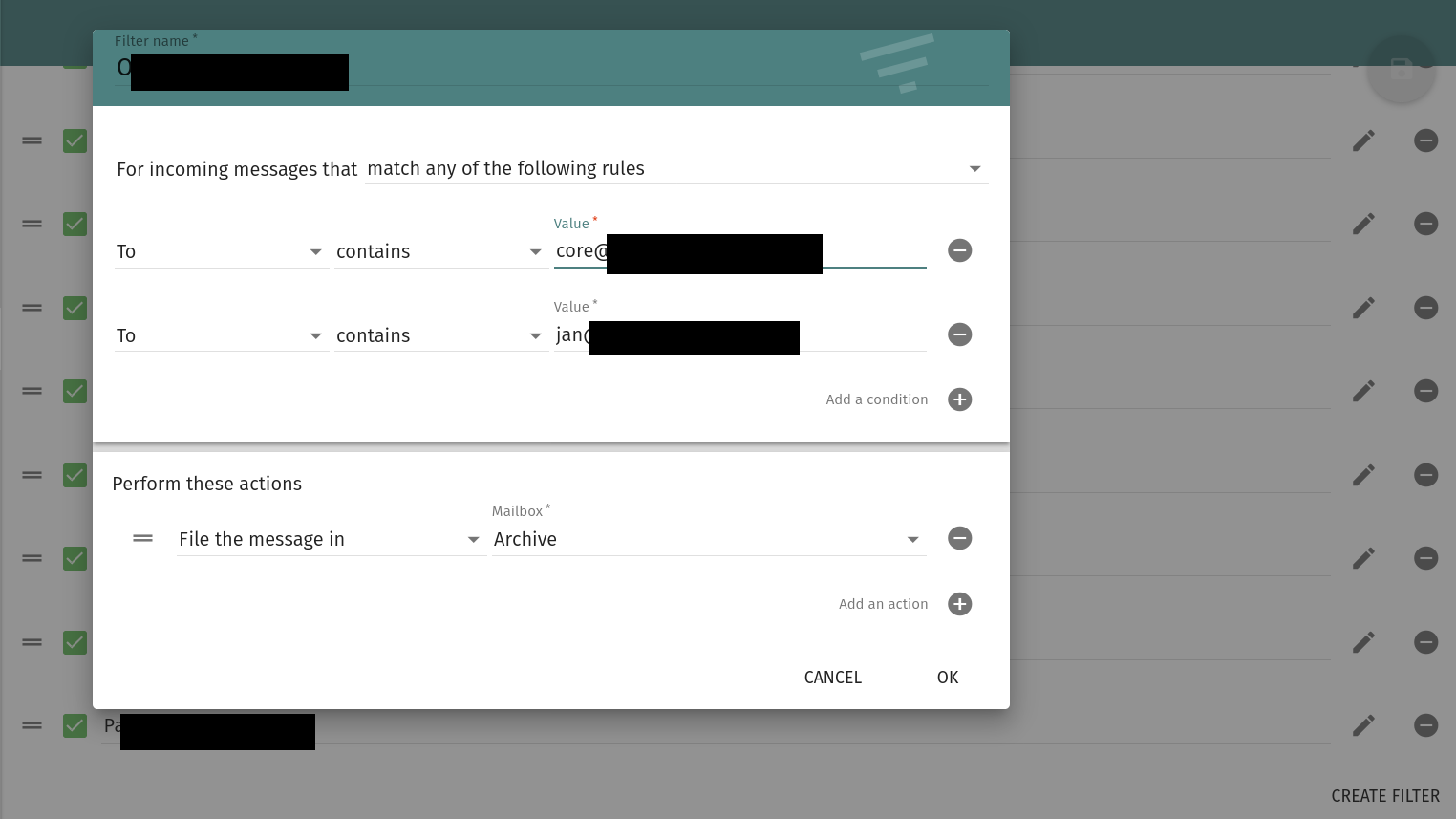
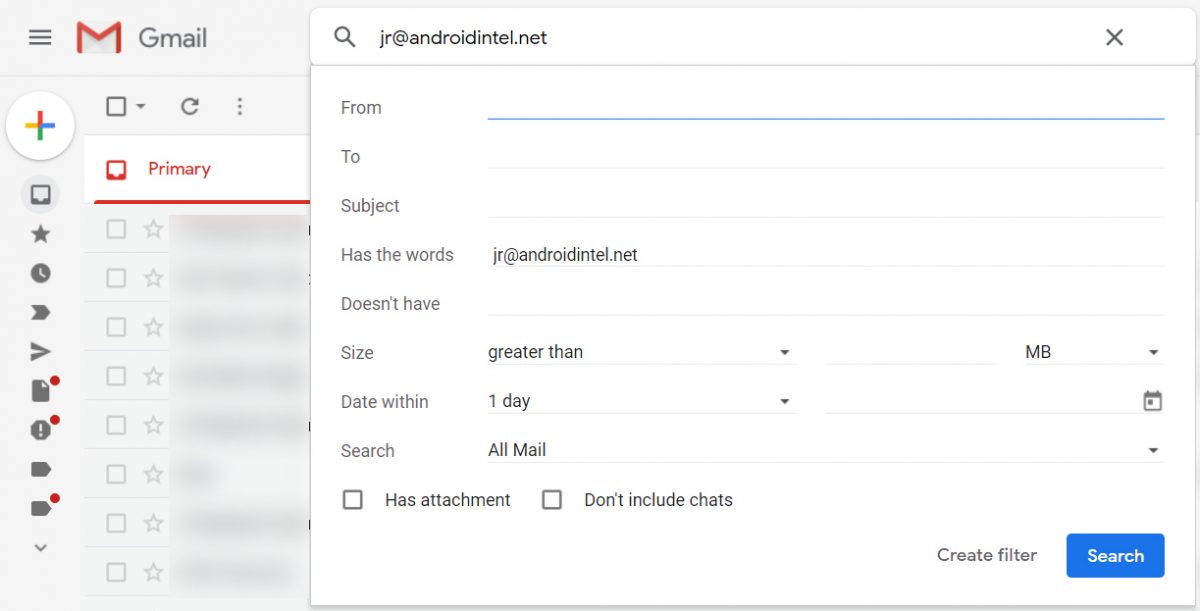
Hi @dehnhardt, nice work! :) So the interface indeed can use a bit of clarification. Did you look at how Gmail, Apple Mail or Sogo mail do filtering? Here some examples, but best to try it out yourself:

sogo filters
01-gmail-filters-form-crop-100811879-orig

@dehnhardt

dehnhardt commented Jul 3, 2020

Copy link
Copy Markdown
Collaborator Author

Thank you for your GUI-Review, @jancborchardt.
I would draw the following conclusions:

  • The processing of the filters (tests and actions) should take place in a modal. (However, I was previously of the opinion that this was not desired in NC)
    But this would have the advantage that we could later implement a function 'create a filter from a mail' and use the same modal.

  • I don't want to have two different windows for the tests and the actions, like in Google. I find that confusing. I like the first screenshot better!
    Mockup-Filterconfig

  • on the filter settings page you will only see the areas 1) and 2). Since the list (2) then is very clear/short, there is space to add a short description (like on Google) and possibly a remarks field
    Mockup-Overview

  • By the way, the examples you show do not represent all the possibilities of the Sieve filters. I don't think that's a good option - so the whole thing becomes more complex than in your examples

But I am still very unsure about the design of area 1. This functionality is not yet available in any Sieveclient implementation I know of, but I want it for two reasons. I will try to present it again briefly:
1.) Currently every Sieveclient creates its own filter set. If I change from one client to another, the first filter set will still run as long as I don't change it. But if I want to extend this, I have to redefine all filters, because the old filter sets are not read at all. I find this unacceptable!
2.) Within a Sieve Client, no second filter set can be created for the Sieve Clients known to me. If I want to have one filter set for normal operation and one for vacation, I have to change all filters back and forth before and after the vacation. This is a pity that there is actually the possibility to switch between filter sets.

What I plan to do is the following (and this is not implemented ye
t, but should all be possible in area 1):

  • filter sets of other sieve clients can be activated - but not changed. (Changes might not be recognized in other Sieve clients)
  • Filter sets from other Sieve Clients can be saved under a new name and then changed.
  • Filter sets can be copied together and attached to a filter set created by the NC client.

For area 2, it would then still make sense to copy individual filters and append them to other filter sets. But this is rather trivial and can be realized via actions.

Ok, this is not short now, but I would be very grateful for design suggestions for the latter functionality (and of course for my 'conclusions')!

@kesselb

kesselb commented Sep 1, 2020

Copy link
Copy Markdown
Contributor

Amazing work @dehnhardt 👍

image

As you asked for design input. I like the way rainloop manages sieve filters. It's super simple. I never run into the situation to need filter sets. It's probably a feature for advanced users.

@dumblob

dumblob commented Sep 3, 2020

Copy link
Copy Markdown

Feel free to take a look at the web-based open source solution @thsmi maintains - Sieve Editor. It could save some time to bring over some ideas and maybe even allow to share some code.

@dehnhardt

Copy link
Copy Markdown
Collaborator Author

Amazing work @dehnhardt

image

As you asked for design input. I like the way rainloop manages sieve filters. It's super simple. I never run into the situation to need filter sets. It's probably a feature for advanced users.

You already use a filterset with Rainloop ;-) See my comments in #3334 (comment)
I know and like the GUI of Rainloop. But when it comes to portability of the filter rules, Rainloop is the absolute worst case. Due to the fact that Rainloop created filter rules can hardly be edited with any other client without destroying the whole structure. Una uch Rainloop represents only a small part of the possibilities.

@dehnhardt

Copy link
Copy Markdown
Collaborator Author

Feel free to take a look at the web-based open source solution @thsmi maintains - Sieve Editor. It could save some time to bring over some ideas and maybe even allow to share some code.

I don't think this GUI is for everyone. @jancborchardt, mayby you can have a look at it: Sieve Editor.

I am not sure if a pure JS solution can be integrated. I will check that. Maybe we can use parts of it.

@thsmi

thsmi commented Sep 3, 2020

Copy link
Copy Markdown

Feel free to take a look at the web-based open source solution @thsmi maintains - Sieve Editor. It could save some time to bring over some ideas and maybe even allow to share some code.

I don't think this GUI is for everyone. @jancborchardt, mayby you can have a look at it: Sieve Editor.

I am not sure if a pure JS solution can be integrated. I will check that. Maybe we can use parts of it.

Feel free to take a look at the web-based open source solution @thsmi maintains - Sieve Editor. It could save some time to bring over some ideas and maybe even allow to share some code.

I don't think this GUI is for everyone. @jancborchardt, mayby you can have a look at it: Sieve Editor.

I am not sure if a pure JS solution can be integrated. I will check that. Maybe we can use parts of it.

@dehnhardt
I don't want to spam the pull request, but it may save you some time.

From my point of view Sieve is more a flexible programming language than
a simplistic filter description language with a linear struct structure.

But in reality all of the UIs I know of use sieve as a filter description language. Which means they simplify the syntax to a tiny subset. This makes rendering very easy, but has the side effect that you loose interoperability. The UI is only capable of rendering rules it created. If a user edits a rule manually or via another tool all of the implementations fail dramatically. And this is by design because every implementation defines their subset differently.

The "Sieve Editor" was designed to be different. It does not limit the syntax. It is capable of rendering almost any sieve script. But you don't get that for free the implementation is way more complex and it also offload complexity to the user. So your assumption is correct. It is not intended for everyone.

Don't get me wrong, both possibilities are viable approaches. From the course of the ticket I would say your
choice is to go with the first option. Limiting the syntax to a tiny subset. Which is perfectly fine but also means you will hardly
find anything which is worth reusing from the "Sieve Editor".

One hint for from my lesson learned. Add an advanced mode with a very simplistic text editor to your UI which allows manually editing scripts. So that the user has a chance to fix broken scripts. And yes you will endup having scripts which do not render due to UI bugs. Without such an editor the "normal" user ends up being pissed because the only way to fix is to delete their precious filter script. And vice versa they react extremely thankful if you helped to savaged their precious script.

@dehnhardt

dehnhardt commented Sep 4, 2020

Copy link
Copy Markdown
Collaborator Author

I don't want to spam the pull request, but it may save you some time.

I do not consider a discussion as spam ;-)

It's about deciding whether we want a full implementation of the Sieve filter specification or one that can be used by as many users as possible.
I had tried to install mail for a citizens' initiative in Nextcloud and had to switch to Rainloop immediately, as most of them failed due to the recipient field, which takes some getting used to.
This group of people will not be able to use the interface you suggested.
In addition, the solution you propose will not prevent sievefilters created by other programs from being recognized by the original programs after you have edited with Sieve Editor. Due to the sometimes very proprietary way other implementations use comments as additional information, we also do not have the case that the solution is compatible with different Sieveclient implementations.
I have tried to work non-destructively with my implementation.
There is a 'quasi-standard' (Roundcube and Thunderbird use it for example) for using comments for descriptive Tests, which I also use and comments that are not recognized remain (if possible) unchanged at the same place. Of course this does not guarantee anything...
On the other hand, it is of course tempting to have a finished implementation. It would be conceivable to create filters for mails automatically and thus offer the complex interface only for power users. But I can't judge if this is possible.
@ChristophWurst I can't interpret your reaction exactly, do you like the proposed solution from @thsmi or the discussion about it?
What about other opinions?

@thsmi

thsmi commented Sep 5, 2020

Copy link
Copy Markdown

@dehnhardt

It looks to me as if you somehow misunderstood my post. I did not intend to propose, suggest or advocate for any kind of an interface.

The way you currently go is perfect for your use-case. But you should be and you are (according to your response) aware that your implementation will be incompatible with other implementations. There is nothing which can be done to fix this, but this is perfectly fine for your scenario. All the other sieve implementation are also based upon this assumption.

The "Sieve Editor" was designed for a completely different use-case. So it does not make any sense trying to reuse it in your simplified scenario. There is no need for you to handle all the ugly corner cases (like deep nesting, implicit keeps, syntax glitches). You would just wast your time changing something square to round.

But you should consider adding an additional advanced mode to your UI, e.g. a very simplistic plain text editor. This allows a user do worst case/disaster recovery in case the script was edited/destroyed by an other sieve editor or your implementation. And this will happen, guaranteed. Having such a fallback is a tiny tweak but makes a huge difference for your users in worst case. As plain text editor I can suggest codemirror. Just to clarify this should be additionally to your UI, as a fallback.

Concerning your question, technically it is extremely easy to integrated the graphical editor part from the Sieve Editor. It is just including an iframe, the API is a getScript and setScript message that is all. But it won't be too useful in your use-case (e.g. It expects to run full screen). The plaintext editor is just a vanilla codemirror. Long time ago I up-streamed the sieve syntax highlighting. So all you need to do for having a plain text sieve editor, is integrate codemirror and enable the sieve syntax highlighting.

To sum up my point:

  • It makes (from my point of view) no sense to integrate any parts of the "Sieve Editor" into your implementation. Both Implementations have from a use-case view only very little in common, so there is only very little to reuse.
  • You should really add a plaintext editor as fallback (not as primary UI), this is my lessons learned.
  • You should be are aware that your implementation will be incompatible with other sieve implementation. But according to your response you are aware.

@dehnhardt
dehnhardt force-pushed the feature/sieveFilter branch 3 times, most recently from 5ac4c9d to 974d615 Compare September 18, 2020 14:49
@dehnhardt dehnhardt closed this Oct 12, 2020
@dehnhardt
dehnhardt force-pushed the feature/sieveFilter branch from 1dfeafe to 57e6bc4 Compare October 12, 2020 15:52
@dumblob

dumblob commented Oct 12, 2020

Copy link
Copy Markdown

Why did this PR get closed? I couldn't find anything related 😢.

@dehnhardt

Copy link
Copy Markdown
Collaborator Author

I had to reset the changes. (Hoepefully) Will be open again in a few minutes...

@dehnhardt dehnhardt reopened this Oct 12, 2020
@dehnhardt
dehnhardt force-pushed the feature/sieveFilter branch 2 times, most recently from b18961c to 276e12f Compare October 14, 2020 16:20
Signed-off-by: Holger Dehnhardt <holger@dehnhardt.org>
@mdik

mdik commented Jan 8, 2021

Copy link
Copy Markdown

Hi,

I tried to merge this onto the current main branch to give it a test spin, but failed.

I'd put 200€ onto the bounty if this pull request would be kept in sync with the main branch, and another 200€ if merged (where can one find said bounty facilitation?).

Sincerely,

Malte

@ChristophWurst

Copy link
Copy Markdown
Member

I'd put 200€ onto the bounty if this pull request would be kept in sync with the main branch, and another 200€ if merged (where can one find said bounty facilitation?).

Please don't: https://help.nextcloud.com/t/dont-use-bountysource-anymore/84943

Instead hire someone to do this, do it yourself or get a Nextcloud subscription.

@dehnhardt

Copy link
Copy Markdown
Collaborator Author

Hi,

I tried to merge this onto the current main branch to give it a test spin, but failed.

I'd put 200€ onto the bounty if this pull request would be kept in sync with the main branch, and another 200€ if merged (where can one find said bounty facilitation?).

Sincerely,

Malte

Sorry, but due to a new Job, currently I don't have time to work on this.

Signed-off-by: Holger Dehnhardt <holger@dehnhardt.org>
@ChristophWurst

Copy link
Copy Markdown
Member

Hi 👋,

we are about to merge #4472. This isn't the full sieve feature but merely the basics with sieve credentials, provisioning and so on and "just" a basic UI, but this will be the foundation for any other enhancements. Therefore I'm closing this PR and the other one.

Thanks a lot everyone who has helped move this forward. Even if this PR wasn't integrated it was a huge help for Daniel's implementation.

✌️

@BRadHoc

BRadHoc commented Feb 13, 2023

Copy link
Copy Markdown

I might be willing to pick this up, is there a specific reason that it hasn't been merged? It looks like a good solution and there isn't currently a UI for Sieve within nextcloud other than the standard simple textarea?

@ChristophWurst

Copy link
Copy Markdown
Member

We track the feature in #44.

@Bugsbane Bugsbane mentioned this pull request Apr 26, 2023
3 tasks
Sign up for free to join this conversation on GitHub. Already have an account? Sign in to comment

Projects

None yet

Development

Successfully merging this pull request may close these issues.

Filtering of Incoming messages

8 participants