Feature/7675 google button touch states - #8017
Conversation


The above looks ok to me, so it's shippable. :) |

 nheagy
left a comment
nheagy
left a comment
nheagy
left a comment
There was a problem hiding this comment.
The wrapping is definitely a plus 😄
The button/tappable area doesn't grow with the label, however, and stays set at 40px. This is especially obvious with three lines of text: the label spills out of the container, and the spacing with the text field disappears.
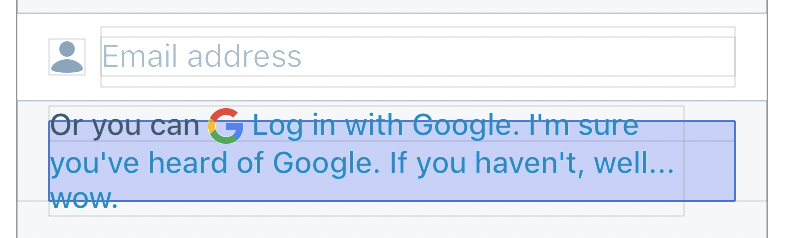

Digging into that a bit... its hard to say exactly what's going on under the hood but it appears the UIStackView was not increasing its size to accommodate the extra lines of text. I thought maybe it was an issue with the button's intrinsic content size not accounting for the size of the attributed text so the UIStackView didn't know it needed to resize, but I didn't have much luck there. Changes to content hugging / compression did nothing and a custom UIButton class to override intrinsicContentSize also made no difference. I ended up setting a couple of constraints that do two things:
I'm not sure if I like this approach. We shouldn't need to set constraints like this, the layout should just work. Either there's something obvious we've missed this whole time (unlikely after the time @nheagy and I have both spent on it), or this is a framework bug we're having to work around. :( That said, its seems like it will do the job, its easy to understand at a glance, and we can still have the button highlight in response to taps without having to wire up actions or other subviews. I did a side by side check with the layout before and after these changes and with multi-line and single line text and everything seems to line up correctly but please confirm. Ready for another peek Nate! |
…nto feature/7675-google-button-touch-states
nheagy
left a comment
nheagy
left a comment
There was a problem hiding this comment.
Well I tried my best but I wasn't able to break the layout this time! 💪
I've requested some changes for code cleanup that hopefully aren't too troublesome. This should be it!
| button.titleLabel?.numberOfLines = 0 | ||
| button.titleLabel?.lineBreakMode = .byWordWrapping | ||
|
|
||
| // Manually setting constraints to ensure that a multiline lable is fully |
There was a problem hiding this comment.
I feel this comment is too long 😜 I know it's surprising that UIKit has this bug, but something like "These constraints are necessary to work around UIKit bugs with multiline buttons" does the job.
| // consistent amount of space between the top and bottom of the label and | ||
| // the containing button. Edge insets can also do this but do not | ||
| // solve the height issue. | ||
| button.titleLabel?.topAnchor.constraint(equalTo: button.topAnchor, constant: 10).isActive = true |
There was a problem hiding this comment.
The 10 should use a value from the Constants enum. Constants.verticalPadding was used for this value in the previous version, and seems to no longer be used, so that's probably a good candidate.
| button.addTarget(self, action: #selector(googleLoginTapped), for: .touchUpInside) | ||
|
|
||
| // Ensure height. | ||
| button.heightAnchor.constraint(greaterThanOrEqualToConstant: 40.0).isActive = true |
There was a problem hiding this comment.
The 40.0 should use a value from a Constants enum. labelMinHeight from the original version did this (but on the label, not the button) and is now unused. You could move this into googleLoginButton and use that enum? Also, I think in the future we'll reuse that button code as there are some other multiline buttons in login that need fixing.

Yup. That's how I felt when I wrote #7731
The search results on StackOverflow definitely suggest this is a longstanding problem with UIKit :( I feel like you've come upon a fairly clean solution that we can easily modify for reuse elsewhere. Great! |
|
Thanks @nheagy! Ready for another peek. |

| button.titleLabel?.numberOfLines = 0 | ||
| button.titleLabel?.lineBreakMode = .byWordWrapping | ||
|
|
||
| // These constraints work around some issues with multiline buttons and |
There was a problem hiding this comment.
I like this edited comment :D
|
Thanks Nate! |
|
Tests pass locally. BBs compile error seems unrelated to these changes. Merging. |
3 participants


Refs #7675
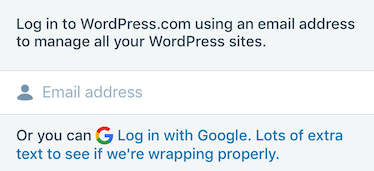
Take Two, now with moar wrapping!
I've updated the original branch with the feedback about the broken wrapping and height issues. Wrapping should work as expected and I've added a minimum height constraint to the button.
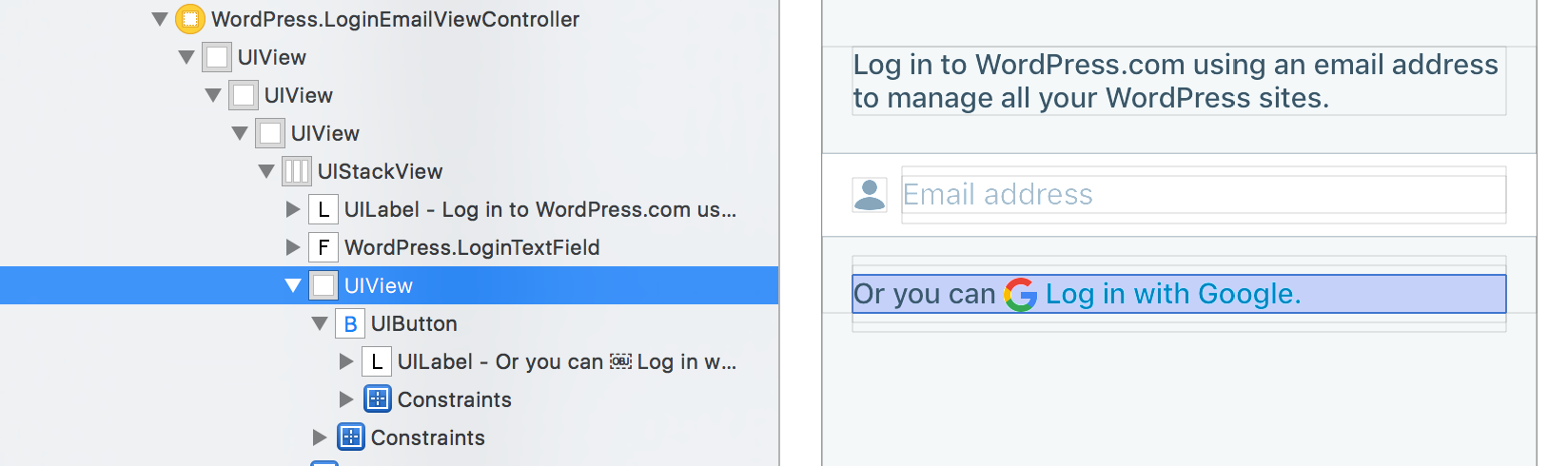
Interestingly, I noticed that the parent view was only 20px high due to the way the top/bottom constraints on the wrapper view are implemented.
This was to make sure there is proper spacing between views, but I think since we're hiding the button when the error label is visible we can remove the bottom constraint. This allows for a slightly larger tappable area without affecting spacing -- at least as far as I can tell. I noticed iOS 11 has new api for setting custom spacing for certain views managed by a UIStackView. Would be good to revisit this once we sunset iOS 10 support.
Tested in iOS 10 and iOS 11 simulators.
Tweaks the google button so it shows a tapped state. I opted to use light blue for the tapped state for consistency with hovers in Calypso and the behavior of link-style buttons in the iOS reader.
Normal:

Pressed:

To test:
View the LoginEmailViewController and tap the button. Confirm that it changes state.
Needs review: @nheagy for code & @folletto for style