In Game Chat
Alpha NET Z PRO feature

See Plugin Parameter In-Game Chat?

You can change chat and messages visual setting in Plugin Parameters
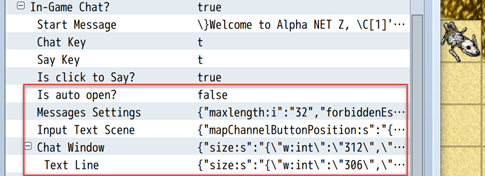
For open\close or write message use keys from Plugin Parameters: Chat Key, Say Key
When you press Say Key will be opened new scene with text input field

Since version 0.7 you can click (touch) on chat window to open text input field scene
You can disable this option by editing plugin parameter Click to Say

You can select channel before send message:
-
All- message will be sended to all players -
Map- message will be sended only for players on same map
You can use message control-characters (\V, \C, {, ...) in chat messages

Chat window can be dragged by mouse.
Click on window header and hold until window will be transparent, then you can drag window.

Script calls list:
- nAPI.isChatWindowOpened(); - returns true or false, use in condition statement
- nAPI.moveChatWindow(X,Y); - X, Y screen coordinates in pixels
- nAPI.openChatWindow();
- nAPI.closeChatWindow();
- nAPI.writeInChat("message", isGlobal:true|false);
Example:
nAPI.writeInChat("Hello for me", false); - message to current player (client)
nAPI.writeInChat("Hello for all", true); - message to all players in game
In Demo Project, on map ID 12 nAPI (script calls) you can find Event (ID 5) with script calls examples

Activate Emotions in Plugin Parameter Messages Settings
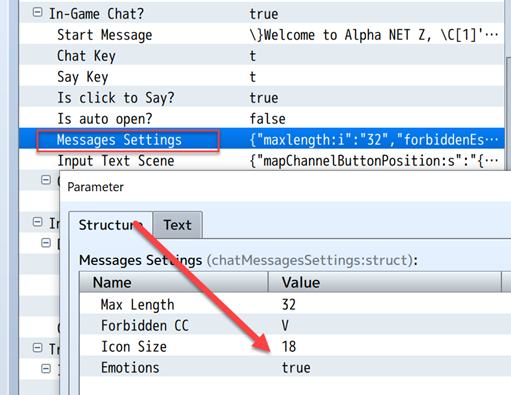
For playing emotion animation, use special code-symbol in chate message

List of emotions:
- :!
- :?
- :song
- :love
- :angry
- :drop
- :conf
- :...
- :idea
- :zzz