In Game Player Menu
Alpha NET Z PRO feature
For activate player menu you should click on another player by right mouse button
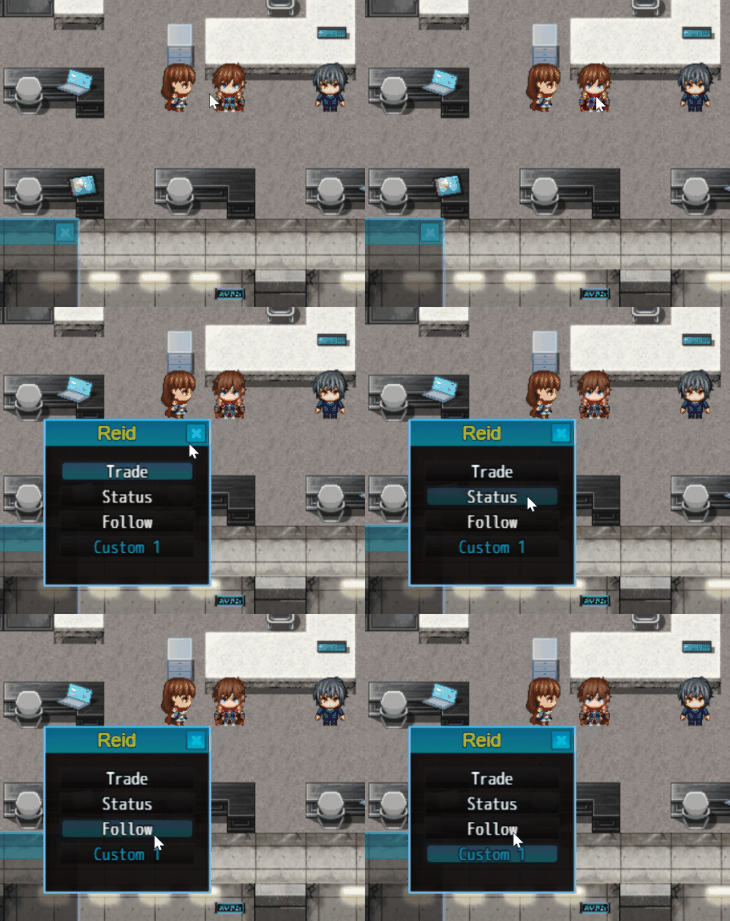
For disable menu, set In-Game Player Menu parameter to false

Player menu have a group of default commands, you can edit them (change text or hide at all)
You can configurate default command for menu via Plugin Parameters. In-Game Player Menu -> Default Commands

You can add own commands, see parameter Custom Commands
Custom commands will be after deafult commands in menu
Each command can start specified Common Event
Default and Used command have a set of options, see command parameters

You can call default player menu commands using script call: nAPI.callPlayerMenuAction(ACTION, ACTOR_ID)
Where:
-
ACTION- one of default action (constants)
trade
follow
status
-
ACTOR_ID- another player (to trade with) actor Id
You can get another player Actor ID also by nAPI script calls
Example:
nAPI.callPlayerMenuAction('trade', 1); // Starts trade with player who selected Reid (ID == 1)
nAPI.callPlayerMenuAction('follow', 2); // Starts follow player who selected Priscilla (ID == 2)