Script calls User API
-
nAPI.startNetworkGameScene() - starts network game scene (network menu)
Use this script call if you have custom Title Scene or custom main menu -
nAPI.ID() - return current game unique ID
-
nAPI.setWaitWhenTransfer(true|false) - same as plugin parameter Wait Map Transfer?, but you can change it dynamically durting game.
- nAPI.isNetworkGame() - is current game in multiplayer?
- nAPI.myPlayerIndex() - client index (in room), host always 1
- nAPI.myActorId() - client Actor ID
- nAPI.playersCount() - players count in game
- nAPI.isMasterClient() - current client is host?
- nAPI.showGreenAlert(text)
- nAPI.showRedAlert(text)
- nAPI.showInfoMessage(text, subText)
- nAPI.hideInfoMessage()
- nAPI.getEventParticipant(field)
return true or false
Using for checking who right now execute current event
Example:
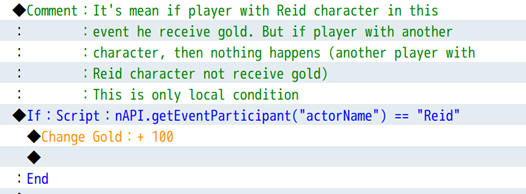
- nAPI.getPlayerInfo(field, byField, value)
field, byField: actor, actorId, netId, actorName, playerName, playerIndex, info
(returnfield)
Example:
nAPI.getPlayerInfo("actorId", "playerName", "Player 333"); // returns integer Actor ID
nAPI.getPlayerInfo("playerName", "actorName", "Reid"); // returns string "Player 333"- nAPI.getPlayerCharacter(byField, value)
(returnNETCharacter(inhereted from Game_Character))
-
nAPI.setupAutoSyncPropertyForCharacter("fieldName", true|false); - register the character (Game_CharacterBase class) field for auto-synchronization over the network.
-
nAPI.setupAutoSyncPropertyForBattler("fieldName", true|false); - register the battler (Game_BattlerBase class) field for auto-synchronization over the network.
These methods are needed so that you can make auto-synchronization of any additional data (variables, fields) of the character (or actor) if, for example, you use third-party plugins. For example, you are using a plugin that adds a new field (weight) to all characters and you want this variable to synchronize over the network.
Example:
nAPI.setupAutoSyncPropertyForCharacter("_characterImage", true); // add field _characterImage for autosynchronization
nAPI.setupAutoSyncPropertyForBattler("weight", false); // remove (previously added) field weight from autosynchronizatoin nAPI (script calls)
You can define your custom server commands and send them to all players. When players received your command, game will start common event that you can specify for each custom command.
- nAPI.registerCommonEventForCommand(name, commonEventId) - register common event for command with NAME
- nAPI.sendCustomCommand(name) - send for all command NAME (call registered common event for this command)
CustomCmd (003) in Demo Project on map nAPI (script calls)
Example code:
// 1. SEND CUSTOM COMMAND
var data = {}; // * some data if you need it (or null)
nAPI.sendCustomCommand("someName", data);

// 2. RECEIVE AND WORK WITH YOUR CUSTOM COMMAND

//@[ALIAS] // Aliasing is REQUIRED!
var _alias_nAPI_onCustomCommand = nAPI.onCustomCommand;
nAPI.onCustomCommand = function (name, data) {
    _alias_nAPI_onCustomCommand.call(this, ...arguments);
    if(name == "someName") {
        // YOUR CODE
    }
};