Implement event tracking for the new lock screen widget - #20422
Conversation


Expand tracks for lockscreen stats entry

Add rectangular widgets count and widgets update of the new widget
Update statsUrl to widgetUrl for separating the url from homescreen widgets

|
@staskus please help to check the event key is ok or not, thanks |


You're correct. I can confirm
|

 staskus
left a comment
staskus
left a comment
staskus
left a comment
There was a problem hiding this comment.
Thank you for the changes!
I'm leaving a comment to discuss the deep link.
| protocol LockScreenStatsWidgetData { | ||
| var siteName: String { get } | ||
| var statsURL: URL? { get } | ||
| var widgetURL: URL? { get } |
There was a problem hiding this comment.
First of all, I'm thinking if we know the value of differentiating between source=widget and source=lockscreen_widget, otherwise, we may not need this change at all.
Second of all, if we want to keep this separate source, I wonder if we could somehow keep data.statsURL for both types of widgets? For example, passing the source instead of having 2 separate URL variables?
What are your thoughts?
There was a problem hiding this comment.
My original thought is to separate the url that can fully control the content, in the case if the lock screen wants to change the destination in the future, but that might be a bit confusing between statsURL and widgetURL, and for now, the link are the same, so I think its good to update with your first suggestions.
We can know the differentiating in the view side, I update to move the source appending from the widget data extension to let the view assign the source type.
And I add an improvement to extract the string to enum, and add the test to make sure the source can convert to DeepLinkSource correctly.
There was a problem hiding this comment.
My original thought is to separate the url that can fully control the content, in the case if the lock screen wants to change the destination in the future
Okay, got it. That makes sense 👍
And I add an improvement to extract the string to enum, and add the test to make sure the source can convert to DeepLinkSource correctly.
I appreciate that, the solution looks good!
…sion

Add widget source type, assign the type in widgetURL in the view

Generated by 🚫 dangerJS |
staskus
left a comment
staskus
left a comment
There was a problem hiding this comment.
👍 Tested again, works well.
I'll merge after CI builds.
ed4ab98
into
wordpress-mobile:feature/19411-add-lock-screen-stats-widgets
|
@tzef merged! |

* Add new feature flag for lock screen widgets in Jetpack  (#20309)

* Add new feature flag for widget in lock screen

* Add new widget kind to widget configuration

* Add empty lock screen widget

* Add JETPACK_STATS_WIDGETS compilation condition

To prevent lock screen widgets from displaying on WordPress target

* Move LockScreenStatsWidgetsView to views folder group

* Revert compilation condition, change to isJetpack of AppCondiguration

* Implement lock screen widgets UI (#20312)

* Extract statsUrl from private to extension for reusable with lock screen widget

* Implement single stat view for today views widget

Add view provider for handling building view for site selected status
Add ViewModelMapper for converting viewModel from home widget data

* Update LockScreenStatsWidgetsView body to get the view from view provider

* Add mapper test to verify the viewModel converting from widget data correctly

Add mapper and viewModel to WordPress target because app extension is not able to run unitTest

* Fix getStatsURL typo

* Add localizable string for "Views Today" title (#20353)

* Add views in today localizable string for footer label

* Remove dateRange and footer, only title is enough for existing feature

* Fix home screen widget for WordPress target disappeared. (#20371)

The root cause is the WidgetBundleBuilder body doesn't allow control flow statements, move it to supportedFamilies with feature flag to keep all control logic in the same place

* Extract content logic to config from lock screen widget (#20317)

* Update title of view provider from hardcoded to pass from config

* Add lock screen stats widget config and implementation to include required information

* Pass config to LockScreenStatsWidget

Replaced the hardcoded data with config properties

* Add associated type view for other status and TODO comments

* Extract app configuration and feature flag check into config

* Create a standalone TimeLineProvider and TimelineEntry for the lock screen  (#20368)

* Add widget data and timeline entry for lock screen to separate concerns

* Add lock screen time line provider for lock screen stats widget entry

Update stats widgets service result type to consist of home widget and lock screen widget for reusable

* Update to use LockScreenSiteListProvider in LockScreenStatsWidget

Update associated type widget data to conform `LockScreenStatsWidgetData` more

Update model mapper and view provider to based on lock screen widget data

Remove unnecessary `disabled` status from `LockScreenStatsWidgetsView`

Remove unnecessary `widgetKind` parameter from `LockScreenStatsWidget`

Remove unused statsURL converter from the view model mapper

Add home widget data conform lock screen widget data extension to WordPress target for unitTest

* Extract widget load data to loader for sharing with lock screen time line provider

* Update widget reader to extract the cache read from getSnapshot

* Extract noData, noSite, loggedOut, disabled status checking logic to data reader with status callback

* Add unitTest for widget data reader

Extract cache reading to `HomeWidgetDataFileReader` for mocking the testing object

Extract app configuration is jetpack to parameter for mocking the config

* Remove multiple space lines

* Update multiple callback to Result and enum Error

* Implement view for logged-out, no-site, and no-data status (#20399)

* Add unconfigured view for lockscreen widget

* Add unconfigured view model to view provider and model mapper

* Add unconfigured view model unit test

* Add background to unconfigured view align with success status widget appearance

* Remove todo comments

* Add reload timelines for lock screen widget (#20405)

* Implement event tracking for the new lock screen widget  (#20422)

* Add event key to configuration and pass to trackers in lockscreen widget

Expand tracks for lockscreen stats entry

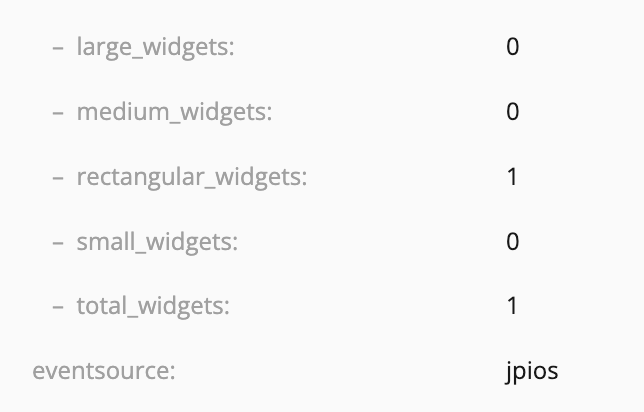
Add rectangular widgets count and widgets update of the new widget

* Add lockscreen_widget source to deeplink tracked

Update statsUrl to widgetUrl for separating the url from homescreen widgets

* Update unitTests

* Remove separate widget url, move widget source from widget data extension

Add widget source type, assign the type in widgetURL in the view

* Add widget url source test to verify the converting with DeepLinkSource

* Disable the feature flag (#20427)

---------

Co-authored-by: Beemo Lee <tzef8220@gmail.com>
2 participants


This is the PR for tracking the lockscreen widgets results.
(Confirm the data display on UI correctly in this phase)
Description
Follow existing home screen widgets event, expand for lock screen widgets
lockScreenTodayViewsPropertiesfor tracking events, and access the key through configlockscreen_widgetto deeplink source to separate the click from the home screen widgetrectangular_widgetsfor tracking new type of widget infotoday_views_lockscreen_extension_widget_updatedfor tracking lock screen widget updatedTesting Instructions
Deep Link
Given user logged in and added today views widget to the lock screen with success status displayed
Widget Info
I don't know how to verify the event tracking in widgets, probably need to setup the proxy or check from the event tracking dashboard
Regression Notes
Potential unintended areas of impact
Existing home screen widget tracking
What I did to test those areas of impact (or what existing automated tests I relied on)
Add widget to the home screen, tap to redirect to insights page, confirm the deep_linked event tracked
WidgetsViewModelMapperTests/testTodayViewsStatsURLto test the sourcePR submission checklist:
RELEASE-NOTES.txtif necessary.